SEO-Friendly URL: Here Are 7 Tips for a Good URL!
 Joram BoonSEO and content specialist
27 December 2023
Are you frustrated because your website isn't getting the attention it deserves? Is your traffic lower than expected? You might have a terrible URL structure.
Yes, you read that right! The structure of your URLs can have a HUGE impact on your SEO performance.
Don't worry!
We're going to show you how to optimise your URL structure to rank higher on Google and attract more traffic to your site.
It's easier than you think!
But Joram, what difference does the URL even make! Nobody looks at that! Right?
Nothing could be further from the truth! Google looks, and so does your visitor!
A messy, unclear URL can confuse search engines, and it's not ideal for visitors either. A clean, optimised URL can give your ranking a SERIOUS boost and create a better user experience.
So, whether you're struggling with low click-through rates, or simply not showing up where you want to in the search results, we've got the solution.
Keep reading, and don't miss the chance to give your website traffic a BOOST!
Speed Course! URL Tips and the Basics in Short!
The basics: Keep it short and logical! Describe what's on the page and give every page a new unique URL. Use a maximum of 5 words, 1 or 2 of which are keywords, and don't use numbers or special characters. One last point, use lowercase letters only.
Example of a good URL structure:

The 7 tips to improve your URL game!
- Tip 1: Avoid numbers or codes.
- Tip 2: Use hyphens (-) instead of underscores (_).
- Tip 3: Use as few parameters as possible.
- Tip 4: Think in folders and subfolders (hierarchy)
- Tip: Avoid dates and years.
- Tip 6: Avoid deep nesting
- Tip 7: Put your keywords at the start of your URL
What Is an SEO-Friendly URL?
An SEO-friendly URL is not a random string of words and characters. It's a well thought-out combination that helps both search engines and users understand what a page is about.
Why Does It Matter So Much?
- Readability: People should be able to understand what your page is about at a glance.
Just take a look at the following examples.


- Search engines: Google and other search engines use the URL to determine a page's relevance. A well-structured URL can therefore give your rankings a boost.
- Visitor trust: A clear, descriptive URL increases the user's trust in your website. Nobody likes clicking a link that looks suspicious.
But Wait… What's This ‘SEO Friendly URL Generator’?
There are tools that automatically generate SEO-friendly URLs for you. They can be handy, but manual optimisation is often better. Why? Because you understand the context and nuances of your content better than a machine does. That said, these AI URL generators keep getting better, and they're great for alt text for images!
Take a look below, here's an example from Slugify.online, which lets you easily create a URL slug. You can easily strip out stop words and numbers, and you'll have a URL within a second!
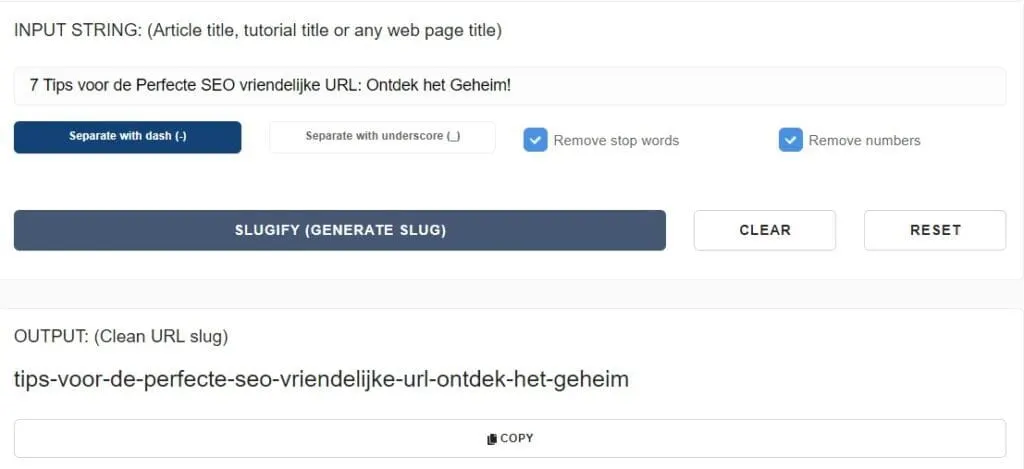
But, before you use that generator tool for page URLs, ask yourself: Can I do this better? The answer is probably: YES!
How Do Search Engines Look at URLs?
The first thing a search engine often sees is the URL, so that URL matters quite a bit!
A clear, concise URL can be the difference between a top ranking and a missed opportunity.
- That readability again!: Search engines also prefer URLs that are readable and understandable for users, because that also makes it easier for the search engine to work out what the page is about.
Think of ‘digitalbean.com/seo-tips’, it's super clear what the page is about. Compared to ‘digitalbean.com/p=123’, which makes it totally UNCLEAR what the page is about!
- Short and punchy: Long URLs can be confusing or too over-optimised for both search engines and users. Keep it simple and straight to the point.
Take a look at this image, for example, a long, over-optimised URL, which makes it super long! Google even hands out penalties for this.

Or look at this one with unnecessary parameters, special characters and numbers for outsourcing online marketing in the URL. See how unclear the URL becomes!

The Effect of URL Structure on User Experience and Click-Through Rates
Imagine seeing two links in the search results:
- digitalbean.com/p=456&cat=seo
- digitalbean.com/seo-url-tips
Which one would you click on first? The second one, right? That's the power of a clear URL structure.
The right URL creates…
- More Trust: A clear URL gives users an idea of what to expect. It boosts trust, and therefore the chance they'll click through, which brings us to the next point.
- Better CTR: URLs that contain keywords matching a user's search can lead to a higher click-through rate (CTR). This is a WIN-WIN for your SEO!
The Basics of a Good SEO URL Structure
First impressions count, right? Whether it's with your father-in-law or mother-in-law, or with the search engine and your visitors. It all comes down to the same thing!
In the world of SEO, your URL and SEO title are often that first impression. So every letter counts!
Here are the basic principles every URL should have to win the hearts of mothers-in-law…
Ugh.. I mean, to win over both search engines and users!
Short, Logical and Descriptive
It's really simple. A URL should make it clear at a glance what the page is about. Don't use more than 5 words! Just be super direct, no filler words. Forget the numbers and special characters.

No Unnecessary Words or Filler Words
Keep it super clean. Words like “and”, “or”, and “but” add little value and just make your URL longer. It's best to avoid them, but it's not the end of the world if they slip in every now and then.
Using Keywords Without Over-Optimising
Yes, keywords matter. But don't stuff your URL full of them. Pick one or two relevant keywords that best describe the content of your page.
Watch out! Over-optimisation can lead to penalties from search engines!
Assignment: Go to your website now and take a look at some of your own URLs. Do they follow these basic principles? If not, it's time for a few tweaks..
The 7 Tips for Better URLs!
1. Avoid Numbers or Codes
A URL should be intuitive. It should reflect the content of the page, so users and search engines know straight away what to expect.
So avoid numbers and codes!
It makes it very hard for visitors, and for Google too, to see what's on your page and what they can expect.
Think about it: what's actually on the page, and how can I convey that to my customers and search engines as directly as possible.
2. Use (-) Hyphens Instead of (_) Underscores
Hyphens are read by search engines as spaces, which means each word in your URL is recognised separately. This matters a lot for good readability and optimisation.
So, www.yoursite.com/seo-url-tips is read as “seo url tips“. Underscores, however, are often read as one single word, like “seourltips“.
Hyphens are also clearer and more recognisable in URLs, which improves readability for users too.
In the past, Google has also indicated a preference for hyphens in URLs, which is why they've become the standard, and why it's best practice in SEO.
Quick Example:
✅ Good: www.digitalbean.com/seo-url-tips
❌ Bad: www.digitalbean.com/seo_url_tips
3. Think in Folders and Subfolders! (Hierarchy)
Structuring your website URLs in a logical hierarchy of folders and subfolders matters a great deal for both search engines and users.
Here's why and how to do it.
- Clarity for Search Engines:
A clear folder structure helps search engines understand the relationship and hierarchy of your content.
For example, www.digitalbean.com/blog/seo-tips suggests that "seo-tips" is an article within the broader "blog" category. - Navigation for Users:
A logical URL structure improves the user experience. Visitors can more easily work out where they are on your site and how to navigate to related content. - Flexibility for Future Growth:
By thinking in folders and subfolders from the start, you can easily scale your website and add new content without disrupting the existing structure. - Improved Breadcrumb Navigation:
Many websites use breadcrumb navigation, a visual display of the page's hierarchy. A clear folder structure in your URLs makes this navigation more intuitive.
Example:
Say you run an e-commerce website. A service like "link building" could have the following URL structure:

This makes it clear that "link-building" is a type of "seo" service, which in turn falls under the broader category of "outsourcing online marketing".
By structuring your URLs into folders and subfolders, you create a logical, organised website that's both search-engine friendly and user-friendly .
It's a simple step that can make a big difference in how your site is perceived and indexed.
4. Use as Few Parameters as Possible
Parameters in URLs, often recognisable by a question mark (?) followed by filter values and odd characters, are fantastic for online stores when it comes to filtering, sorting and tracking products.
But for your URL structure, they're NOT fantastic!

Says it all!
Too many parameters in a URL can cause problems in the following areas:
Excessive parameters lead to a large number of URL variants of the same page.
This means Google ends up crawling your website unnecessarily often, which wastes your crawl budget (important for large online stores).
You also end up competing with yourself (also known as ‘cannibalisation’) in the search results, so Google doesn't know which page to rank, meaning both pages end up ranking lower.
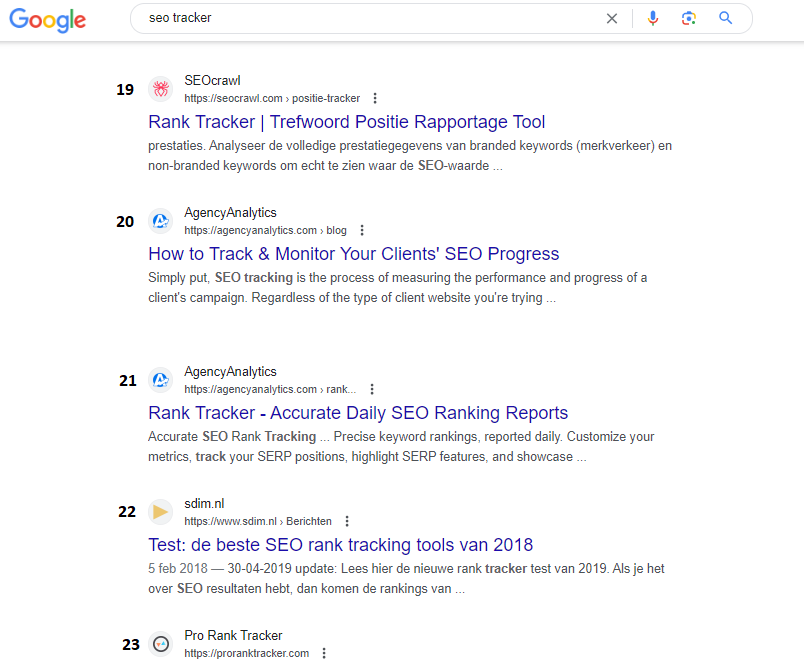
Parameters definitely have their place, and you should absolutely use them. It's just that, generally speaking (not always), you shouldn't let Google index them.
You do that by excluding the parameter URLs from indexing in your robots.txt.
5. Don't Use Dates or Years
Imagine walking into a trendy clothing shop, looking for the latest fashion. But instead of the newest trends, you find clothes from 1995.
Neon tracksuits and platform shoes, anyone?
Dates in your URLs date your content, and not in a good "vintage" way.
A date suggests your content is outdated, even if it's still spot-on. Nobody wants to click a link screaming: "I'm old news!"
Did you write a top article in 2020 and want to refresh it in 2023? With a date in your URL, you'll need to set up a redirect and keep updating your URL constantly. A lot of unnecessary EXTRA work!
URLs should be short, concise and to the point. Adding dates just makes them longer and more complicated.
A URL like www.digitalbean.com/blog/2023/march/the-best-seo-tips sounds more like a diary entry than a good SEO-friendly URL.
So avoid those years and dates, you'll make things a lot easier for yourself! Unless, of course, you run a news site or the content is genuinely tied to a specific date or year.
6. Avoid Deep Nesting
Imagine you run an online store selling sports gear. You want to categorise a specific product, say a football boot from a particular brand and model, under several subfolders.
A deeply nested URL could look like this:
www.sportsshop.com/sports/football/boots/brands/adidas/models/predator-2023
In this example we've got no fewer than six subfolders: /sports/, /football/, /boots/, /brands/, /adidas/, and /models/.
A good rule of thumb is to limit yourself to two or three subfolders.
A better URL could be:
www.sportsshop.com/football/boots/predator-2023
So, while deep nesting might seem logical from the perspective of tip 3, you can also OVER-categorise! That makes it a lot harder for Google to map out (crawl) your website. Once again, keep those URLs nice and short and punchy!
7. Put Your Keywords at the Start of Your URL
“Ladies first”? In the world of SEO we say: "Keywords first!"
Why?
People scan. They don't have time for detective games. Keyword up front? "Bingo! That's what I'm looking for!" says the visitor.
In the search results, long URLs get cut off. If your keyword is at the front, it gets the spotlight. That way, people can still see what the page is about!
Google is that person who only hears the first few words and thinks: "I'm sold!" So, seduce Google with your best words up front. Give it that great first impression!
Example:
Say you sell "organic coffee beans from Ethiopia". Why hide the product behind a long URL?
Go for:
www.digitalcoffeebean.com/organic-coffee-beans-ethiopia
Let those beans score!
So put those keywords up front and show straight away what your page is about! The faster visitors and Google can see what it's about, the better!
That Was the URL Structure!
You've reached the end of this in-depth article, and I bet you now have a clear picture of how to set up the perfect SEO URL structure. Let's quickly recap the key points:
- The basics: Keep it short and logical! Describe what's on the page and make sure every page has a unique URL. Use a maximum of 5 words, with 1 or 2 keywords. Avoid numbers, special characters and use lowercase letters only.
- An optimised URL structure isn't just good for search engines, it's good for your visitors too. It makes your site more intuitive and user-friendly.
- The most important tips for a good URL structure:
- Avoid numbers or codes.
- Use hyphens (-) instead of underscores (_).
- Think in folders and subfolders.
- Avoid dates and years.
- Put your keywords at the start of your URL.
But wait, there's more!
Want to stay up to date with the latest SEO trends and tips? Want your website to always stay one step ahead of the competition?
Sign up for our newsletter NOW! You'll regularly get updates, tips and tricks straight to your inbox. Don't miss this chance to keep developing your SEO skills.
Keep learning, keep optimising, and watch your website grow!
Need help? We're here for you! Just send us an email or give us a call! We'll take a look straight away at how we can help grow your business.
Speak soon! Until next time!