On-Page SEO: How to Optimise Every Page for Maximum Reach!
 Joram BoonSEO and content specialist
10 January 2024 · updated 3 January 2024
Google is the online library of the digital age, and on-page SEO is your way of telling it what your book is about!
On-page SEO covers all the optimisation techniques on your website and pages themselves, from URL structure to a catchy title tag and meta descriptions, to make clear to search engines like Google what your content is about.
By working on these, you’ll rank better and bring in more traffic! And more traffic means more chances at conversion!
What we’ll cover!
- The core factors of page optimisation!
- The difference between on-page and off-page SEO.
- On-page SEO best practices!
- Various on-page SEO tools and checkers!
- And a surprise at the end!
What Is On-Page Optimisation?
It’s the process of perfecting every element on your website (think of texts, images, title tags) so that search engines like Google understand what your page is about, and love it too.
For you as a business owner, this simply means more visibility. The better your on-page SEO, the higher you rank in the search results. And we all know what that means: more visitors, more leads, and ultimately more revenue!

Core Factors of On-Page SEO
- Content Quality: Informative, relevant, up to date, and answers the search intent!
- Keywords: The right keywords placed strategically.
- Title Tags: Catchy titles with your most important keywords.
- Meta Descriptions: Engaging descriptions that encourage clicks.
- Headers and Subheaders: Use H1, H2, etc. to give structure to your content.
- Image Optimisation: Images with ALT tags and compression.
- URL Structure: Short and descriptive URLs.
- Internal Links: Links to other relevant pages on your site.
- Social Media Integration: Easy sharing of your content.
- Mobile-Friendliness: A site that works great on mobile devices.
- Site Speed: Fast loading times for a better user experience.
On-Page vs Off-Page SEO: What’s the Difference?
On-Page SEO
On-page SEO is about fine-tuning the factors above on the website itself. It’s also known as on-site SEO.
Think of improving content, using HTML tags cleverly, and optimising images, to maximise your visibility in search engines and offer a great user experience.
Handy tools for this include Yoast SEO, SurferSEO and, as always, Google Search Console. More on SEO tools shortly!
In short: it’s the way to make sure your site is clear and understandable for both Google and your visitors.

Off-Page SEO
Off-page SEO, on the other hand, covers all the SEO techniques used outside your website.
Think of earning backlinks (check out our blog on link building here) from other websites, for example through guest blogging and being active on social media.
This is all about building your online authority, trust and reputation. It secretly falls under online branding too, and we can help with that as well!
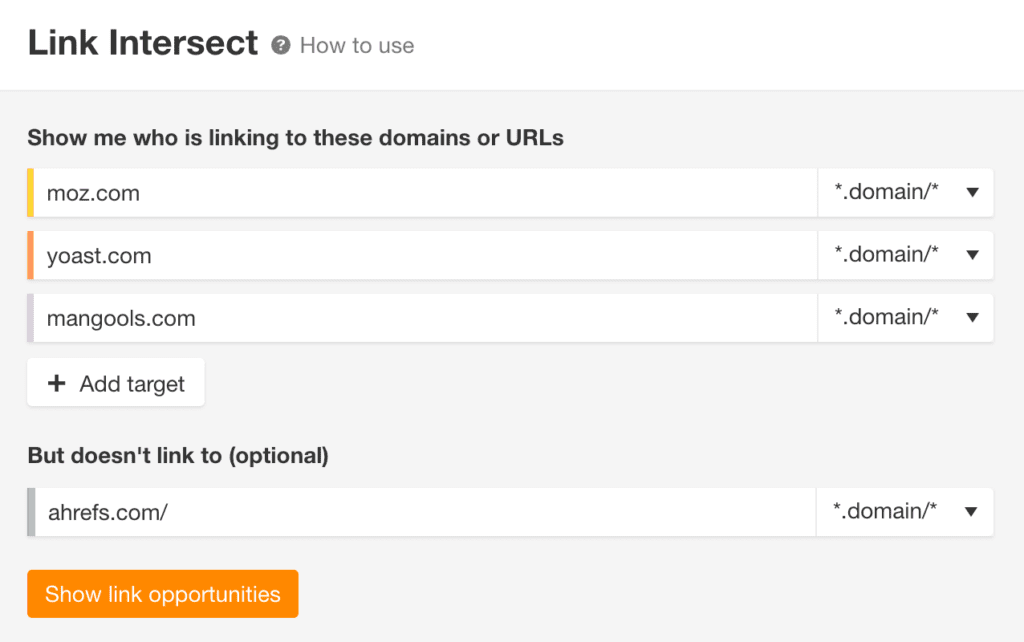
The Ahrefs Link Intersect tool (see image) or the Semrush Link Building Tool can help you with this.
Curious how to put all this into practice? Check out the best on-page SEO practices below!
On-Page SEO Best Practices: Here’s What You Can Do!
Create Killer Content!
In the world of on-page SEO, content is king. Why? It’s the backbone of your website and what your visitors judge you on. Good content is like a magnet, it attracts readers and keeps them there.
What Makes Content Good?
- Search intent: Know your audience. What are they searching for? Your content needs to answer their questions and solve their problems.
- Target audience: Write specifically for who you want to attract. Every target audience has unique pain points, needs and preferences.
- Tone of voice: Be yourself, be genuine. A casual, friendly tone often works best.
- Catchy title: Your title needs to grab attention. Make it provocative, intriguing, and persuasive. Use a question, spark curiosity! But we’ll go deeper into that shortly!
- Good structure: Use headings and subheadings! More on this in a moment!
- Short sentences and paragraphs: Make it easy to scan. Long walls of text put people off.
- Understandable language: No jargon, unless your audience expects it. Keep it simple.
Your website needs to be the final stop on their search! When people read your content, they shouldn’t need to look any further. Give them EVERYTHING they need.
Use (Long-Tail) Keywords!
Keywords are the words and phrases people type into search engines to reach their desired result. It’s one of the fundamental pillars of SEO.
Finding the right keywords starts with tools such as Google Keyword Planner, Ahrefs or SEMrush.
Search for terms that are relevant to your business and analyse their search volume and competition. This is often where you’ll find great opportunities to reach your target audience without too much effort!

Long-Tail Keywords
Long-tail keywords are the internet’s hidden gems.
They’re often longer, specific phrases, such as “organic red roses delivery London”,
They often have less search traffic, but attract a more targeted audience with high purchase intent!
This means the people who find your site are probably searching for exactly what you offer, and are ready to reach for their wallet!
These are often ideal for creating subheadings when you’re covering bigger topics!

Keyword Density
Too much of a good thing can backfire.
A keyword density of 1-2% (3% maximum) is ideal.
This means your keyword appears 1 to 2 times for every 100 words.
This makes sure the keyword appears often enough to be noticed by search engines, but not so often that it’s considered ‘keyword stuffing’
Handy plugins that can help with this are YoastSEO or Rankmath!

The Secret of the First 100 Words
The first 100 words of your text are super important!
Here you immediately set the tone, grab visitors’ attention and tell search engines what your page is about.
So make sure your most important keyword appears within these first 100 words.
A quick example!
Say you have a blog about homemade cakes. (Fancy a slice of cream cake already?)
You could start like this, for example:
“Dreaming of delicious, homemade cakes? Then you’ve landed in the right place! Here’s why!”
Here you use ‘homemade cakes’ right away, so Google (and your readers) immediately know what your page is about.
In Short
Keywords matter a great deal when it comes to SEO content and on-page SEO! Do keyword research and uncover hidden gems that let you rank easily!
Use long-tail keywords for less competition and higher purchase intent, ideal for working into subheadings.
Watch out that you don’t place too many search terms in a small piece of text, a maximum of 3 times per 100 words.
And finally, use your most important keyword in the first 100 words, so you immediately let search engines (and your readers) know what the text is about!
But to create good, understandable texts for your readers and search engines, a solid structure with headers is a must! So read on and learn!
Structure Your Content With Headers (H1, H2, H3)
Headers, also known as headings, are the building blocks of your content structure.
Headers are the signposts in your content
They make it easy for both readers and search engines to understand the structure of your text.
H1: The Title of Your Page
Every page needs an H1, it’s the title of each chapter in the book (your website).
This title tells Google and your visitors what your page is about. Keep it simple, relevant and catchy! I’ll come back to how to write a good title shortly!
H2 and H3: Subheadings for Structure and Depth
Use H2s for the main sections of your article and H3s for subsections, and keep going all the way up to H6s.
These subheadings help break your content up into digestible chunks.
It helps readers scan the text more easily and reach their answer faster!
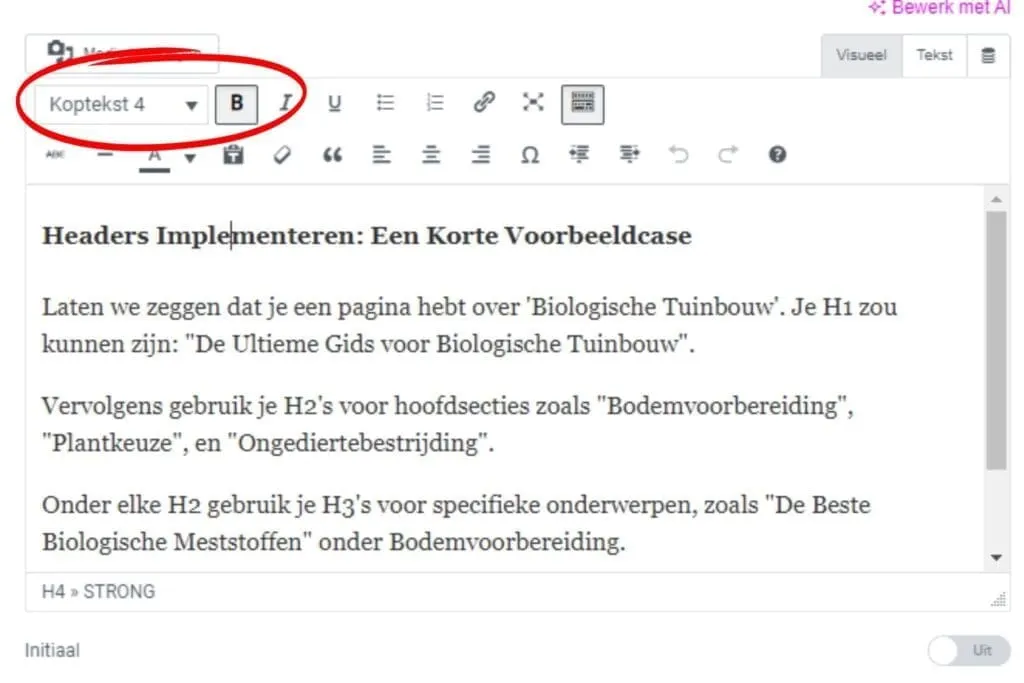
See the example below!

How Do Search Engines Look at Headers?
Search engines, like Google, use headers to understand the content and context of your page.
They scan these headers to determine relevance for search queries.
Well-structured headers are like a table of contents for your page, which makes it easier for search engines to index, and rank, your content!

The Impact of Headers on User Experience (UX)
Good headers don’t just make your text SEO-friendly, they also improve readability for visitors.
They offer natural breaks and make it easy to quickly find the information you’re looking for.
Implementing Headers: A Short Example Case
Let’s say you have a page about ‘Organic Gardening’. Your H1 could be: “The Ultimate Guide to Organic Gardening”.
Then you use H2s for main sections such as “Soil Preparation”, “Choosing Plants”, and “Pest Control”.
Under each H2, you use H3s for specific topics, such as “The Best Organic Fertilisers” under Soil Preparation.
It’s really just a matter of logical thinking, and looking a little further than the end of your nose!
Now let’s tackle those titles and meta descriptions! Next section: Optimise Title Tags and Meta Descriptions!
Optimise Title Tags and Meta Descriptions!
Title tags and meta descriptions are the pieces of text that appear in the search results when your website is shown.
The title tag is the blue heading, and the meta description is the short text underneath that summarises the page’s content.
You can probably guess this matters, it’s where people decide whether to click, so it needs to be clear and persuasive!

Optimising the Title Tag!
Be Descriptive, But Keep It Short!
Your title tag needs to make clear what the page is about.
Keep it between 50-60 characters to avoid it getting cut off in the search results.
Use Keywords in Your Title!
Place important keywords at the front of the title tag to immediately make clear what the page is about! Of course, only where it makes sense!
- Example: “Organic Gardening: Best Tips for a Sustainable Garden”
Make Every Title Unique.
Every page needs a unique title tag.
This helps search engines understand what each page is about, and avoids confusing them.
Which can otherwise lead to ‘cannibalisation’!
Add a Powerful Hook!
To increase the click-through rate (CTR) of your title tags, try adding an element of urgency or curiosity. This could be a question, a striking fact, or something that speaks to a direct need or interest.
- Example: “Writing Product Descriptions! Avoid the Mistake 95.37% of Online Stores Make!”
This title immediately grabs attention by presenting a surprising statistic and promises the reader they’ll learn something they may not already know.
It encourages action and taps into the reader’s natural curiosity.

The goal is to make it clear to people (and search engines) what the page is about, and to convince them to come to your site!
Optimising Meta Descriptions
Be super clear here about what they’ll find on the page!
Be honest, when you’re searching yourself, this is often what tips the scales!
So here too, be descriptive and clear about the content of your page.
Be Persuasive
Your meta description should encourage action and spark curiosity.
Keep it between 150-160 characters.
- Example: “Discover the secrets of organic gardening with our extensive guide. Start gardening sustainably today!”
Use Action Words:
Words like ‘Discover’, ‘Learn’, and ‘Check out’ encourage people to click on your link.
- Example using action words: “Discover the best nutrition tips and fitness routines for a healthy life! Start losing weight today with our easy-to-follow guides and personal advice.”
Add Keywords:
Just like with title tags, keywords matter here too, but don’t overstuff them.
Your main keyword once, plus one other search term, that’s something you can play around with!
Maybe add a long-tail keyword too!
By applying this, you make your title tags and meta descriptions irresistible, and make it very hard for people to ignore you!

Use Alt Text and Compress Your Images! (+ Bonus Tip!)
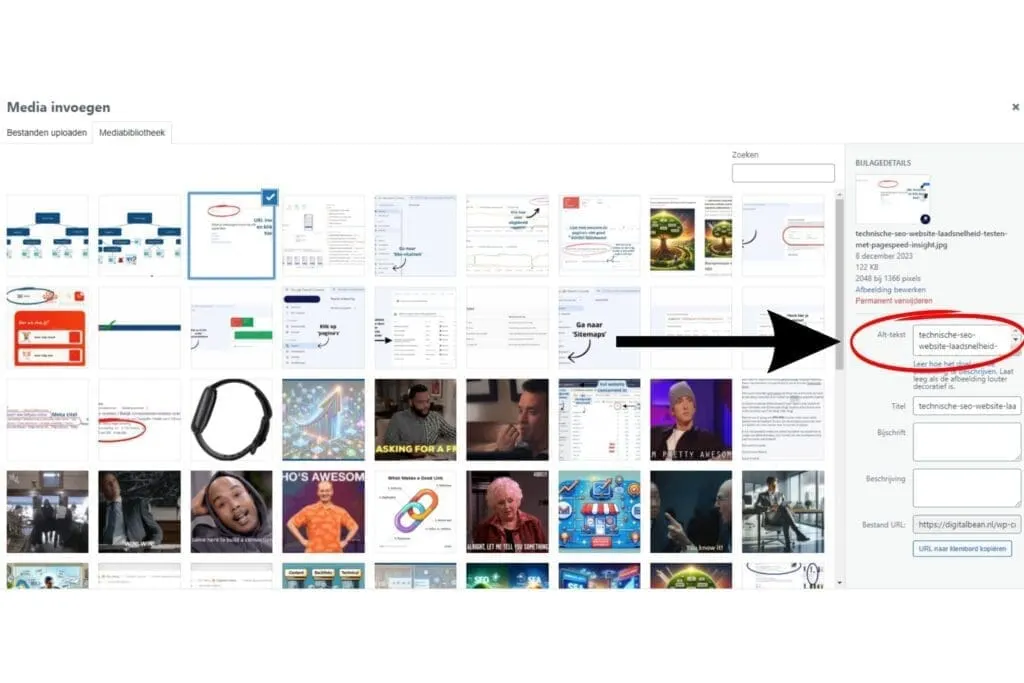
Alt text (alternative text) is the description of an image on a web page.
It makes sure search engines understand what’s in your images.
You add alt text in the HTML code of your image.
Sounds complicated!
Don’t worry, most content management systems (like WordPress) offer a simple way to do this in the image settings. (See the image below.)
Why Does It Matter?
Search engines use this text to understand what’s in the image, which in turn contributes to your page’s relevance for certain search terms.
You can also end up in the image search results!
And search engines, like Google, love images!
So it’s definitely worth it to
How to Write Good Alt Text!
Here’s a short checklist for writing effective alt text:
Descriptive and Accurate: Make sure the alt text describes the image accurately and clearly.
Keep it short and to the point. Ideally no more than 125 characters.
Relevant Keywords: Include relevant keywords, but avoid keyword stuffing.
By following these points, you make sure your alt text is both useful for SEO and accessible for users with visual impairments.
Here’s an example of good alt text for an image of a man in a canoe on a wild river:
Descriptive and Accurate: “Man paddling powerfully in a red canoe on a wild river.”
Short and to the Point: The description is specific and direct, without unnecessary detail.
Relevant Keywords: Keywords such as “canoe”, “river”, and “paddling” are included, relevant to the image and potentially useful for SEO.
This alt text gives a clear picture of what’s in the photo while staying concise and SEO-friendly.

Compress Your Images for Speed!
Large images can slow down your website, and nobody likes waiting, I certainly hate it!
Compressing images can significantly reduce your website’s loading time, which improves the user experience, and your SEO score too!
Where Can You Compress Images?
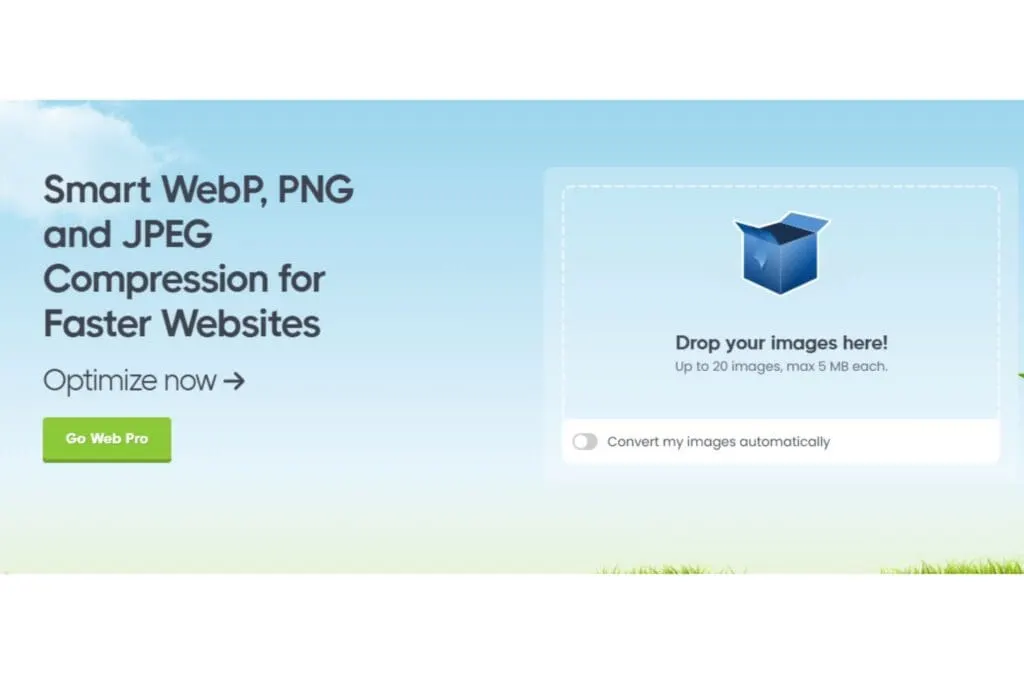
One tool for this is TinyPNG.
It’s simple: upload your images and let the tool do the work.
You get optimised images that, with minimal loss of quality, are ready to be uploaded to your website.
Use an SEO-Friendly URL Structure!
An SEO-friendly URL is clear, concise, and above all, easy to understand.
It’s not just a string of words, but a strategic choice that describes the content of your page.
You want it to intrigue, inform and create clarity.
Example:
- Not SEO-friendly: www.digitalbean.com/12345/post/9876
- SEO-friendly: www.digitalbean.com/blog/seo/on-page-seo
See the difference? The second URL tells you exactly what to expect on the page, and that’s what we want!
Tip: Use simple tools like Slugify to optimise your URLs.
And for more depth, dive into our blog post on SEO-friendly URLs, it’s a real difference-maker!
Add Internal and External Links!
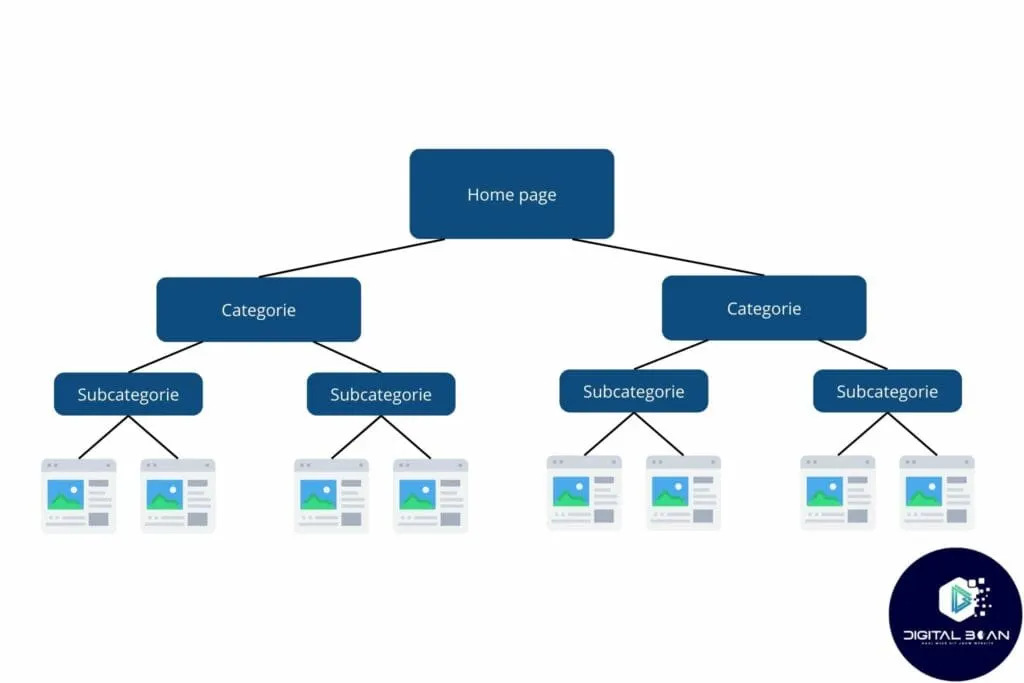
Internal linking is like building your own road network within your website.
These internal links connect different pages to each other, so visitors can easily find relevant content.
This doesn’t just improve the user experience, it also helps search engines understand the structure and relevance of your site
External links open doors to other trustworthy sites.
By linking to external sources, such as another informative site, you show that your content is part of a larger network of knowledge.
This builds authority and improves your website’s credibility in the eyes of search engines.
For this blog post, for example, I draw a lot of knowledge from Backlinko’s On-Page SEO guide! (worth reading next!)
In it, they also refer to this study by Reboot which shows that websites with links to external parties rank better!
Because they create such good content there, that’s where I get my information, and I point you (and search engines) right back to it!
Give People the Chance to Share on Social Media!
Indeed, social media isn’t just for cat videos and questionable selfies…!
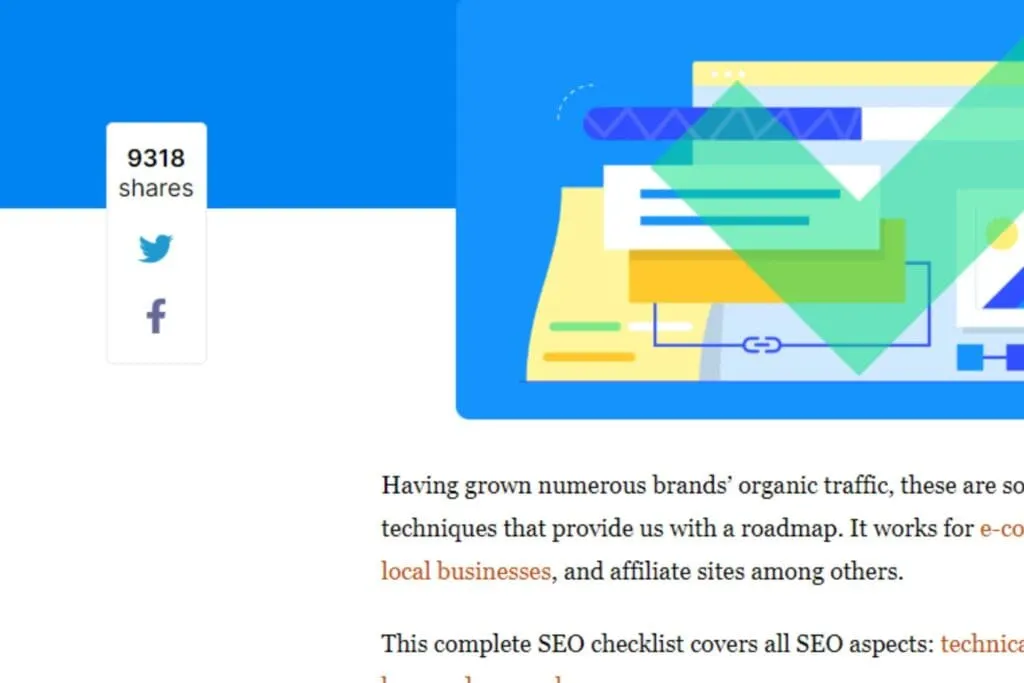
By adding a simple ‘Share on social media’ button to your articles, you can make a world of difference.
Why? Imagine this: someone loves your article, you’ve given them all the answers they needed, and they want to share it with their friends.
They click the button and voilà, your content appears on their social media feed.
What happens next?
- More visibility: Their followers see your article. More eyes = more traffic to your site.
- Increased authority: Every share is a vote of confidence in your content. Google sees this and thinks: “Hey, this page must be valuable!”
- Network effect: The best part of social media? The snowball effect. One person shares, a few of their friends then share it too, and before you know it, your article has reached a much bigger audience.
Definitely a fun one to tap into! And it’s a fantastic way to spread your content!
Setting up a social media campaign? We’d be happy to help! Check out the options here!
Use Synonyms! (Semantics and LSI Keywords)
Semantics in SEO is like the art of cooking. You don’t just pick the main ingredients (your primary keywords), you also add a range of spices (LSI keywords) to strengthen the flavour (relevance).
What Are LSI Keywords?
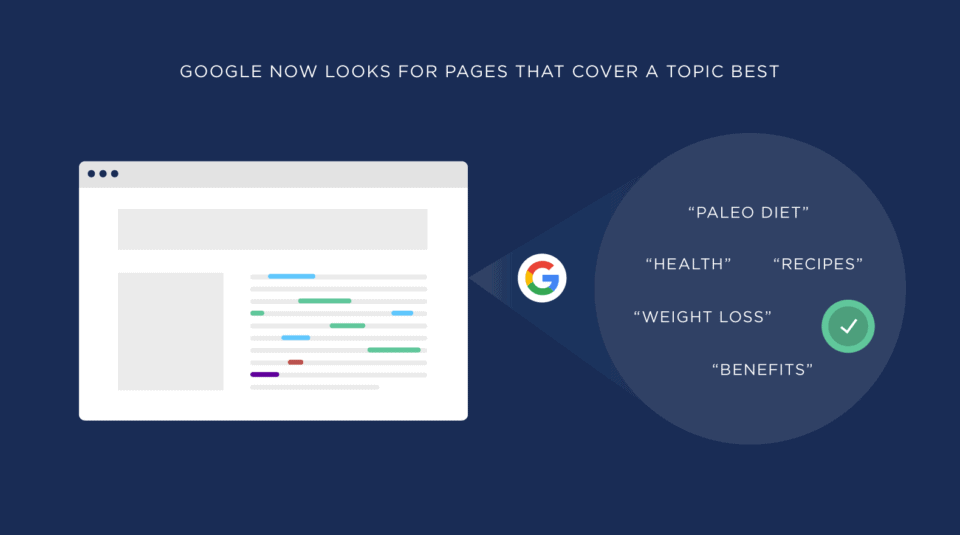
LSI (Latent Semantic Indexing) keywords are terms and phrases that are closely related to your main topic.
They help search engines better understand the context of your content.
They’re not just synonyms, but words that are often found in the same context.
How Do You Implement Semantics and LSI Keywords?
Start With Research: Use tools like ChatGPT to find relevant LSI keywords.
Work Them In Naturally: Sprinkle these LSI keywords through your content, but do this naturally. Forced or excessive repetition doesn’t read well and can be seen as ‘keyword stuffing’ by search engines.
Diverse content: Use LSI keywords to highlight different aspects of your topic. For example, write about ‘sustainable energy’ and work in terms like ‘green energy’, ‘renewable sources’, and ‘energy saving’.
Alt Text and Meta Descriptions: Don’t forget to sometimes use LSI keywords in your image alt text and meta descriptions too.
Internal Links: Use LSI keywords as anchor text for internal links. This doesn’t just help with SEO, it also helps keep visitors on your site longer.
Be Mobile-Friendly
In our modern, mobile-first world, it really matters to understand that your website’s mobile-friendliness isn’t just a ‘nice extra’, it’s an absolute must!
How often do you check something on your phone? Exactly, we practically live in our mobile devices.
What Is Mobile-Friendliness?
Mobile-friendliness means your website works smoothly on smartphones and tablets.
It’s about fast loading times, readable text without needing to zoom in, accessible menus and buttons that are large enough for fingertips.
Why does this matter so much? Because Google thinks from a ‘mobile-first’ perspective!
Google’s Mobile-First Index: What Does That Mean?
Google’s mobile-first index means the search giant uses the mobile version of your website for indexing and ranking.
Put simply: if your site isn’t friendly to mobile users, you risk getting buried in the search results.
And we all want to be found, right?

How Do You Check Whether Your Website Is Mobile-Friendly?
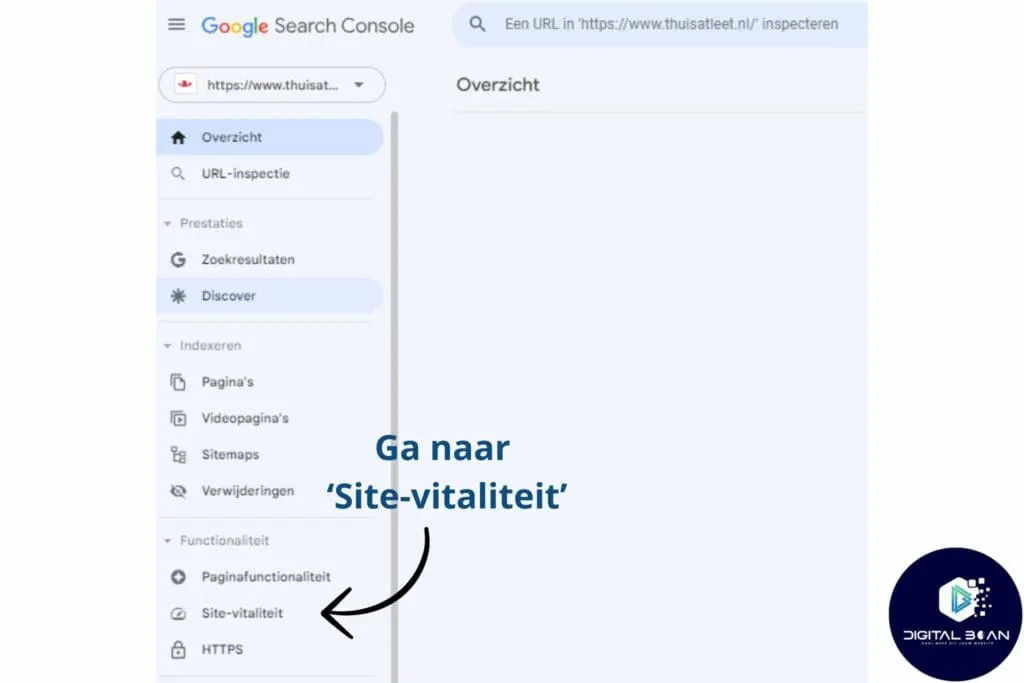
Google Search Console (GSC) is your best friend here.
With this tool, you can easily check how mobile-friendly your website is.
It gives you insight into how Google sees your site and provides valuable feedback on any points for improvement.
Getting Started With Google Search Console (GSC)!
Want to become a true master at using GSC?
Then be sure to check out our “Google Search Console Mastery“.
This is the guide that walks you through Google Search Console step by step!
Be Lightning-Fast With Your Loading Speed!
Imagine standing in line for coffee and it’s your turn within seconds. What a great feeling!
That’s what your website should offer too.
Nobody likes waiting, especially not online, the threshold for clicking over to someone else is incredibly low!
Test Your Speed
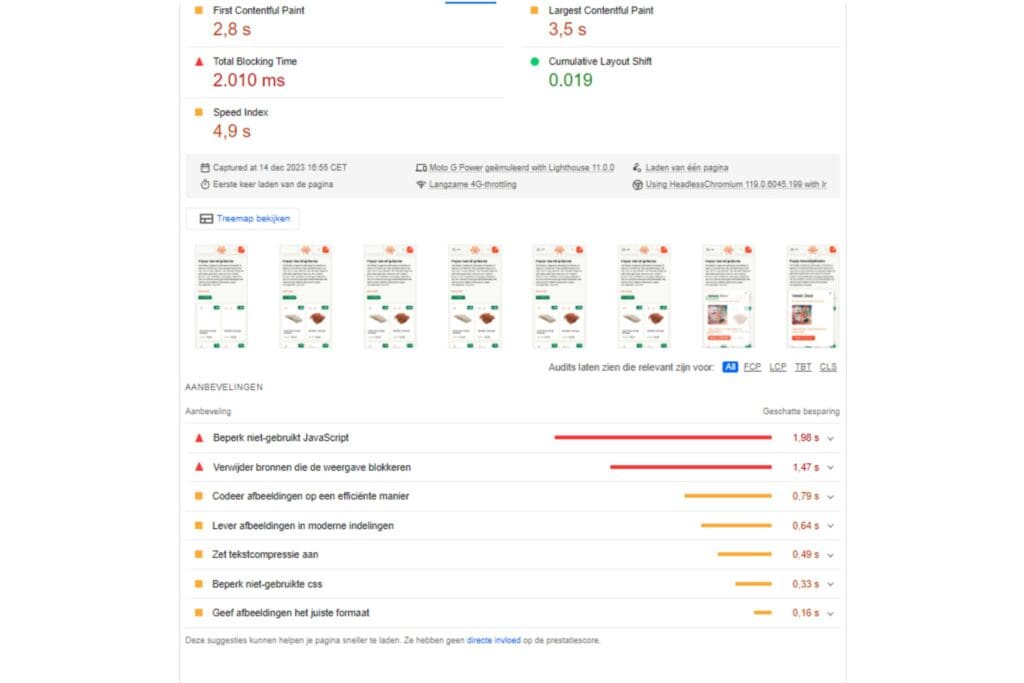
Grab your stopwatch and test your website speed with Google’s PageSpeed Insights.
This tool doesn’t just give you a speed score, but also personalised tips to turbocharge your site!
As you can see below!
Three Quick Tips for Faster Loading Speed
Optimise Images: Large images can slow down your site. Use formats like JPEG or WebP and compress them without losing quality using TinyPNG
Use Browser Caching: Let browsers remember certain information, so returning visitors don’t need to reload everything each time. It’s like a regular customer walking in whose order you already know.
Minimise CSS, JavaScript, and HTML: Remove unnecessary spaces and line breaks and simplify your code. It’s like removing those extra “ums” and “ahs” from your order, it makes everything faster and clearer.
Use Structured Data for Rich Snippets! (Schema Markup)
Structured data is like the secret recipe for your website.
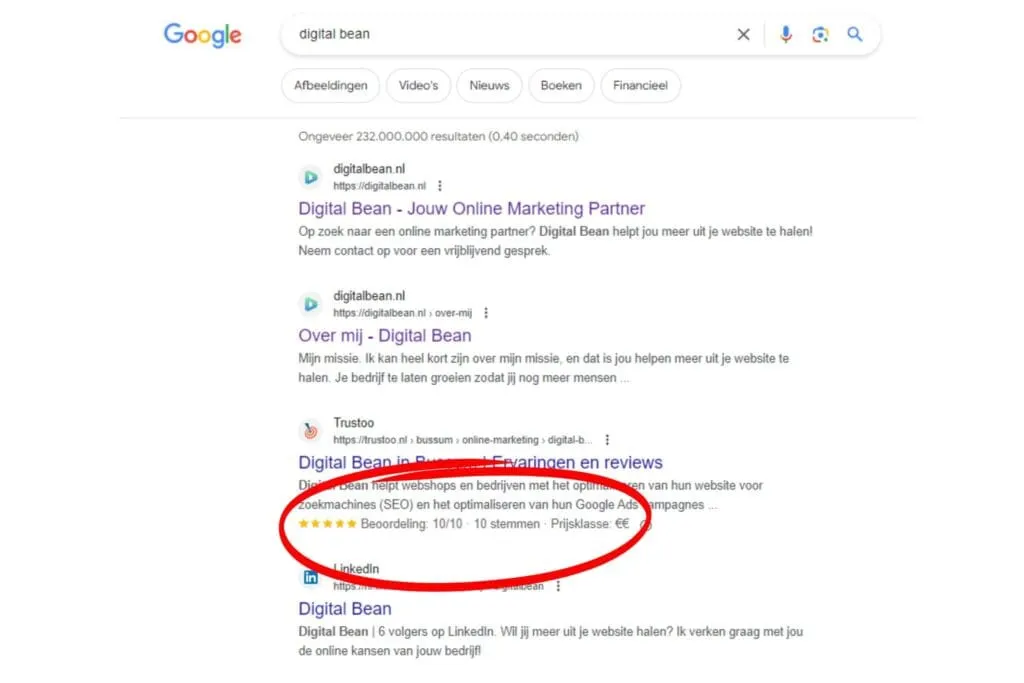
It helps search engines understand what’s on your page by presenting specific information, such as reviews or events, in a structured way.
This sometimes results in rich snippets, which show extra info in the search results, such as star ratings (see image!).
Where Do You Create Structured Data?
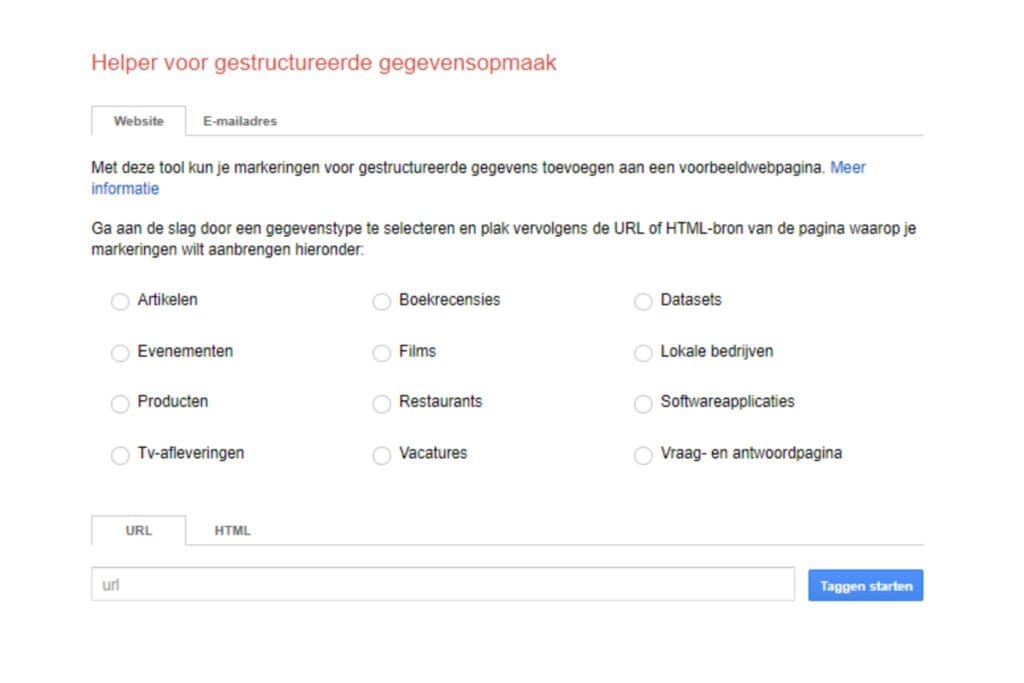
You can create structured data with tools such as Google’s Structured Data Markup Helper.
This lets you easily mark up data on your website and generate the necessary code.
Check Whether Your Structured Data Is Correct
After implementation, you can use Google’s Rich Results Test to check whether your structured data is set up correctly.
Simply enter your page’s URL, and you’ll immediately see if there are any errors.
Super easy!

Curious how to get started yourself?
Read on and discover which (free) SEO tools you can use to make your on-page SEO watertight!
On-Page SEO Tools and Checkers
SEO can feel like a mystery, but with the right tools, it becomes an open book.
Whether you’re a business owner looking to grow your digital footprint or you’re just curious how your website is performing.
These on-page SEO tools and checkers will help you!
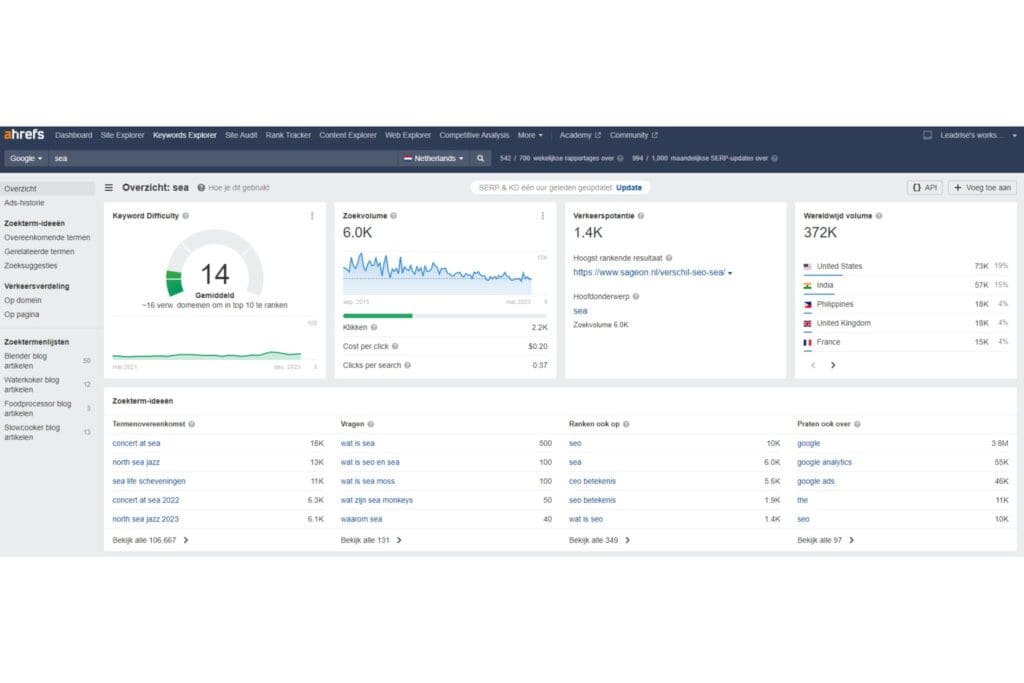
Ahrefs for Keyword Research
Ahrefs is one of the best SEO tools for keyword research (in my opinion).
It helps you find the most relevant keywords for your content.
Use Ahrefs to:
- Discover which keywords your competitors are using.
- Find new keyword ideas.
- Analyse the search volumes and difficulty levels of keywords.
And that’s just the tip of the iceberg!
Ahrefs is incredibly comprehensive, though it’s less suited for on-page content analysis.
For keyword research and finding backlinks, it’s a master!
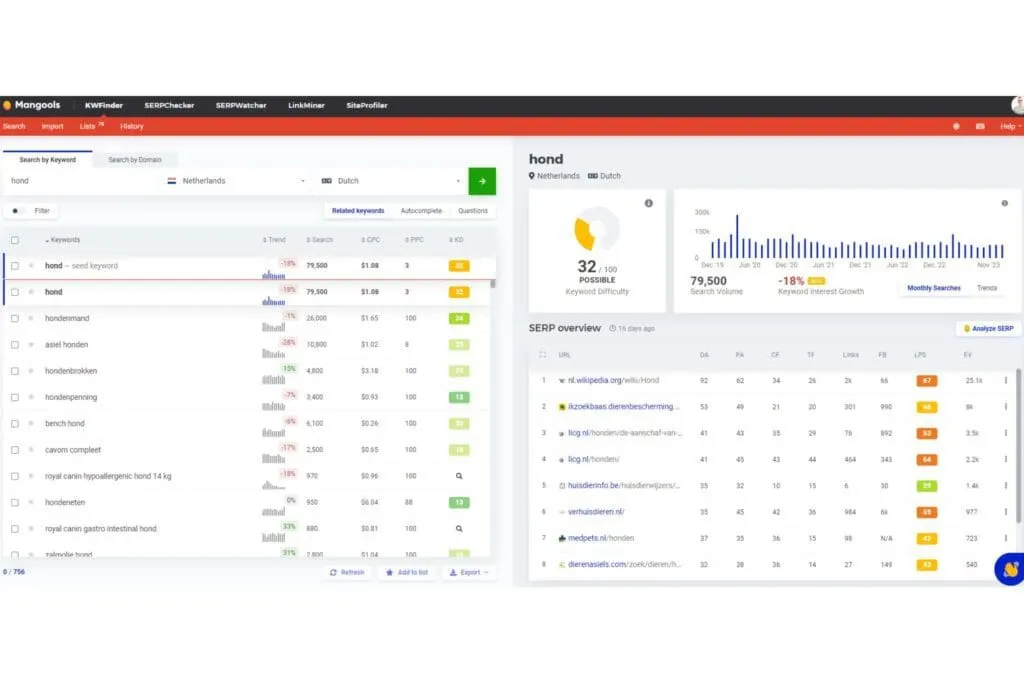
KWFinder for Keyword Research.
KWFinder is, in our opinion, a bit more beginner and user-friendly.
We’ve also found it’s an ideal tool for long-tail keywords, perfect for new websites.
With KWFinder, you can:
- Find keywords relevant to your niche.
- View search volumes and trends.
- Estimate a keyword’s difficulty level.
- And much more, but that’s for another time!
SEMrush On-Page SEO Checker
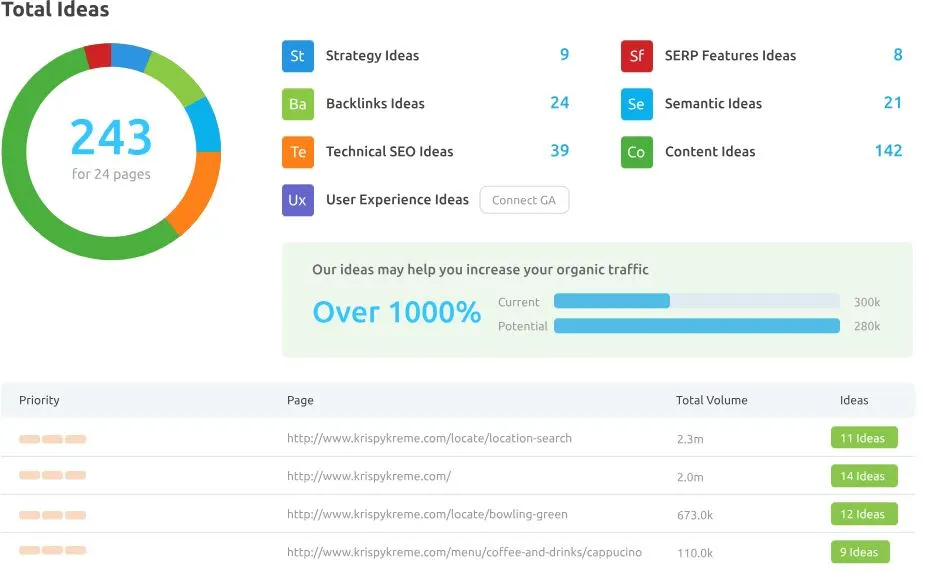
SEMrush On-Page SEO Checker is your GPS in the on-page SEO jungle.
It offers in-depth analyses and tips to improve your website.
Plus, SEMrush also offers features for keyword research and building backlinks!
Here’s a selection of its features!:
Semantic Ideas: Enrich your website content with more keywords and topics related to your main keyword. This can lead to higher Google rankings by covering more related topics.
Content Ideas: Analyse the content of your top competitors on Google and get guidance to outrank them. Understand when your content has too many keywords, how readable it is, and when it isn’t informative enough.
User Experience Ideas: See how your web page is perceived by your audience. This tool analyses data from Google Analytics to give you a picture of your page’s UX status.
Strategy Ideas: Discover which pages of your website perform best and optimise them for specific keywords. The tool analyses your landing pages and gives suggestions for optimisation.
SurferSEO Content Editor
The SurferSEO Content Editor is perfect for optimising your content in real time!
SurferSEO offers a sidebar with a content score, keywords to add and how often you should add them!
Really ideal for while you’re creating content, we’ve used it ourselves for one of our own sites too, and we’re very happy with it!
Here’s a list of the most important features!
- Content Generation Options: Generate keywords, create outlines and write optimised content.
- Real-Time Optimisation: Offers relevant keywords and optimisation metrics while you write, in a sidebar! (super handy!)
- Outline Builder: Create detailed outlines with potential headings and questions.
- Multilingual Support: Write and optimise content in various languages.
- Plagiarism Check: Check the authenticity of your article.
- Platform Integration: Works together with Google Docs, WordPress, and Jasper
Wincher’s Free On-Page SEO Checker
Wincher’s Free On-Page SEO Checker is ideal for beginner websites and for running your first check!
It offers a free way to analyse your on-page SEO.
You get insight into the following:
- Checking the basic SEO elements of your pages.
- Getting quick insight into areas for optimisation.
- Keeping an eye on your progress for free.

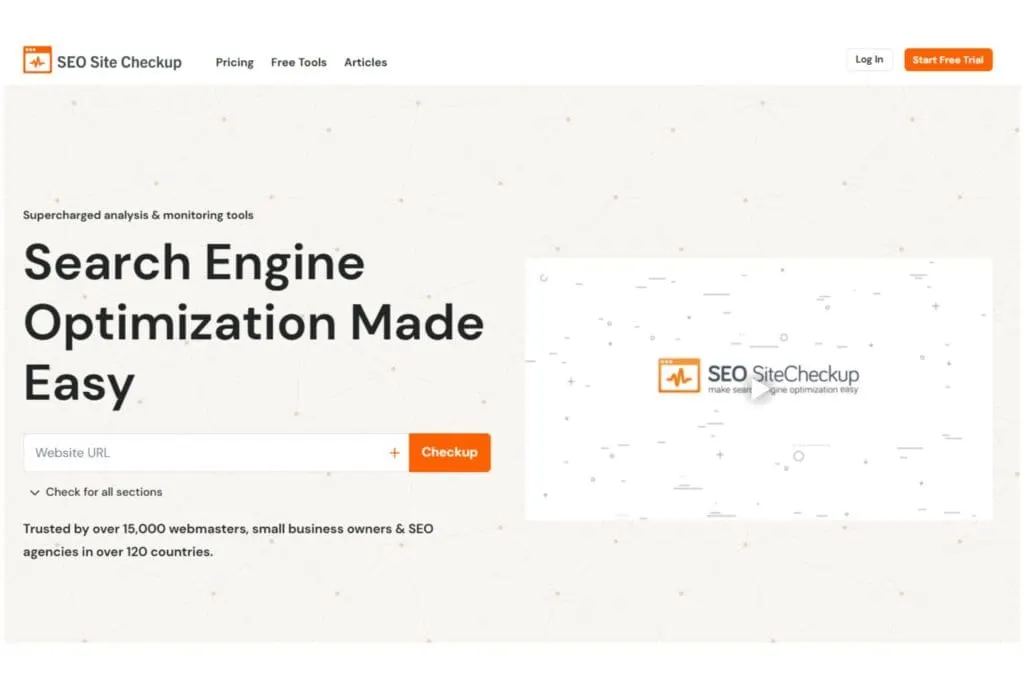
SEO SiteCheckup Analysis
SEO SiteCheckup is a free tool that offers a quick and effective way to analyse your SEO performance.
It’s particularly well suited for quick checks and basic analyses, ideal for anyone who wants insight into the basic SEO status of their website.
With its ease of use and instant results, it’s a handy option for both beginners and experienced users in search engine optimisation.
Frequently Asked Questions About On-Page SEO
There are a number of questions that tend to come up when talking about on-page SEO. So let’s go over the most important ones below.
What’s the difference between on-page SEO and technical SEO?
On-page SEO is about optimising the content and elements on your web pages themselves, such as titles, content and images, to rank better in search engines. Technical SEO focuses on the underlying technical aspects of your website, such as site speed, mobile compatibility and structured data. But they overlap quite a bit and support each other enormously!What are the most important on-page SEO factors?
Quality, relevant content: Provide content that adds value for your visitors.Optimised titles and descriptions: Including relevant keywords and persuasive phrasing.
Internal and external links: Make sure you have relevant internal links and high-quality backlinks.
What’s the Best On-Page SEO Tool?
In our opinion, Ahrefs is the best for keyword research, SurferSEO for real-time optimisation during content creation (my favourite!), and SEMrush for the complete package.
How Long Does It Take Before On-Page SEO Starts Working?
3 months is a realistic time frame for when you can start seeing the first results. Just like all SEO efforts, this isn’t a 100-metre sprint! It’s a marathon (unfortunately). But you really are building something that lasts!
What’s Better, On-Page SEO or Off-Page SEO?
On-page SEO optimises your site’s content and structure, while off-page SEO strengthens your online reputation. Both are indispensable for successful SEO and complement each other.
Should I Outsource On-Page SEO?
Whether you outsource your on-page SEO depends on your knowledge, time, and budget. For expertise and fewer headaches, outsourcing is well worth considering. That way you can focus on the business! For help, we’re ready for you at Digital Bean! Get in touch and put us to the test!
My On-Page SEO Tool Says We Need to Stop!
Great that you’ve read the whole article, I really appreciate it!
To help you look back over everything, I’ve listed all the aspects once more below!
- Create killer content! Attracts, retains and builds a relationship with visitors.
- Use keywords! To make clear to search engines what the content is about.
- Structure your content with headers (H1, H2, H3) Increases readability and SEO structure.
- Optimise title tags and meta descriptions! Improves click-through rate (CTR) from the search results.
- Use alt text and compress your images! This makes images clear for search engines and speeds up loading times.
- Use an SEO-friendly URL structure! Makes links short, clear and descriptive.
- Add internal and external links! Improves visitor flow and strengthens authority and relevance.
- Social media integration Increases reach and engagement.
- Use synonyms! (Semantics and LSI keywords) Enriches context and relevance.
- Be mobile-friendly! A must for modern internet users.
- Be lightning-fast with your loading speed! Matters hugely for the user experience.
- Use structured data for rich snippets! (Schema markup) Increases visibility in the search results.
The last three are secretly a bit of technical SEO too, but I couldn’t resist covering them! Check out our blog post on technical SEO here as well!
We also covered a few handy SEO tools! In our opinion, you’re best off using Ahrefs for keyword research (our favourite), SurferSEO during content creation, and if you’d rather have an all-in-one package, go for SEMrush!
Now it’s your turn to put these strategies into practice. But don’t worry, you’re not on your own. At Digital Bean, we’re here to support you with your SEO strategy.
Got questions, comments, or just a fun SEO anecdote? Share them below in the comments, we’re incredibly curious about your questions, insights and experiences!
And finally, want to stay up to date with the latest SEO tips and tricks? Sign up for our newsletter! That way you’ll always stay one step ahead in the dynamic world of online marketing.
Good luck, and go grab those #1 spots in the SERPs!
Until next time!