Structure as the Key to Success: How Layout Can Boost Your E-commerce Store's SEO
 Matthijs BoonFounder and online marketer
20 March 2024 · updated 17 April 2024
Do you run an online store and want to structure it in the most user-friendly way, so your visitors are happy and the search engines are happy too, improving your SEO?
As an online store owner, you already have your hands full just keeping your store running. That's why in this blog I want to walk you through how best to structure your online store so that both visitors and search engines are delighted with you.
I'm Matthijs, and I've been doing SEO for years, mainly focused on online stores. Besides having run an online store myself and experienced every pain point first-hand, I now help our clients get their online stores to the top of the search results.
Let's get straight into it, so you can get back to focusing on your online store.
In Short
- A user-friendly, intuitive, SEO-optimised design with clear CTAs
- A solid menu structure that shows the hierarchy of your website.
- A clear URL structure that's easy to read.
- Make sure the key elements are present for each type of page (information pages, blogs, category, product). More on which elements those are later.
- Make sure your homepage leaves a great first impression, and treat it as the starting point of the visitor's search. Your most important pages need to be featured there.
The General Layout and Look of Your Online Store
If you've spent years in online marketing like I have, you learn one thing fast: first impressions are everything. That goes double for your WooCommerce store.
A user-friendly, SEO-optimised design isn't just a nice extra; it's the foundation of your success.
Why does this matter so much? Let's start with the fact that a well-designed online store opens the door for both users and search engines.
A clear, logical structure helps visitors find what they're looking for, which increases the chances they'll convert.
For search engines, the rule is: the clearer the structure, the better they can index your content. In fact, the goal of Google is to give the visitor the best results. So the better a visitor is helped with their search the better. This leads to a higher ranking in the search results. So it matters that the visitor stays at the centre of your website.
The search engines will naturally follow if the visitor is well looked after. Search engines like Google also look at usage signals from users on your website.
Want to know more about this? Take a look at our blog about what SEO is.
What Makes an Online Store User-Friendly and Clear?
But how do you know whether your online store is user-friendly? Here are a few key points:
- Clear navigation: Visitors should be able to find what they're looking for within seconds. On every page. Product pages, category pages, the homepage, information pages and blog pages alike. A solid menu structure, a simple URL structure and well-built pages all matter here.
- Fast load times: Nobody likes waiting. Optimise your images and use reliable (and fast) hosting to cut your load times.
- Responsive design: Your online store needs to look good and work well on every device. Mobile (you can barely do without it these days), tablet and PC.
- Accessibility: Make sure everyone, including people with disabilities, can use your online store. So write all your information in language everyone can understand. No fancy jargon or anything like that. Just plain language so everyone can follow what's being said.
Structuring Your Menu
Let's talk about your online store's navigation menu: the unsung hero of SEO and user experience.
An easy-to-understand menu structure doesn't just work wonders for your visitors, it also helps search engines understand the structure of your site, which matters a great deal for your ranking. Win-win, right?
Why Does a Good Menu Matter?
A well-organised menu guides visitors smoothly to the information or products they're looking for. This lowers the bounce rate (the percentage of visitors who leave your site without interacting) and increases the chance of conversion.
For search engines, a clear structure signals a high-quality website, which can only be good for your SEO.
Best Practices for Menu Structure
- Keep it simple: Limit the number of menu items. Too many options can be overwhelming. People can always click further once they land on the page after clicking a menu item.
- Use clear naming: Avoid jargon. Choose terms your audience understands. So carry out (or have someone carry out) keyword research.
Logical structure: Put your most important categories at the front. Use a hierarchy that makes sense both for your visitor and for SEO.

The Importance of Breadcrumbs
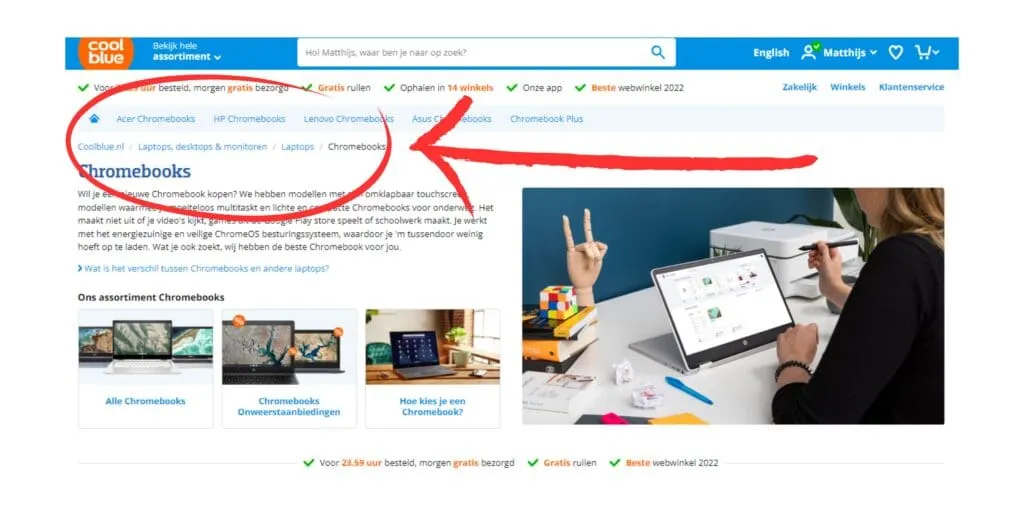
Breadcrumbs are the small navigation trails at the top of your pages. They help users find their way back and improve your website's internal linking.
This isn't just good for SEO, it also improves the user experience. My tip? Implement breadcrumbs for streamlined navigation. For WooCommerce stores, you can use this feature within the Yoast SEO plugin. Check out this complete explanation of how to implement these breadcrumbs in your online store.
Below you'll see an example of how this looks on Coolblue, so you get an idea of it.
Structuring Different Page Types
Every type of page in your online store plays a unique role in both user experience and SEO. Let's explore the differences and best practices for each page type.
Information Pages
Goal:
Inform visitors about your business and services.
What you'll find:
Basic information about your business, such as mission, vision, history, team information, and the services you offer. Possibly also location details, contact information, and frequently asked questions, and for online stores, don't forget the returns page, warranty policy, privacy policy and any disclaimers.
Best layout:
- Provide a clear, concise introduction at the top of the page that immediately captures the essence of your business.
- Include a clear Call-To-Action (CTA), such as a contact form or a button for more information, that's prominent and easy to find.
- Split the content into logical sections with subheadings for easy navigation.
Blogs
Goal:
Share knowledge and demonstrate authority in your niche.
What you'll find:
Valuable content that addresses your audience's problems, shares tips and tricks, discusses industry trends, and offers in-depth insights.
Best layout:
- Start with a catchy title and an introduction that immediately grabs attention and introduces the problem or topic of the post.
- Use subheadings to structure the text and keep it readable.
- Include CTAs that invite readers to learn more about related products or services, sign up for the newsletter, or get in touch.
- Use images and videos to clarify your explanation.
- Close with a conclusion that sums up the key points and prompts the reader to take action.
Category Pages
Goal:
Organise products and make it easier for visitors to search and compare.
What you'll find:
An overview of products grouped by category, with descriptive text and images. But don't forget the filters, subcategories and any sorting and comparison options.
Best layout:
- Provide a clear, concise description of the category at the top of the page, including relevant keywords. Continue with the more detailed explanation further down the page.
- Present products in a clear, visually appealing layout. So images that are all the same size, all of them
- Use filters and sorting functions so users can refine their search.
- Add a clear button to each product to direct users to product pages or offers.

Product Pages
Goal:
Drive conversions.
What you'll find:
Detailed descriptions, specifications, prices, reviews and images or videos of the product.
Best layout:
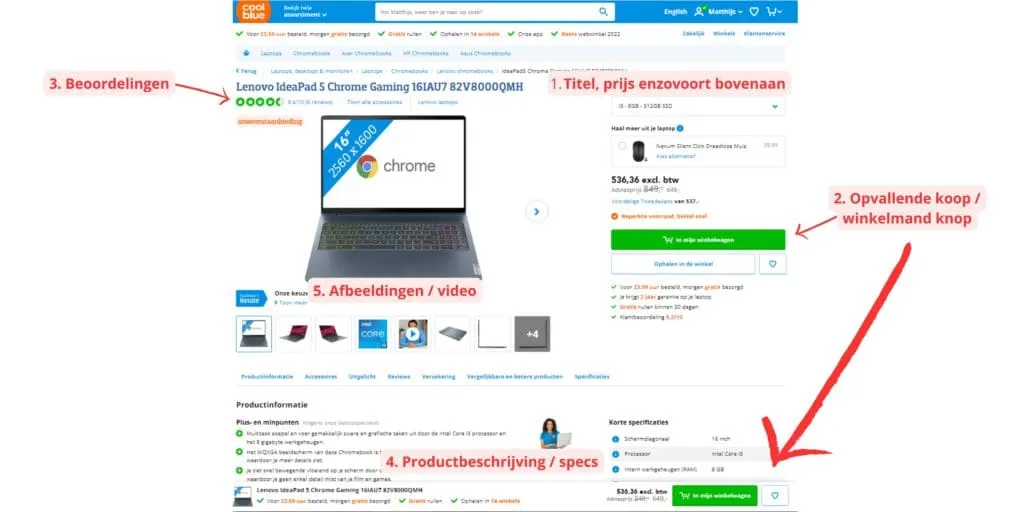
- Place the product title, price, and key benefits or USPs (Unique Selling Points) prominently at the top of the page.
- Include a clear, eye-catching 'buy' or 'add to cart' button. Put it in view right away when people land on the page.
- Show ratings and reviews close to the CTA to build trust and credibility.
- Offer detailed product descriptions and specifications in a structured format, with the option for users to easily view more or fewer details.
- Use high-quality images and videos to show the product from different angles.
By following these guidelines for every page, you can improve not just the user experience but also the SEO value of your online store, which ultimately leads to a higher conversion rate.
Below is an example of what a good product page looks like.
The Importance of Quality Content and Keyword Research
Regardless of the page type, quality content and thorough keyword research matter just as much as the right layout. Keywords don't just help you get found in search engines, they also give you insight into your audience's needs and wants.
At Digital Bean, we understand that the right words in the right places can transform your online store from overlooked to indispensable. Need help setting up an SEO strategy that makes your WooCommerce store shine? Get in touch with us, or sign up for our newsletter for more insider tips and tricks.
Structuring Your URLs
Ah, the art of URL structuring – an often-overlooked but vital element for any e-commerce store aiming for SEO success. Why? Because a clean, logical URL isn't just easy for your visitors to understand and remember, it also helps search engines index your page's content better.
The Importance of a Clean URL
Imagine this: you're searching for a specific product and land on a URL that looks like a random string of characters. Confusing, right? A clear URL like https://yourstore.com/men/jackets/leather-jackets is immediately clear and user-friendly. This doesn't just increase click-through rates in the search results, it also improves the user experience. Visitors know exactly where they are on the site.
Tips for Using Keywords in URLs
- Be specific and relevant: work in keywords that are directly related to the page content.
- Separate words with hyphens:"/leather-jackets/" is far more readable than "/leatherjackets/".
- Avoid unnecessary words: keep it simple and to the point.
This structure helps organise your site and makes it clear to both users and search engines what to expect on a page.
Structuring URLs for Categories and Product Pages
WooCommerce automatically adds (if you use the default settings) a URL segment to the URLs of your products and product categories.
For products that's "/product/" and for product categories "/product-category/", if you've set your store to English.
Now, this isn't necessarily a problem, but it can make your URLs quite long quite quickly. You can adjust this, which makes your URLs a lot tidier.
For example, you could turn /product/ into /p/, and turn /product-category/ into /pc/.
It's sensible to only do this if you're either just starting out, or you're already overhauling the entire structure of your online store anyway.
If everything's already been live for a while, then it's all already indexed, and I wouldn't recommend overhauling everything again. There's a real chance you'll drop a bit in the rankings at first if you make changes like this.
If you'd like to know more about making your URL structure SEO-friendly, read our in-depth blog on the topic.
Effective Homepage Layout for Online Stores
A strategically structured homepage really matters for the success of your online store, both in terms of user experience and SEO performance. Below are the key things for optimising your homepage:
Showing Your Best-Selling Products:
Show your most popular or best-selling products prominently on your homepage. This doesn't just grab visitors' attention right away, it also demonstrates the value and popularity of what you offer. Make sure this section is visually appealing and invites action with clear links to the product pages.
Highlighting Offers and Promotions
Everyone loves a good deal. Highlight special offers, discounts or seasonal promotions on your homepage to spark interest and drive conversions. This can take the form of a slider, banner, or a dedicated section that's easy for visitors to find.
Highlighting Your Main Categories
Make it easy for users to navigate by showing your main categories directly on your homepage. This doesn't just improve the user experience by simplifying the search process, it also supports SEO by offering a clear site structure.
A Short Introduction to Your Store
Close with a short but powerful piece about your online store. Tell people who you are, what you do, and why customers should shop with you. This piece helps build a brand identity and can help create trust with your visitors.
By working these elements in cleverly, you create a homepage that not only welcomes visitors and guides them through your online store, but also contributes to a strong SEO foundation. Remember that your homepage is often the first point of contact with potential customers, so make the most of that chance to leave a lasting impression.
Conclusion
We've covered a lot of ground on the key aspects of SEO optimisation for your WooCommerce store.
From the importance of an intuitive menu structure and the power of quality content on your pages, to the importance of a clean URL structure and optimising your homepage for the ultimate first impression.
Every one of these elements plays a vital role in how your online store performs, both in the eyes of your customers and in the search results.
But it doesn't stop here. SEO is a dynamic field, always moving, just like the online market itself.
It takes ongoing attention, adjustment and optimisation to be truly successful. And that's where Digital Bean comes in. With our expertise and experience, we can help your online store not just climb the SEO ladder, but stay there too.
So, do you have questions about how to further optimise your e-commerce store? Or are you curious what Digital Bean can specifically do for you?
Leave your questions in the comments below. We're here to help you navigate the complex world of SEO, and together we can make sure your online store leaves the competition behind.
Take the step today and discover how our SEO services can help your online store grow even further. Because remember, in the world of e-commerce, standing still means falling behind. Let Digital Bean be your partner on the road to success.
Also worth a read is our blog on how to do SEO for online stores.