Technical SEO: Here's What You Need to Know in 2024!
 Joram BoonSEO and content specialist
3 January 2024 · updated 10 January 2024
Product or service to be proud of, check! Beautiful website, check! Great SEO content, double CHECK!
But one thing is missing! You’re not ranking well in Google!
Why is that? The answer might just lie in technical SEO!
Here’s what you’ll learn today:
- What technical SEO is and why it matters.
- The core components, think of website speed optimisation, SEO structure and much more!
- More advanced technical SEO optimisation.
Let’s get started!
PS: No experience with SEO yet? Then check out this post on ‘What Is SEO‘ first!
What Is Technical SEO and Why Does It Matter?
Technical SEO is optimising a website’s speed, crawlability and structure for search engines, in order to improve the website’s ranking in search engines.
Technical SEO matters a great deal, and here’s why:
- Faster Loading Times: Nobody likes to wait. Fast sites beat slow sites, in Google’s eyes too.
- Better Visibility: If Google can find you easily, you get added to the search results faster, so you can be found more easily too.
- Better User Experience (UX): A site that scores well on technical SEO is generally experienced as much better by visitors, and keeps them around longer!
In short, it doesn’t just help your website perform better, it also makes sure you don’t get lost in the enormous sea of online content, and keeps visitors on your website longer!
‘How do I get started with this kind of SEO?’. With the basics, of course! Read on for the fundamentals!
Technical SEO Basics!
Good Website Structure
A good website structure is like the foundation of a house: without it, everything collapses. But why does it matter so much?
- Google’s Understanding: A clear structure is like a map for Google. It helps Google understand the role and purpose of every page.
- Better Crawlability & Indexing: With a clear structure, search engines find their way around the site more easily, which leads to better indexing of your pages.
What Does a Good Structure Look Like?
The fastest way to explain this is with images….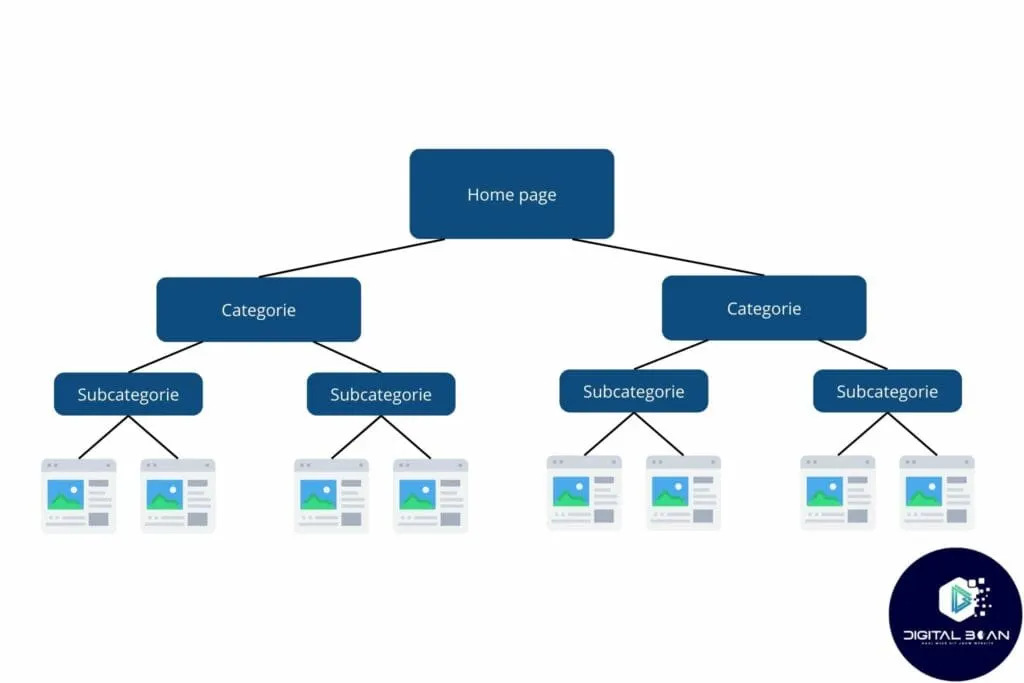 A good website structure looks like an organised tree structure, as illustrated in the image.
- The homepage sits at the top and acts as the central hub.
- From there, main categories branch out, representing the website’s most important themes or services. For example: ‘Air Fryers’
- Each main category then splits into subcategories, which dive deeper into specific topics or product groups under the main category. Example subcategory: ‘Dual Basket Air Fryers’
- Finally, these lead to individual pages, where you’ll find detailed content about specific topics or products. Example: Philips dual basket air fryer product page.
This structure also helps keep things clear for you, your visitors and search engines.
Without a good website structure, so-called ‘orphan pages’ can appear, these are pages that have no internal links pointing to them, which makes it hard for visitors, but especially for Google, to work out what the page is about!
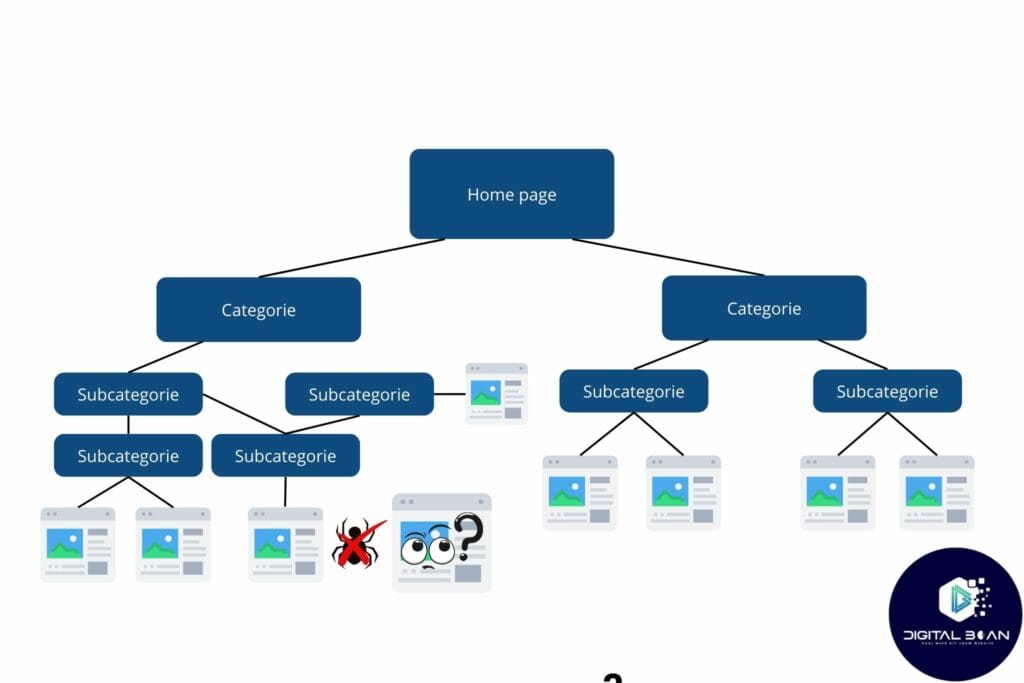
For small websites and blogs, setting up a good structure is often fairly simple, but for large online stores, this is naturally quite a challenge!
But to help you on your way, here’s a step-by-step plan to get started with!
How to Create a Good Website Structure…
- Start With Main Categories: First put your website’s main categories down on paper. These are the most important topics or services you offer and will cover.
- Determine Subcategories: Determine subcategories that logically fit under your main categories. This helps visitors and search engines better understand the content.
- Limit the Number of Clicks: Make sure every page on your website is reachable within three clicks, four at most, from the homepage.
- Add Internal Links: Use internal links to connect relevant pages. This improves navigation for users and search engines and strengthens your site’s SEO. Make sure links are relevant and have clear anchor text.
- Use Understandable Navigation Terms: Make sure you have a clear and consistent navigation menu. Avoid jargon and choose terms everyone understands.
Extra Structure Tips!
Finally, let’s introduce…
- Robots.txt
What is it? A robots.txt file tells search engine crawlers which pages on your website they may or may not visit.
Why does it matter? It helps manage access to certain parts of your site, which matters a lot for both privacy and efficiency.
- Sitemap
What is it? A sitemap is a file showing the structure of your site, usually in XML format.
Why does it matter? It helps search engines understand your website better and index it more efficiently.
We’ll go deeper into both topics in the section on advanced technical SEO, so keep reading!
Website Speed
Why Does Website Speed Matter? Here Are the Main Reasons!
- Ranking Factor: Google’s Core Web Vitals are like a digital health check. They measure the loading speed, interactivity and visual stability of your pages. Not up to speed? Then Google might give you a lower ranking.
- User Experience (UX): Visitors are impatient. If your website loads slowly, they’ll click away. Think of waiting for a slow lift, nobody enjoys that.
- Bounce Rate: A slow website can lead to a high bounce rate, meaning visitors leave quickly without exploring further. Bad for Google rankings and conversion, which brings us to the next point!
- Conversion Rate: Fast sites convert better. Slowness can cost you customers, just like a slow checkout in a shop.
How Do You Test Your Website Speed?
Easiest option: PageSpeed Insights, this tool from Google gives you insights into your website’s speed.
Enter your URL…
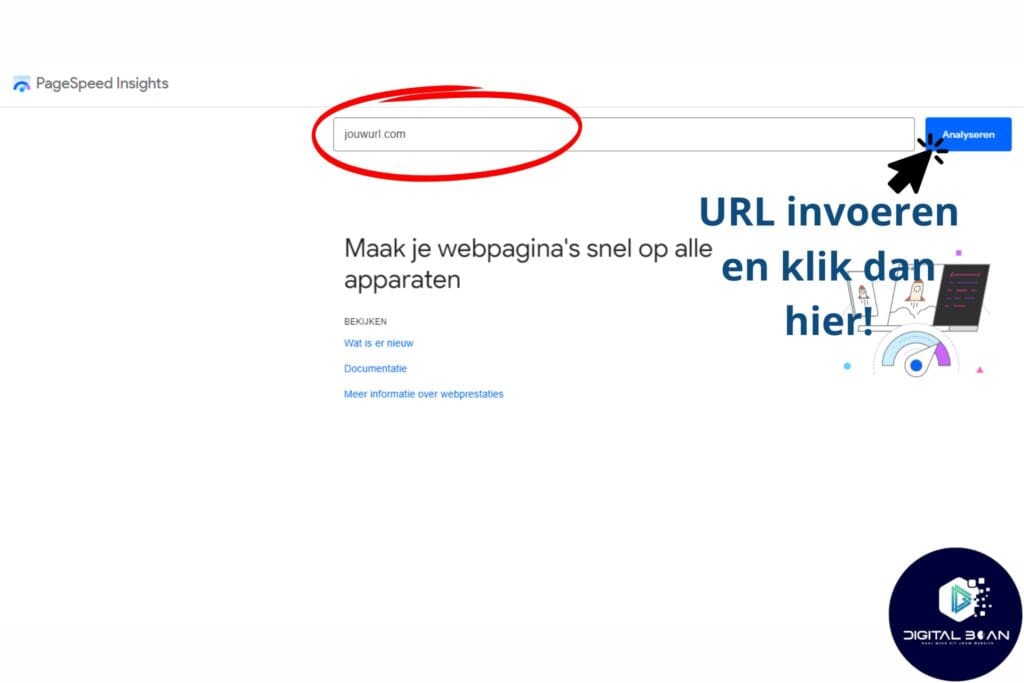
And there you go! A detailed report on your performance, plus tips for improvement.
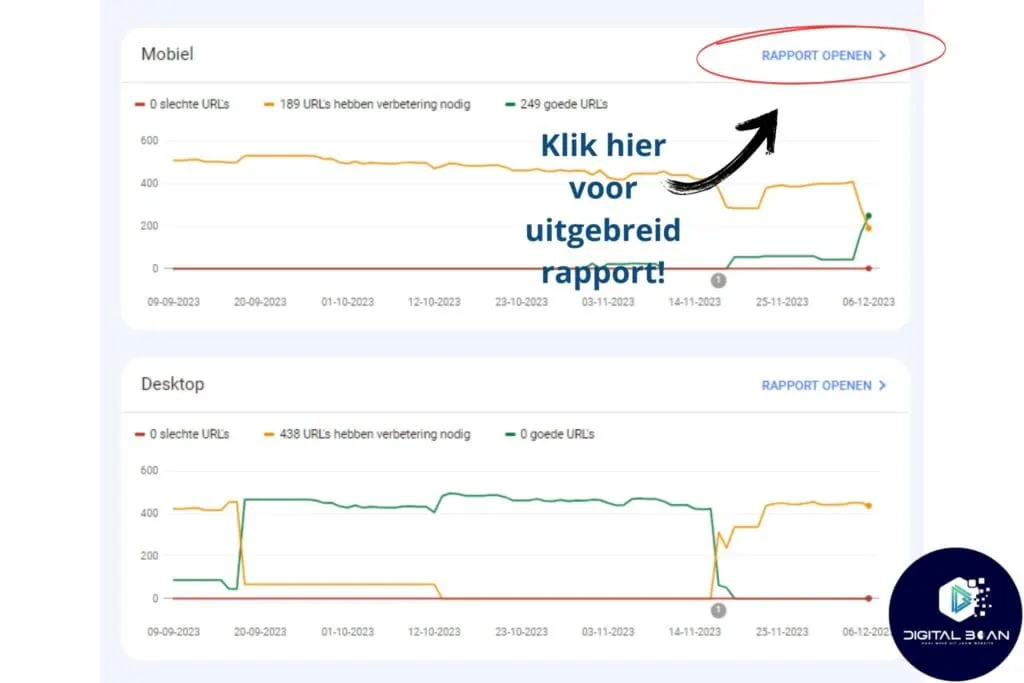
For a quick overview of pages with slow loading speeds, use Google Search Console! (Check here how to set up GSC!)
In Google Search Console, go to ‘Experience‘–> ‘Core Web Vitals‘.
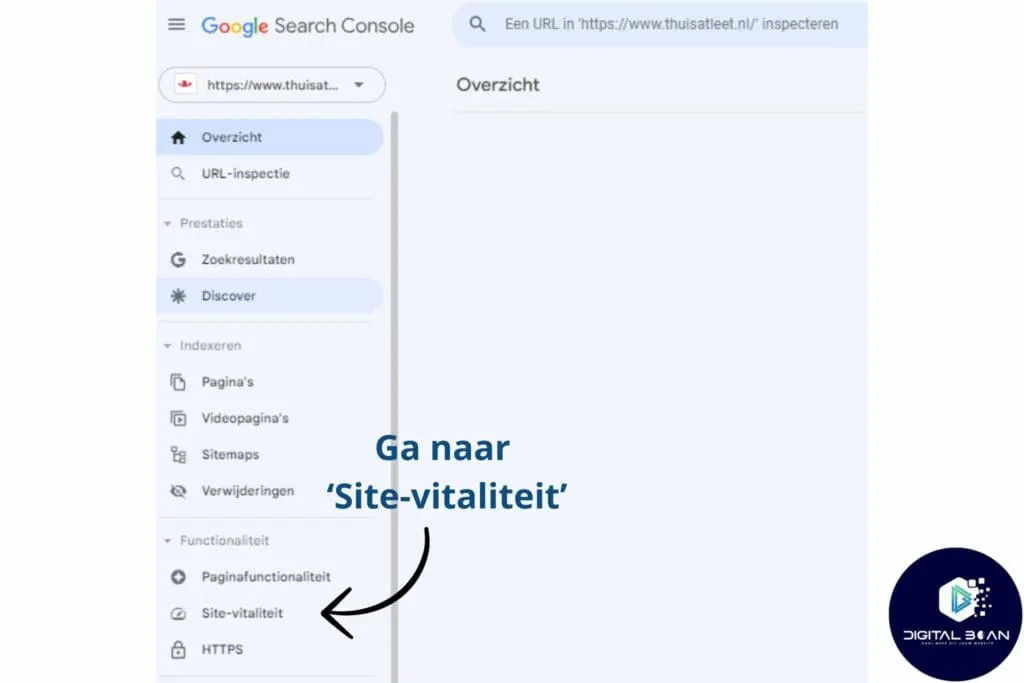
Here you’ll get an overview of the number of pages with issues, for both mobile and desktop. Then click ‘open report’ in the top right.
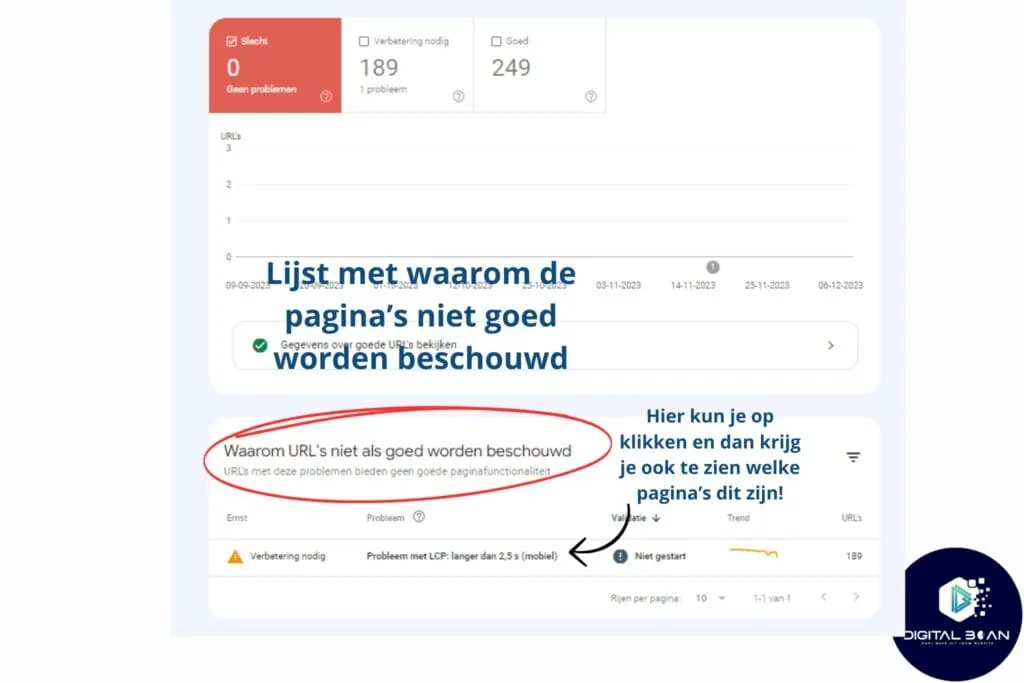
Here you’ll see an overview of all the issues, and if you click on one of them, you’ll get a list of URLs affected by it.
Tips to Improve Your Website Speed!
Here Are 9 Practical Tips to Improve Your Website’s Speed:
- Compress Images: Large images slow down your site. Use tools like TinyPNG to compress them without losing quality.
- Use Website Caching: Website caching lets you structure your website better on the server, so it can be loaded from the server faster!
- Optimise CSS and JavaScript: Minify and combine these files where possible to shorten loading time.
- Use a Content Delivery Network (CDN): CDNs are servers all over the world that host your website. A CDN helps deliver content faster to users worldwide. (Especially interesting for international websites, then)
- Reduce Your Use of Redirects: Too many redirects can significantly increase loading time, think of redirects as a detour. You’ll still get there, but it takes longer!
- Enable Browser Caching: This lets returning visitors load pages faster because certain elements are already stored.
- Improve Server Response Time: Choose reliable hosting and optimise your web server. (You can also host with us!)
- Remove Unnecessary Plugins: Too many plugins can slow things down, keep only the ones you really need.
- Lazy Loading: Only load images and content further down the page once the user scrolls down.
Mobile-Friendliness
57.84% of all internet traffic was mobile! According to this article! That’s more than half of all search volume, no wonder Google gives priority to mobile-friendly websites!
What Is a Mobile-Friendly Website?
A mobile-friendly website is a site optimised for use on mobile devices, such as smartphones and tablets.
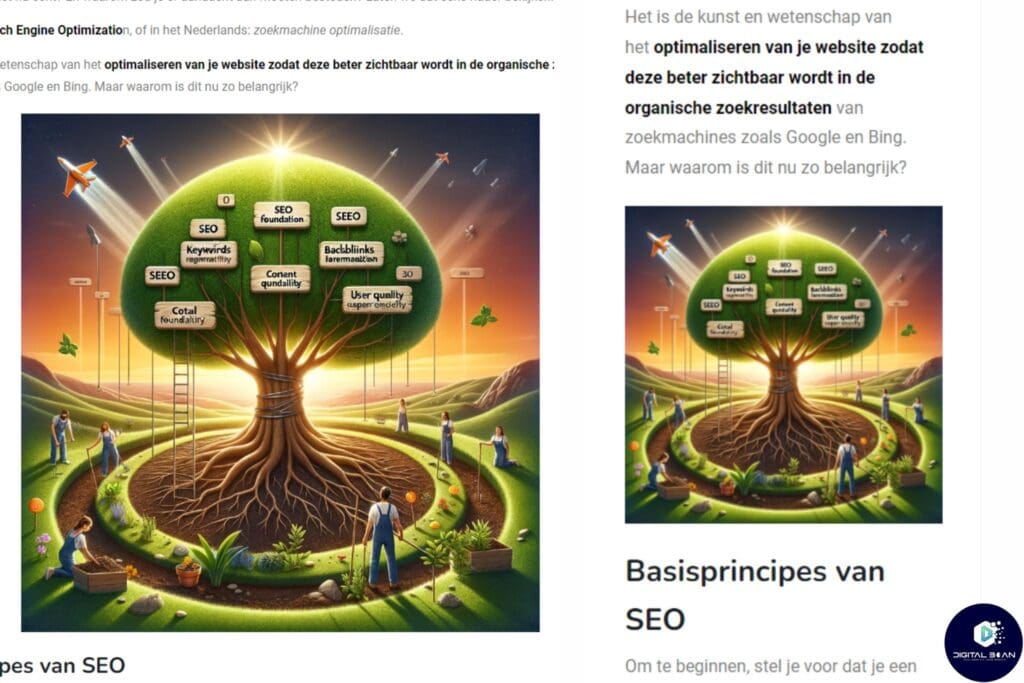
This means the site has a responsive design that automatically adapts the layout to the screen size, so the content is easy to read and navigate without needing to zoom in. Take a look at the image below, left is desktop and right is mobile!
Why Does Mobile-Friendliness Matter?
- The Largest Share of Internet Traffic: As discussed earlier, 57.84% of all internet traffic is mobile, that reason alone is enough to work on this!
- People Stick Around Longer! (Dwell Time): Users stay longer on a website that’s easy to use on mobile. Longer sessions are also good for rankings!
- Google Ranking Factor: Having a mobile-friendly website is a known factor in Google’s ranking algorithm. Websites optimised for mobile devices can rank higher in the search results.
- More Traffic: Higher rankings attract more visitors!
See how it all connects!
How Do You Test Mobile-Friendliness?
The easiest way is, of course, to look up your website on your own phone!
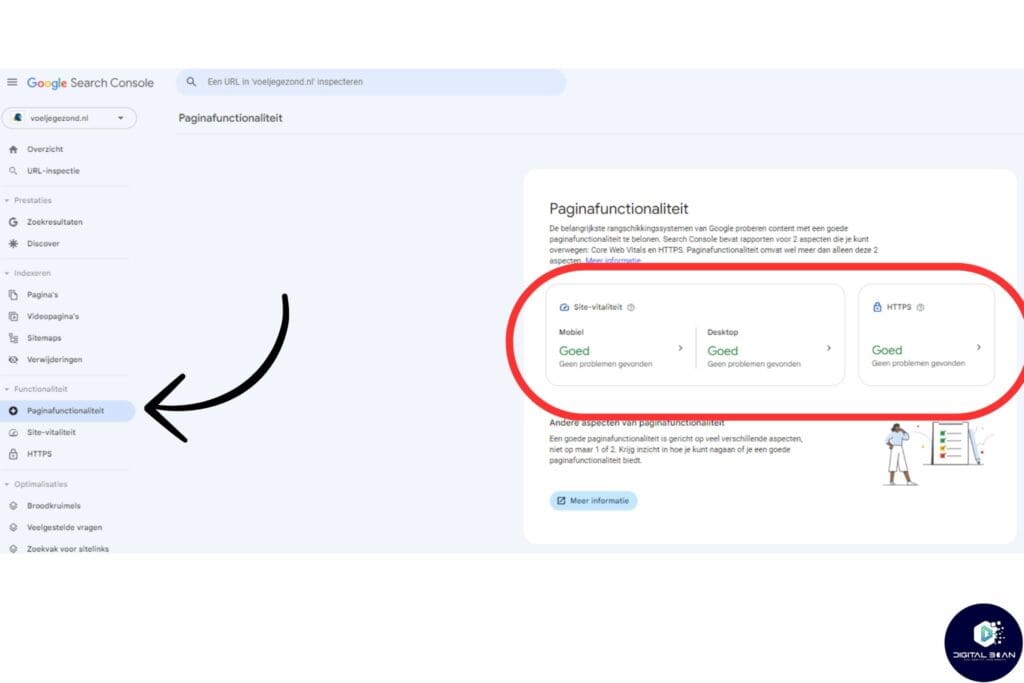
But you can also head to Google Search Console, under ‘Page Experience’ on the left in the GSC menu.
Or you use Lighthouse (formerly: Google’s Mobile-Friendly Test). This is an extension that lets you quickly test pages and websites!
Tips to Improve Mobile-Friendliness!
- Responsive Theme: Make sure your site automatically adapts to different screen sizes. Most WordPress themes already have this!
- Compress Images: Large files are a no-go for fast mobile experiences. Use TinyPNG
- Readable Font Sizes: Make sure your text can be read without a magnifying glass. Try a few different sizes and see what feels right, or ask your partner, friends and colleagues if you have to!
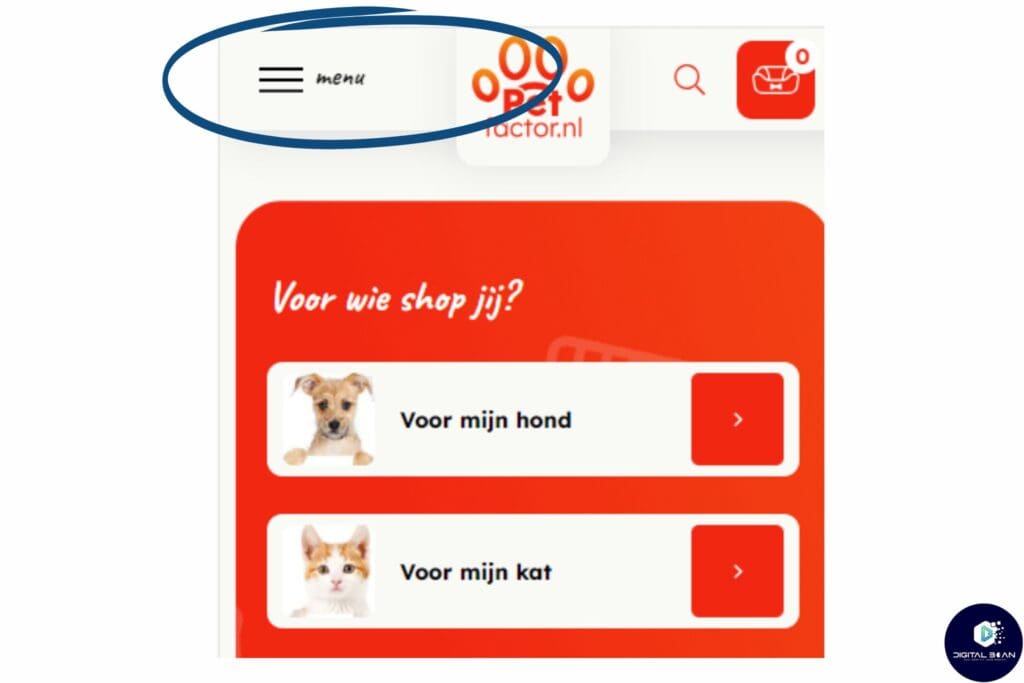
- Accessible Menu Bar: A hamburger menu works fine, as long as it’s not the only option. See the example below!
Secure Website (HTTPS)
HTTPS stands for HyperText Transfer Protocol Secure. It’s the standard way to keep user data safe. Think of it as digital encryption that protects the communication between a visitor’s browser and your website.
Why Does HTTPS Matter?
- Trust and Security: It’s like a seal of approval. Visitors know their data is safe with you.
- SEO Benefits: Google sees HTTPS as a sign of trustworthiness. This can help your ranking in the search results
- How Do You Check Whether HTTPS Is Set Up Correctly?
You have two simple ways to check whether HTTPS is set up correctly!
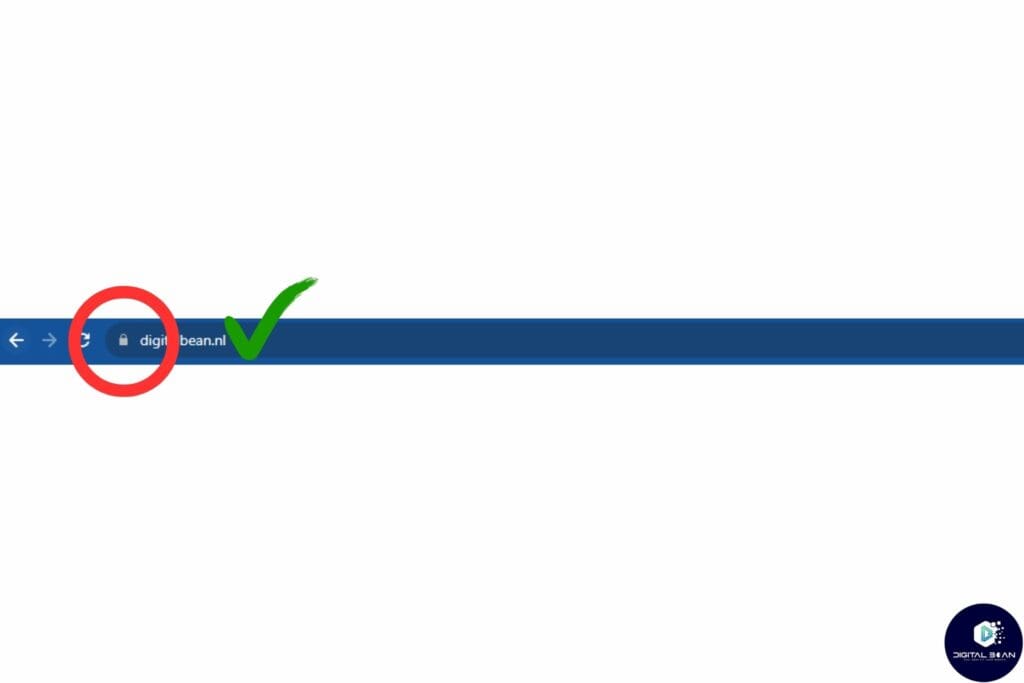
- Browser Check: Look at the address bar. See a padlock? Then you’re good. No padlock? Time for action!
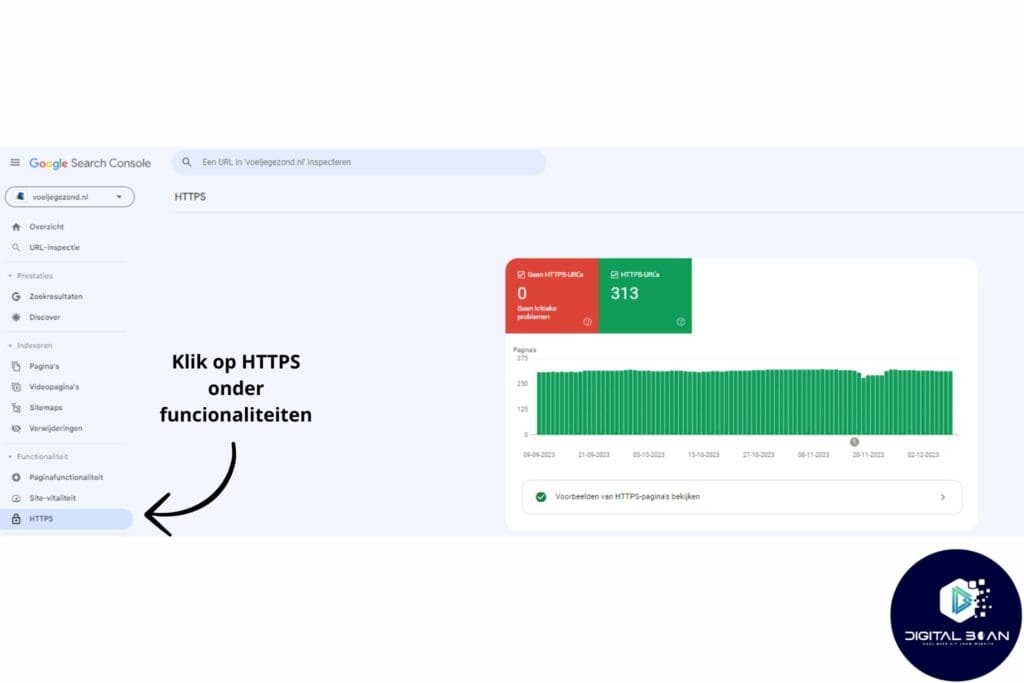
- Google Search Console: Go to ‘Experience’ –> ‘HTTPS’ and BOOM, you have an overview. Click the ‘view example HTTPS pages’ button for a detailed report!
Keep in mind, HTTPS security isn’t just good for Google, it’s especially reassuring for your visitors. It’s a win-win situation!
Duplicate Content and Thin Content
Let’s talk about duplicate content. It’s a bit like telling the same funny story to the same friend twice, not so funny the second time, right? Google feels the same way about duplicate content!
What’s the Problem With Duplicate Content?
Confusion for Search Engines: Google doesn’t know which version to show or rank. This can lead to reduced visibility for both pages.
Split Link Value: Incoming links can get split across multiple identical pages, reducing the strength of each link.
Why Does This Matter?
Google is like a picky eater, it loves diversity and quality.
When your website is full of duplicate or wafer-thin content, Google may decide not to place your site high in the search results.
It’s like being in a library where every book has the same content, not very useful!
How Do You Find Duplicate Content on Your Website?
Simple, use Google Search Console. Here’s how
Go to Google Search Console: your SEO command centre ;)!
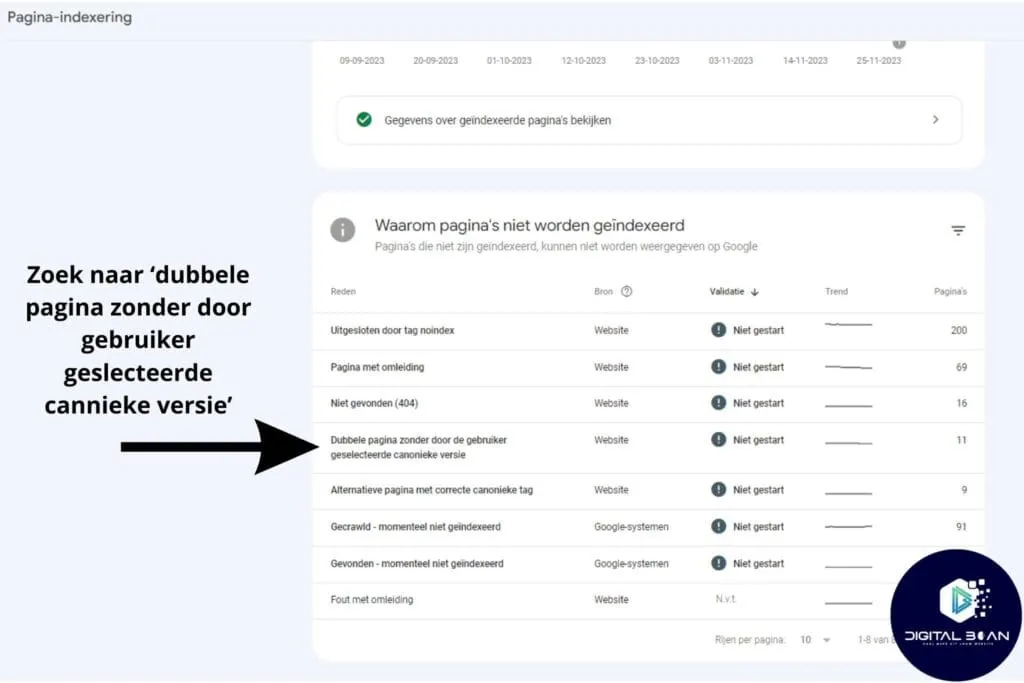
Navigate to ‘Indexing’ –> ‘Pages’: Here you’ll find an overview of your indexed and non-indexed pages.
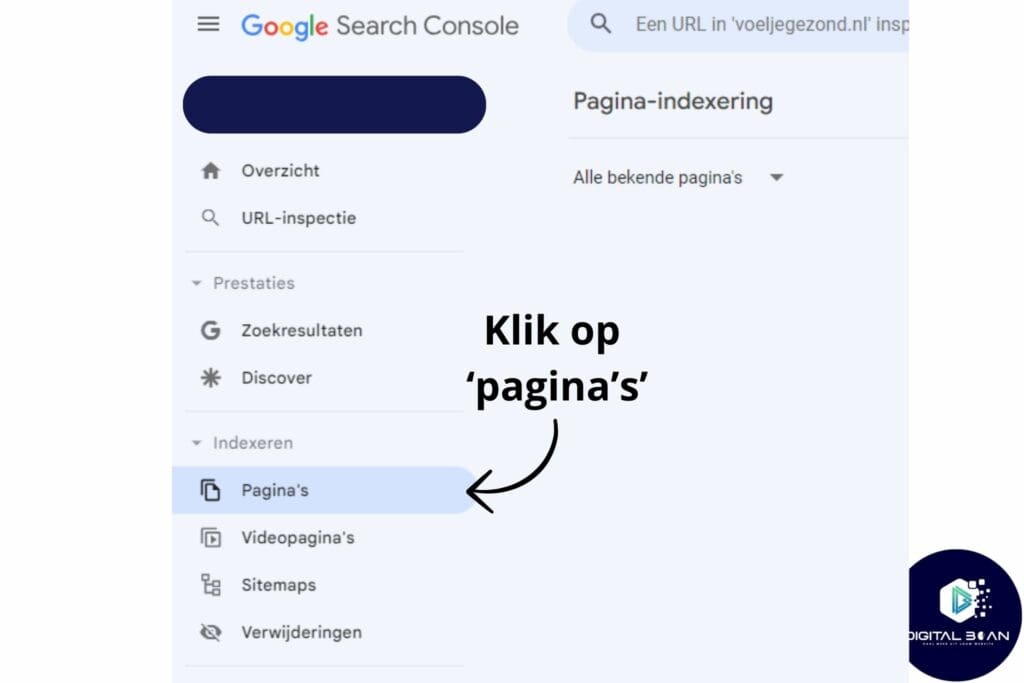
Duplicate content: Look for ‘Duplicate, Google chose different canonical than user’. These are signs of possible duplicate content.
Another option is Screaming Frog SEO Spider, definitely worth trying! You can test other technical SEO aspects with it too!
URL Structure
Your URL is your web page’s business card! Exactly, that string of letters in your browser’s address bar is more than just an address, it’s a first impression! For both visitors and search engines!
Why Does a Good URL Structure Matter?
- First Impression for Visitors: Just like a firm handshake, a URL needs to inspire trust. A neat, professional-looking URL can build trust with visitors!
- Clear for Search Engines!: Search engines like Google use URLs to assess a page’s content. A clear URL helps with this, and leads to better rankings!
- User Experience: People can easily tell from the URL where they are on the website, and it can help confirm the page’s content for them in one glance.
In short, optimising URLs contributes to a better user experience, improves SEO, increases trust and credibility, and makes assessing content easier!
Example of a Good URL…
- Good: www.yourwebsite.com/services/search-engine-optimisation
- Bad: www.yourwebsite.com/index.php?page=123&item=456
Clear and Specific:
- For a blog about healthy recipes: www.yourkitchensite.com/healthy-recipes
Short but Informative and Descriptive:
- For a marketing company’s services page: www.yourcompanyname.com/services/digital-marketing
- For a contact page: www.yourcompanyname.com/contact
These examples show that a good URL both reflects the page’s content and is short and easy to remember. It’s the perfect mix of functionality and usability!
Handy URL Tool!
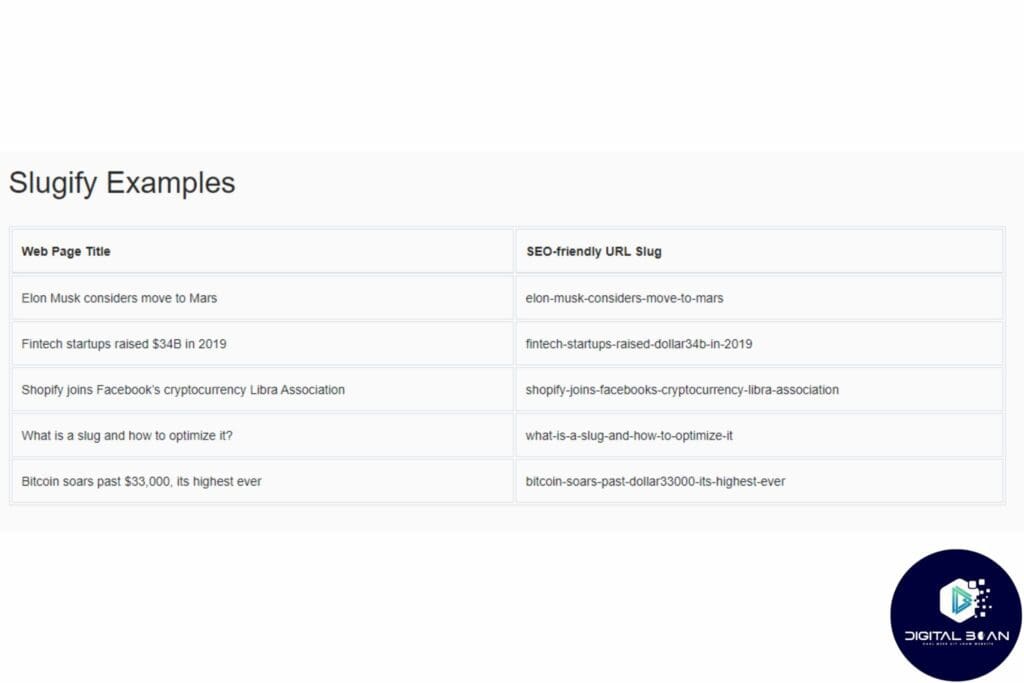
Give Slugify a try! This tool helps you create URLs that are not just SEO-friendly but user-friendly too. We use this tool ourselves from time to time when we’re stuck, it makes creating URLs super easy!
Technical SEO for the Pros!
Dive deeper into the technical side of SEO with these somewhat more advanced technical SEO techniques. Don’t worry, we’ll keep it easy and light!
XML Sitemaps
Think of your website as a large library full of valuable books (pages). An XML sitemap is like a detailed index, helping search engines quickly find each book and understand what’s in it.
This makes it a lot easier for Google to navigate your ‘library’ and suggest the right ‘books’ to visitors. A sitemap like this really matters for a well-organised, SEO-friendly website.
Why Do XML Sitemaps Matter So Much?
- Better Indexing: It helps search engines like Google find and index all the pages of your website more efficiently.
- Faster Discovery: New or updated pages are noticed more quickly by search engines, which is especially handy for large websites or ones that get updated regularly.
- Indexes Content Updates Better: The sitemap also provides information about when the content went live or was updated!
- SEO Improvement: By giving search engines a clear path, you can improve your website’s visibility and ranking in the search results.
How Do You Create and Submit an XML Sitemap?
- First Create the Sitemap: Use tools like Yoast SEO or Screaming Frog to generate an XML sitemap.
- Place it in your website’s root directory. See how it’s done in this video!
- Go to Google Search Console, add your sitemap URL, an explanation follows below!
To add your sitemap to Google Search Console, follow these simple steps
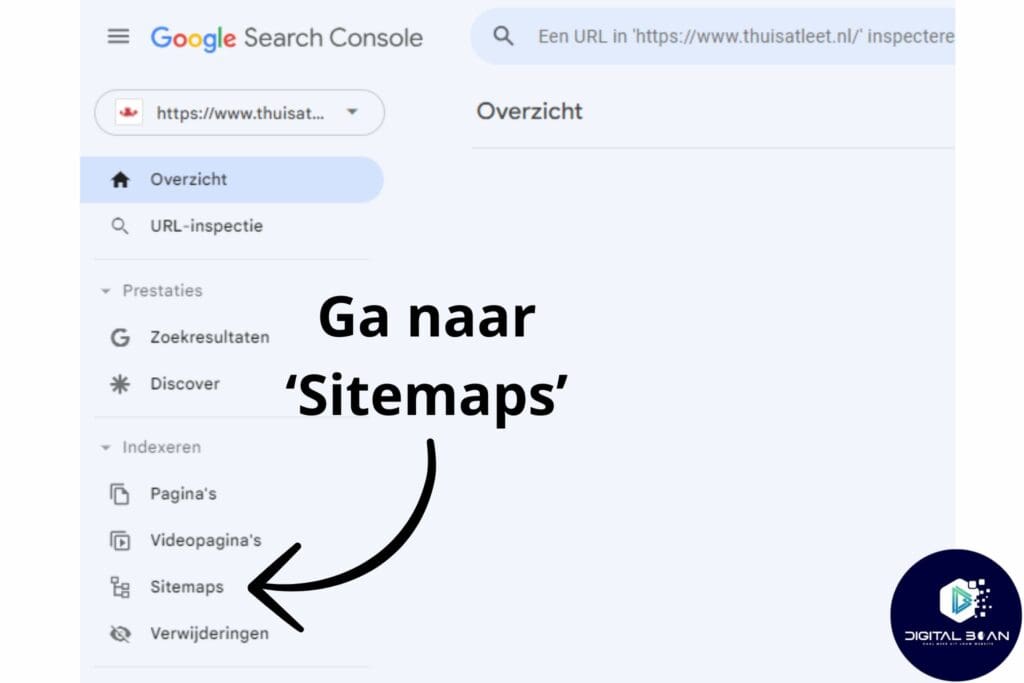
1. Go to ‘Sitemaps’: Find the menu on the left side of the screen and click on ‘Sitemaps’.
2. Add Your Sitemap URL: In the ‘Add a new sitemap’ field, enter your sitemap’s URL. This URL usually ends in /sitemap.xml or /sitemap_index.xml.
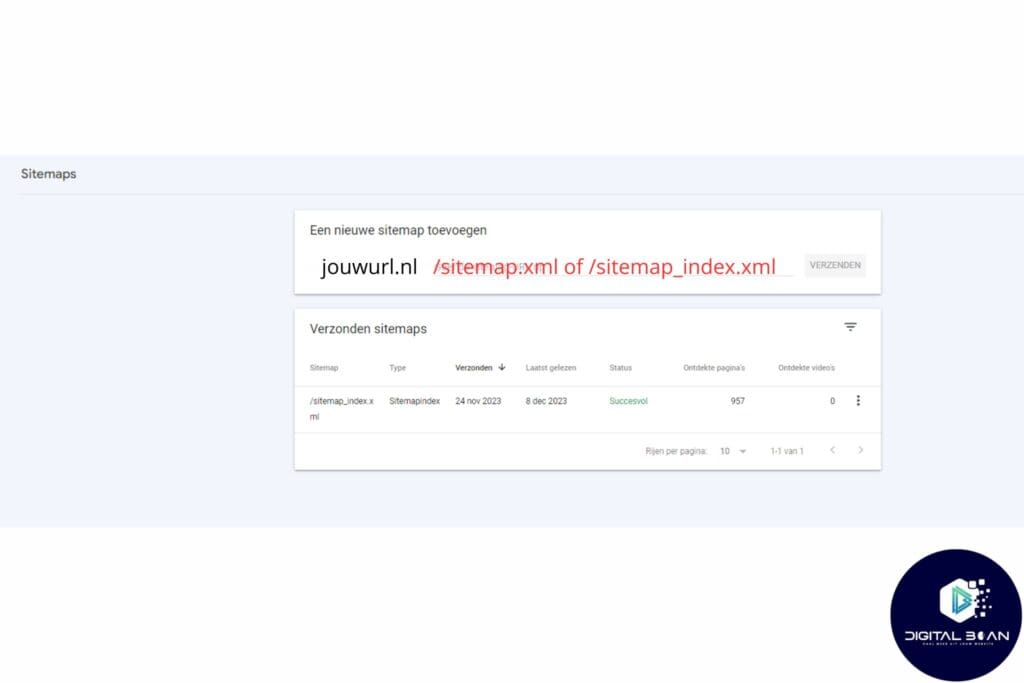
3. Submit the Sitemap: Click ‘Submit’ and Google will start processing your sitemap.
After submitting, it can take a while before Google has indexed your sitemap. You can check its status in Google Search Console to see if there are any errors.
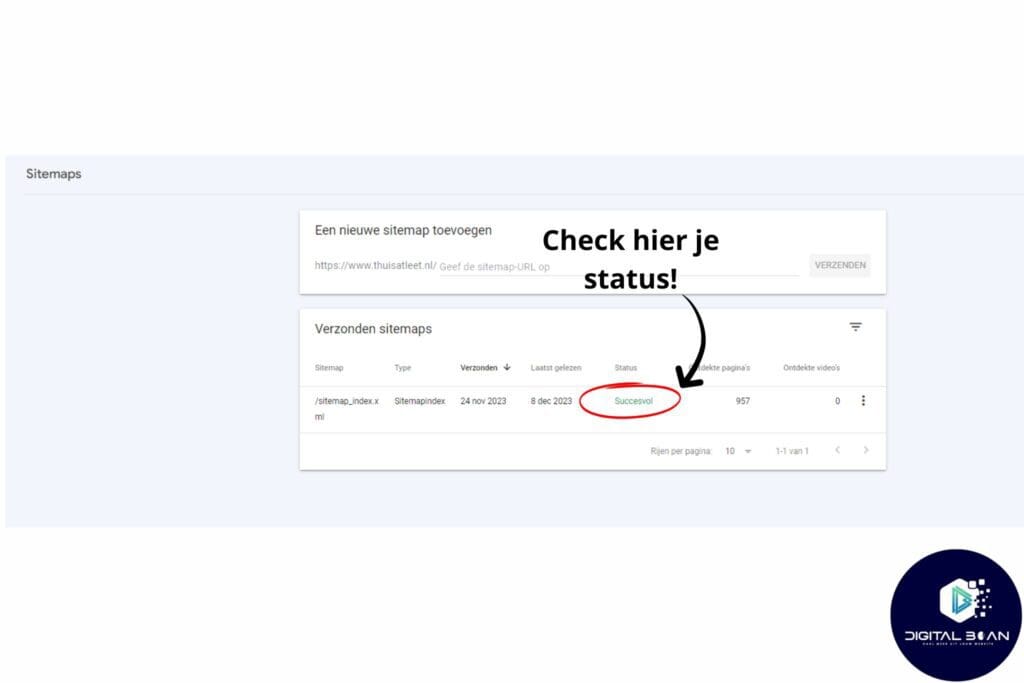
So a sitemap really can’t be missing, it helps Google index and organise your website the right way!
Meta Title and Meta Description
Meta titles and descriptions are like a first impression during a presentation: you want to grab attention immediately and never let go!
What is a meta title and description? It’s the title and description you see in the search results. See the image below!
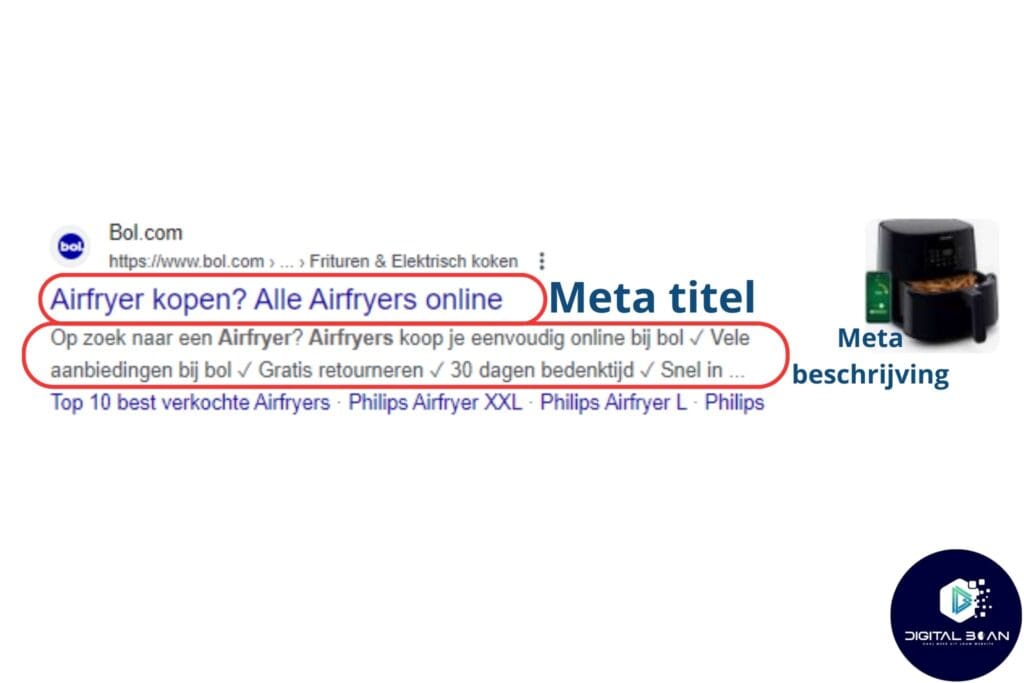
Optimising Meta Titles!
Meta titles are like your website’s neon sign in Google’s search results. So it really matters to have a catchy title that sparks curiosity!
After all, the goal is to get people to click!
Combine creativity with SEO. Use a fun question or an attention-grabbing statement, and combine it with keywords!
Ideally between 50-60 characters (preferably a maximum of 11 words). Put your most important keyword as far to the left as possible, and close with your brand name for recognisability (optional).
Stuffing it with keywords is a no-go. Google isn’t a fan of spammy titles. So just keep it natural and spark people’s curiosity!
Optimising Meta Descriptions!
These are short descriptive snippets under the title, the bits of text that ultimately get people to click! So super important for click-through rate (CTR)!
The goal is to explain the page’s content to people, what unique aspect (free shipping, for example) you offer, and to spark their curiosity enough that they click!
Use powerful language, also known as action words. Think of ‘discover’, ‘exclusive’, ‘transform’ and there are plenty more!
Why should someone click right now? Give them a reason, an offer, or a unique opportunity. Create urgency!
Experiment with different versions. What works better: a question, a statement, or a teaser? Just play around with it and look at the results!
Image Optimisation
Images on your website can be both a blessing and a curse for your SEO. Let’s make sure it’s the former!
Images make your content more attractive and more interactive, people are simply visual creatures!
Size & Compression
- Compress: Use advanced tools like TinyPNG. They’re like surgeons of the image world, cutting away unnecessary weight without damaging the beauty.
- Responsive Images: Make sure your images adapt to the size of the device! This usually already happens if you’re working with a theme, so you often don’t need to do much here!
File Name & Structure
- Descriptive Names: Think of it as naming a painting in a gallery. “sunset-on-the-beach.jpg” tells a story, unlike “IMG_1234.jpg”.
- Folder Structure: Organise your images in clear folders. “/images/fruit/apple.jpg” isn’t just handy for you, but for search engines too.
ALT Text
Combine creativity with SEO tactics. Describe what you see and subtly weave keywords into the alt text, without forcing it. It needs to feel natural!
This can help you rank in Google Images for certain keywords!
Context and Relevance
Placement: Put images close to relevant text. If you’re writing about red apples, place that image of a red apple nearby.
Relevance: Make sure every image contributes to your story.
In Short
Optimise images by reducing their size and adding relevant alt text, to improve both loading speed and SEO ranking.
A good approach to image optimisation can make a real contribution to your website’s overall performance and visibility.
Structured Data (Schema Markup)
Imagine having a cookbook without a table of contents. Tricky, right? Structured data (or schema markup) is like that table of contents, but for your website. It helps search engines understand what’s on each page.
Why Does It Matter So Much?
- Google’s Love: Google is like a visitor in a museum: without a guide (schema), it misses the stories behind the art (your content).
- Rich Snippets: With schema, your pages can shine like stars in Google’s search results, complete with extra info like star ratings or event dates. Check below!
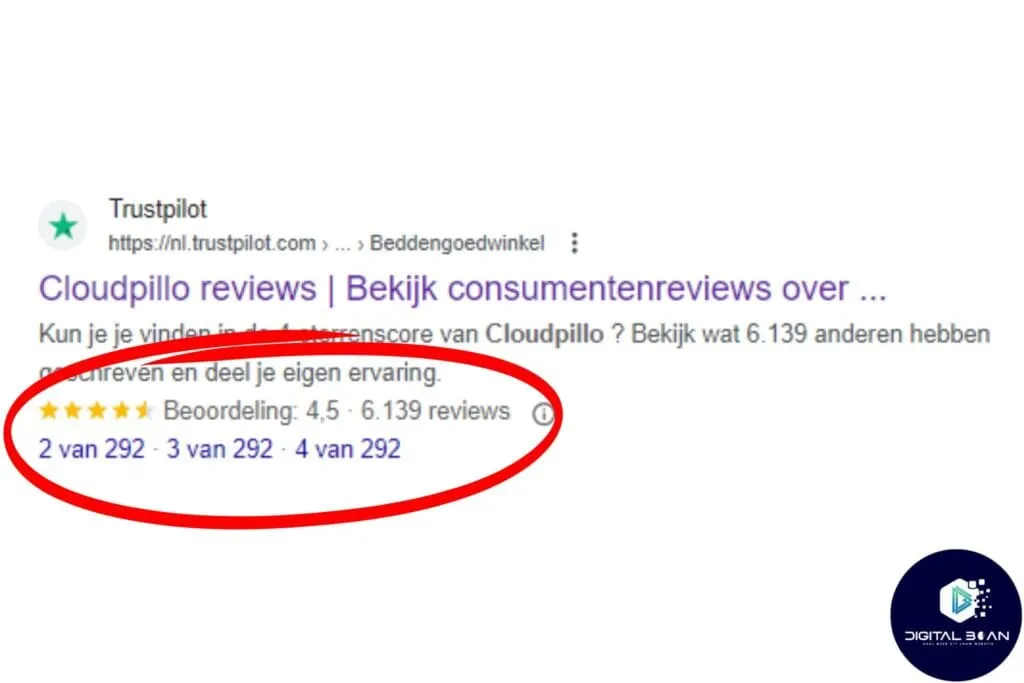
Structured data in SEO (search engine optimisation) is a way of presenting information on your website clearly and in an organised way, so search engines like Google can understand and display it more easily in the search results.
This doesn’t just make your website more appealing in the search results, it also helps Google better understand your website’s content.
And this can, in turn, lead to better visibility and possibly more visitors to your website. So structured data is a way of communicating with search engines and helping them present your website better to the people searching.
Types of Structured Data
Of course, you’ll want to know what types there are.
Below, I’ll list the most commonly used ones for you.
Article: For blog posts, news articles and online publications. This lets you mark up details such as the title, author, publication date and featured image.
Local Business: If you have a physical location, you can add information such as address, phone number, opening hours and geographic coordinates. This helps search engines display accurate local search results.
Events: For concerts, conferences or other events. You can mark up dates, location, ticket prices and availability.
Product and Offer: For e-commerce websites, to mark up product information such as price, availability and reviews. This can help with showing products in rich search results.
Recipes: If you have a recipe website, you can mark up details such as cooking time, ingredients, nutritional values and reviews.
FAQ (Frequently Asked Questions): For pages with frequently asked questions. This lets you mark up the questions and answers, which can lead to a richer display in the search results.
Organization: To mark up information about your organisation, such as your logo, social media profiles, contact details, etc.
Person: For biographies or personal websites, letting you mark up information about a person, such as name, occupation and education.
Breadcrumb Navigation (Breadcrumbs): For marking up page navigation paths, which helps display your website’s structure in the search results.
Hreflang Tags
Hreflang tags are a kind of label on websites that tell search engines which language and which country a page is intended for.
This makes sure people see the right language version of a website.
This helps prevent confusion when the same website is available in multiple languages.
Why Do Hreflang Tags Matter?
- Prevents Language Confusion: They make sure visitors see the right language version of your site. No Dutch for English visitors and vice versa.
- Prevents Duplicate Content on Multinational Sites: Hreflang tags help prevent duplicate content issues on multilingual sites.
- Helps Search Engines: They make it easier for search engines like Google to understand which audience each page is intended for.
Best Practices for Hreflang!
- Accurate Language and Region Codes: Use the standard ISO 639-1 for language codes and ISO 3166-1 Alpha 2 for country codes.
- Consistent Content: The content on the pages should match in theme and subject, but should be adapted to the language and culture of the target region.
- Mutual References: Every page on a multilingual website should have hreflang tags pointing to all language versions, including a link to itself, to show the right language content to the right users.
Side note! Hreflang tags need to be checked regularly and require constant monitoring to be effective! There are specialised tools for this, such as SEO Minion!
Hreflang tags matter especially for the SEO of multilingual and international websites, helping show the right content to the right users.
Conclusion
Hey! You’ve made it all the way to the end, that’s great! We’ve covered a lot, so here’s a quick list of all the key points and what they’re for:
- Website Speed Optimisation: Improving the site’s loading time to improve the user experience and rank higher in search engines.
- Good Website Structure: A clear structure improves a site’s crawlability and indexing in search engines.
- Mobile-Friendliness: A responsive site that works well on mobile devices matters hugely, given the growing amount of mobile internet traffic.
- Secure Website (HTTPS): Using HTTPS protects user data and improves trust and SEO.
- Preventing Duplicate and Thin Content: Unique, rich content really matters for ranking high in search engines.
- Optimised URL Structure: Clear and descriptive URLs improve the user experience and help with SEO.
- XML Sitemaps: They help search engines index the site more efficiently.
- Meta Titles and Descriptions: These improve visibility in the search results and increase the click-through rate.
- Image Optimisation: Compressed and well-labelled images improve loading speed and SEO.
- Structured Data (Schema Markup): This helps search engines better understand a site’s content.
- Hreflang Tags: Important for multilingual sites to show the right language version to users.
At Digital Bean, we’d love to help optimise these aspects of technical SEO for your website. If you’re interested in improving your website’s performance, get in touch with us!
If you’re still unsure whether to do your SEO yourself or outsource it, check out this post!
We also have an interesting newsletter full of useful tips, updates and our experiences in online marketing! Sign up and stay in the loop!
Got anything to add, questions, or a great experience of your own? I’m incredibly curious, let me know below in the comments!
I hope I’ve been able to help you move forward once again! Get to work, and maybe I’ll see you at the top of the search results!
Good luck!