
Everyone knows the fairy tale of Hansel and Gretel, right? If not, it's about two children who leave a trail of breadcrumbs to find their way back home. This clever trick isn't just useful in fairy tales these days, it's useful on your website too!
Just like the crumbs helped Hansel and Gretel, 'breadcrumbs' help your visitors navigate your website easily. These small but powerful navigation links don't just improve the user experience, they also give your SEO a boost.
Curious how you can use breadcrumbs to improve your online store? Read on and discover everything you need to know about breadcrumbs and SEO!
What are breadcrumbs?
Breadcrumbs, also known as a breadcrumb trail, are small navigation links at the top of a web page. They show visitors where they are within the structure of a website and help users find their way back to earlier or higher-level pages on a website.

Just like in the fairy tale of Hansel and Gretel, where the children used breadcrumbs to find their way back, breadcrumb trails help users follow their path on your website and find higher-level categories. This doesn't just make navigating easier for your visitors, it also gives them a better user experience.
And a better user experience generally means more conversions!

Want to know how to use breadcrumbs effectively for your online store's SEO? Read on and discover all the ins and outs of breadcrumbs! Starting with all the different types…
Types of breadcrumb trails you can use
Breadcrumbs come in different forms, each with their own benefits and uses.
Here are the three most common types:
Hierarchy-based breadcrumbs
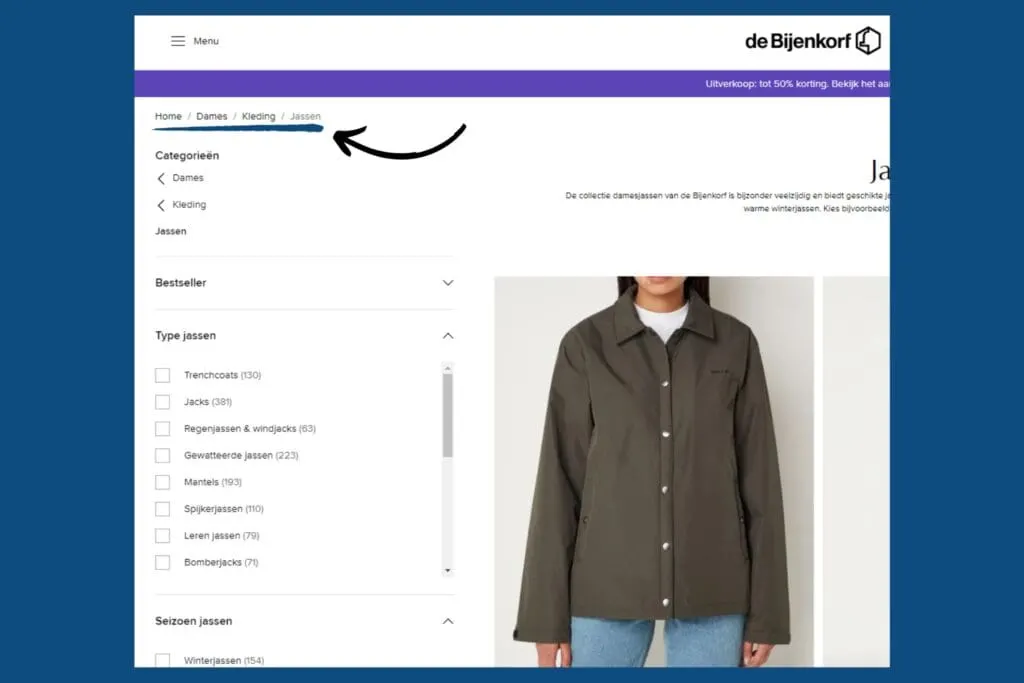
Hierarchy-based breadcrumbs show the hierarchical structure of your website. They show how the current page relates to the pages above it.
- Example: Home > Category > Subcategory > Product
- Use: Ideal for e-commerce stores with multiple product categories.
Path-based breadcrumbs
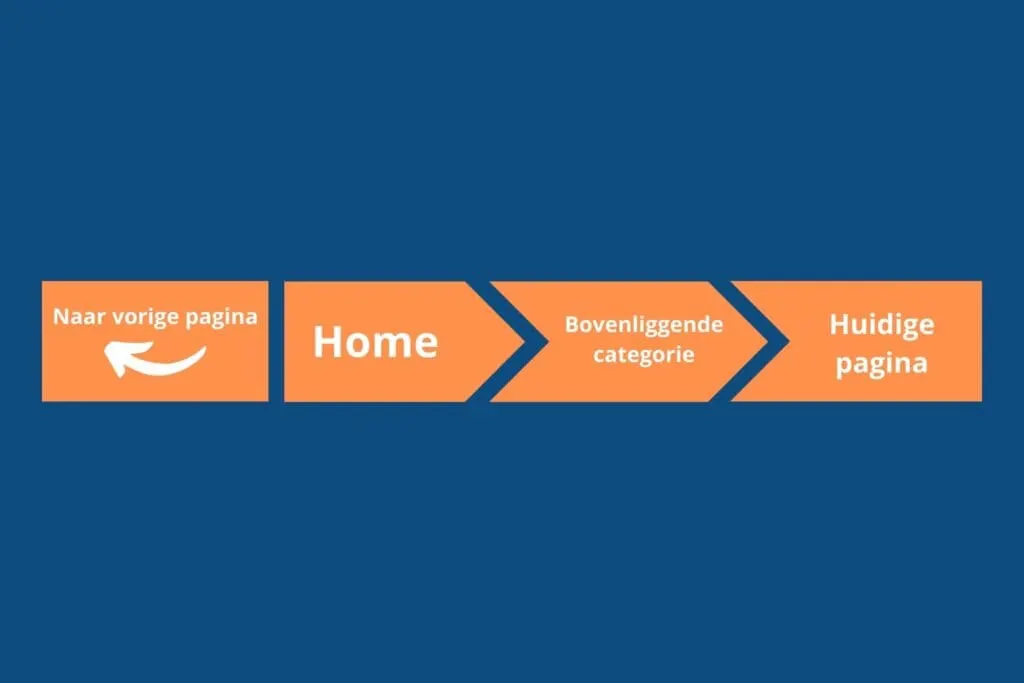
Path-based breadcrumbs show the route the user took to reach the current page. They can help when a user runs several searches or visits different sections of the site.
- Example: < Back to previous page / Home > Parent category > Current page
- Use: Useful for websites with a lot of dynamic content.
Dynamic content means the website's content changes and adjusts regularly, based on user behaviour or interactions. You might come across this on:
- News websites
- Blogs
- Forums
Attribute-based breadcrumbs
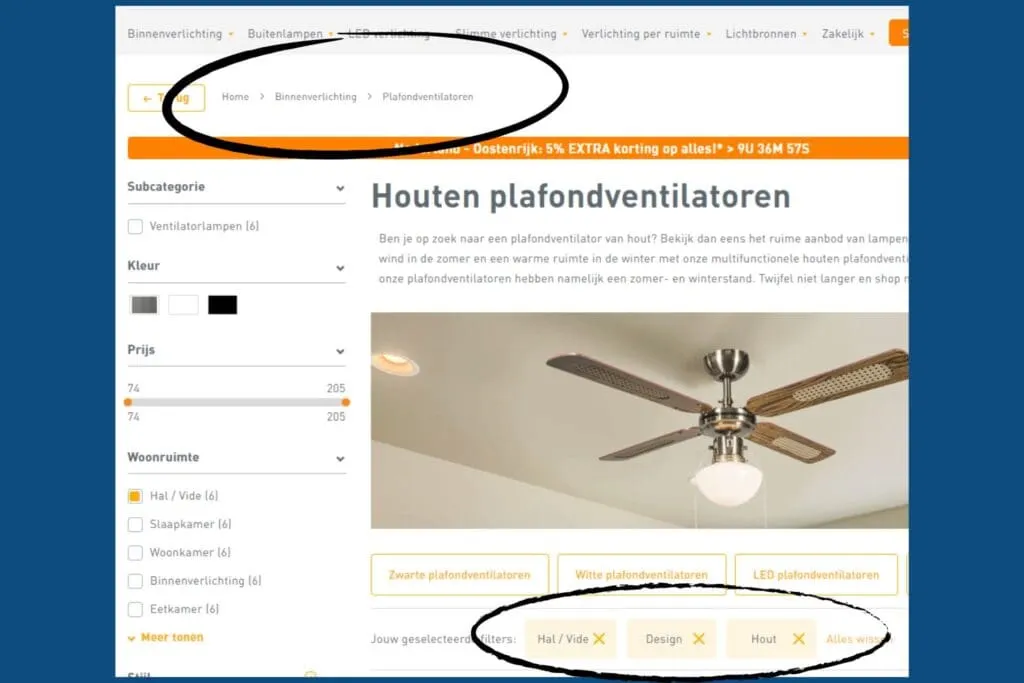
Attribute-based breadcrumbs are usually used on websites with lots of filtering options, such as e-commerce sites. They show the properties of a product or category and are generally displayed separately from hierarchy-based breadcrumbs.
- Example: Home > Category > Colour: Red > Size: M
- Use: Perfect for online stores with lots of product variants, since they clearly show which filters or attributes have been selected.
Read on to discover when to use them and their impact on SEO!
When should you use breadcrumbs?
Breadcrumbs are especially useful on websites with multiple layers, such as large e-commerce stores or news sites. They provide better navigation, which matters enormously for the best possible user experience.
For e-commerce stores, this means visitors find what they're looking for faster, resulting in happier customers and higher conversions.

But why does this matter for SEO? Simply put: a better user experience means visitors stay on your site longer and view more pages. This signals to search engines that your site is valuable and user-friendly, and meets users' needs.
Curious about the impact of breadcrumb trails on SEO? Then read on!
The impact of breadcrumbs on SEO
Breadcrumbs do more than just make navigation easier; they can give your SEO a serious boost. Discover the hidden power of breadcrumbs and how they can grow your SEO success.
Improved user experience
Breadcrumbs make it easy for visitors to find their way around your website. They can quickly return to previous pages or important sections without getting lost. This improved navigation leads to a more enjoyable user experience, which makes visitors happier and keeps them on your site for longer.
Fantastic for your internal link structure
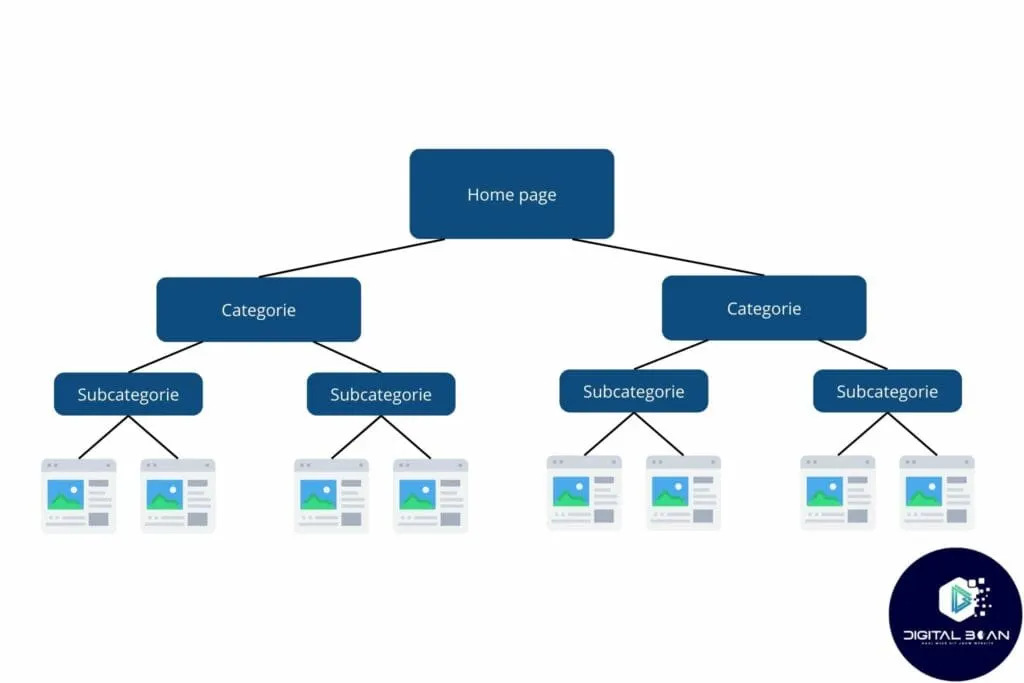
Breadcrumbs automatically add internal links to your website. Search engines such as Google love well-structured websites with plenty of internal links, because it helps them understand and index your site. A good internal link structure can help you rank higher in the search results.
Clarity in the search results
Breadcrumbs can appear in Google's search results, often right below your page title. This immediately gives potential visitors a better idea of what they'll find on your site.
A clear breadcrumb trail can increase your click-through rate, since users know exactly what to expect.

Longer visits
Thanks to improved navigation, visitors stay on your website for longer. They can easily return to previously visited pages or quickly navigate to related content.
This lowers your bounce rate, an important factor search engines use to judge the quality of your site. The longer visitors stay on your site, the better this is for your SEO ranking.

Want to benefit from these SEO advantages? Read on and learn the best practices for breadcrumbs and how to add them.
Best practices for using breadcrumbs!
Now that you know everything about breadcrumbs, you'll want to put it into practice on your website. But what should you keep in mind?
Here are the best practices for using breadcrumbs:
1. Keep them small and unobtrusive
Make sure breadcrumbs don't stand out too much. They should be subtle and functional, clear enough to use for navigation without distracting from the main content. This helps users navigate the website easily without feeling overwhelmed by extra visual elements.

2. Make breadcrumb titles match the page title
Consistency matters. The titles in your breadcrumbs should match the page titles, to avoid confusing users. This makes navigation intuitive and helps users understand where they are within the website's structure.
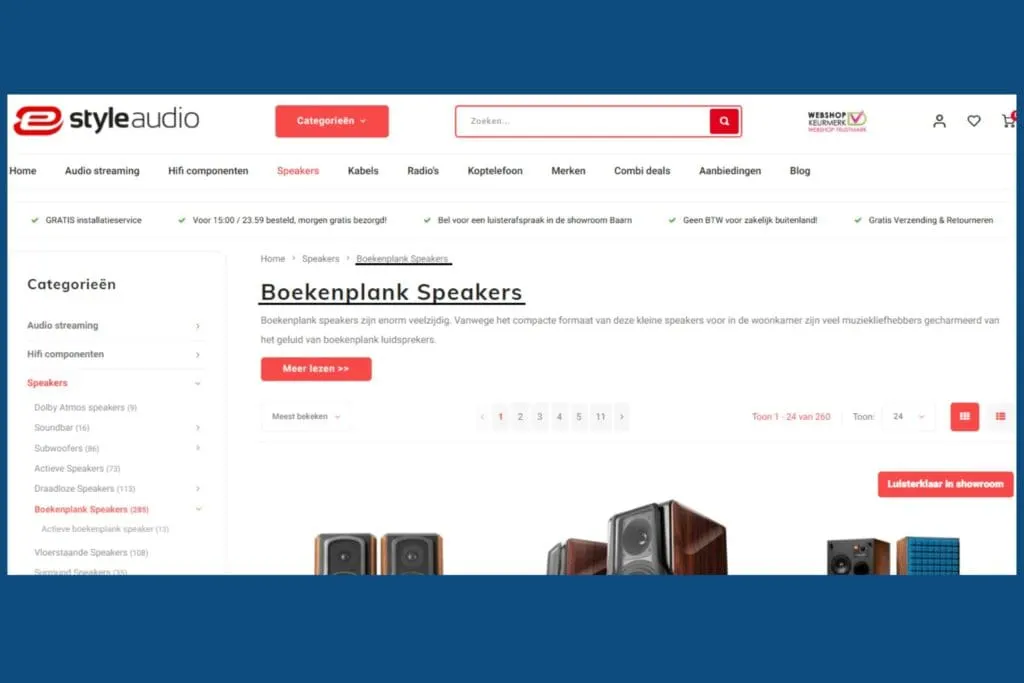
3. Don't link to the current page
Avoid confusion and irritation by not linking to the same page. Clicking a breadcrumb link should always take the user to a different, relevant page, providing a smooth navigation experience.
4. Place them directly below the main menu
The ideal placement for breadcrumbs is directly below the main menu. This is where users expect them most, and where they're easiest to find. A well-placed breadcrumb trail improves usability and helps users quickly return to earlier sections of the website.
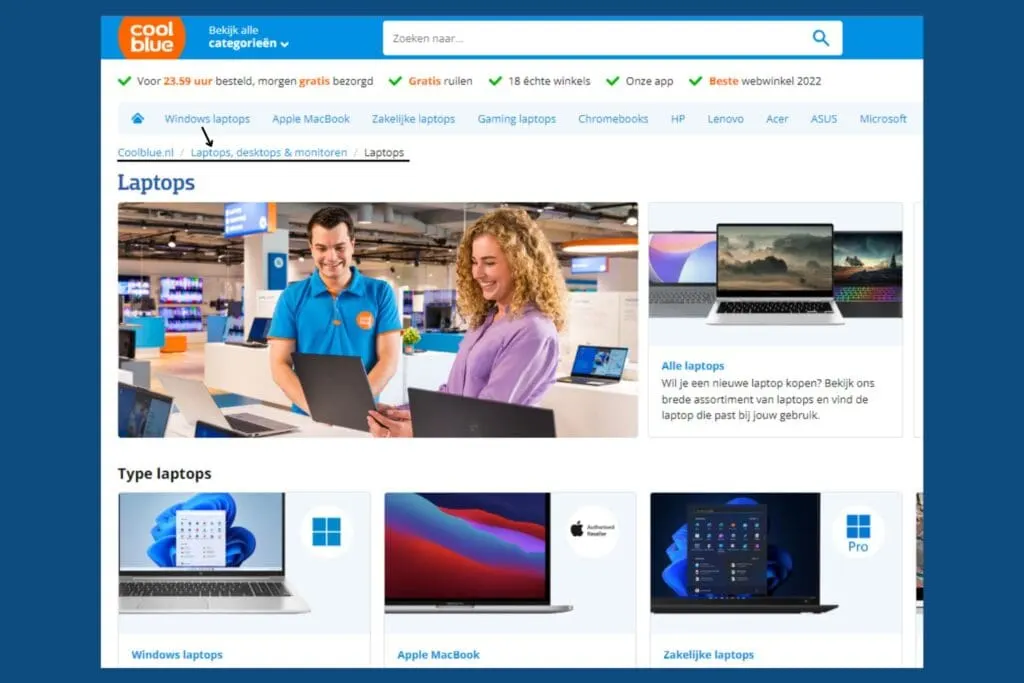
5. Only use breadcrumbs once
Avoid repetition and confusion by only using breadcrumbs once on a page. This keeps your navigation clear and efficient. Overusing breadcrumbs can lead to a cluttered interface and confuse users.
Now that you know the best practices, you're ready to add breadcrumbs to your website.
Want to know how to do this with Yoast SEO in WordPress?
Read on for a step-by-step guide!
I want breadcrumbs too! How do I add them?
Want to add breadcrumbs to your website too? Follow these simple steps and you're all set!
1. Install the Yoast SEO plugin
- Go to your WordPress dashboard.
- Navigate to "Plugins" and click "Add New Plugin".
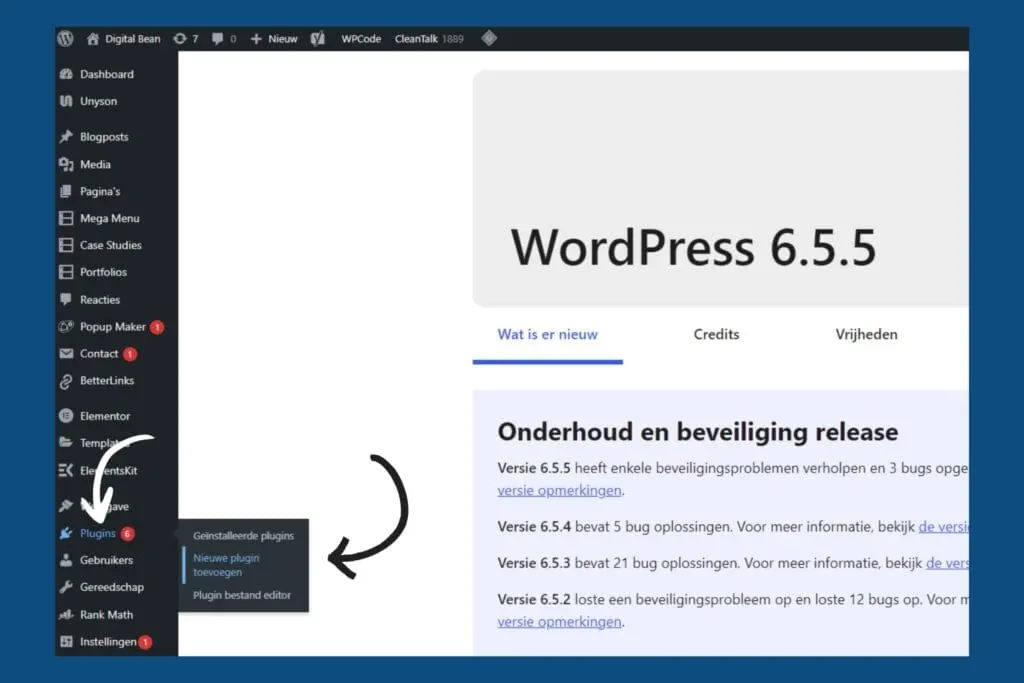
- Search for "Yoast SEO" and click "Install Now".
- Activate the plugin after installation.

2. Set up breadcrumbs with Yoast SEO
- Go to the WordPress menu and select "Yoast SEO".
- Click "Settings" in the Yoast SEO menu.

- Go to "Advanced" and select "Breadcrumbs".
- Adjust your breadcrumbs here as you like. For example, you can customise the separator and the breadcrumb text.

3. Enable breadcrumbs for your theme
- Scroll down in the breadcrumb settings to the section 'How to insert breadcrumbs in your theme' and switch breadcrumbs on with the toggle.

The crumbs from this blog!
Breadcrumbs are a powerful tool that not only helps your website users find their way, but can also indirectly improve your SEO. Who'd have thought SEO and fairy tales could have so much in common, ha!
Here are the key points once more:
- What are breadcrumbs? Small navigation links that help users find their way around your website.
- Types of breadcrumbs: Hierarchy-based (based on site hierarchy), path-based (based on user history) and attribute-based (based on filter options).
- When to use them: Especially useful for websites with multiple layers, particularly e-commerce stores, news sites and large blogs.
- Impact on SEO: Improved user experience, better internal link structure, clarity in the search results, and longer visits.
- Best practices: Keep them small and unobtrusive, make titles match, don't link to the current page, place them below the main menu, and only use them once.
So, whether you're looking for breadcrumbs in a fairy tale or on your website, following the right path can make a world of difference. Let us be your breadcrumb trail in your online marketing, and make sure you never get lost in the online woods again! 😉
Book a free call, and steal a few free ideas!
Good luck, and see you next time…