What Is a Sitemap and Why Does It Matter So Much for SEO?
 Joram BoonSEO and content specialist
5 June 2024 · updated 21 May 2024
We’ve all been there, happily browsing along and landing on a website that’s super unclear and hard to navigate. Frustrating, right? Now imagine search engines running into that same problem when they try to understand your website.
Search engines like Google love clear, well-structured websites. If your site is a mess, search engines can’t crawl it properly. This means your website ranks lower in the search results and gets fewer chances of visitors.
The solution? A sitemap! A sitemap helps search engines understand and navigate your website better. This gets your site indexed faster and more thoroughly.
In this blog, you’ll learn: what a sitemap is, why you need one, and how to create one. This way, you make sure your website is understood by search engines and stands out in the search results.

What Exactly Is a Sitemap?
A sitemap is a kind of map of your website. It’s a document or page containing links to every other page on your site. These links are usually neatly sorted by topic or relevance.
A sitemap helps both visitors and search engines find all the pages on your website quickly and easily.
There are two types of sitemaps:
HTML Sitemap: This one is intended for your visitors. It helps them quickly find what they’re looking for. Though it isn’t used much anymore these days, and isn’t really a must either.
XML Sitemap: This one is specifically for search engines. It makes sure search engines can crawl and index your site properly.
On top of that, there are also sitemaps for images, videos and the mobile version of your website.
In short, a sitemap makes your website clearer and easier to find. It’s a simple but powerful tool for better navigation and SEO.
But why does a good sitemap matter so much?

Why Does Having a Sitemap Matter?
A sitemap is a must-have for every website. Here are three reasons why:
Better SEO
With a sitemap, you help search engines like Google understand your website better. A sitemap shows which pages exist and how they’re connected. This makes sure all your important pages get indexed. This way, you rank higher in the search results and get more visitors.
Faster Indexing
A sitemap makes sure new and updated pages get discovered quickly by search engines. If you add a new page or update an existing one, it gets picked up fast. This matters especially for e-commerce websites with regular product updates.
Technical Benefits
A sitemap also helps with fixing technical issues. Search engines get a clear picture of your site, which helps spot and fix errors faster. This makes your website work better and helps you avoid issues that could hurt your ranking.
Better Structure
A sitemap helps you organise your website properly. It forces you to think about your site’s structure and how the pages relate to each other. This doesn’t just make your site more user-friendly, it also helps search engines better understand your site’s content.
Curious about the best way to structure your online store? We’ve got you covered! Check out our blog on SEO-friendly site structure! .
In short, a sitemap makes sure your website is found more easily, gets indexed quickly, has a better structure, and is technically sound.
The Different Types of Sitemaps
There are several types of sitemaps you can use, each with its own purpose. Here are the most important ones:
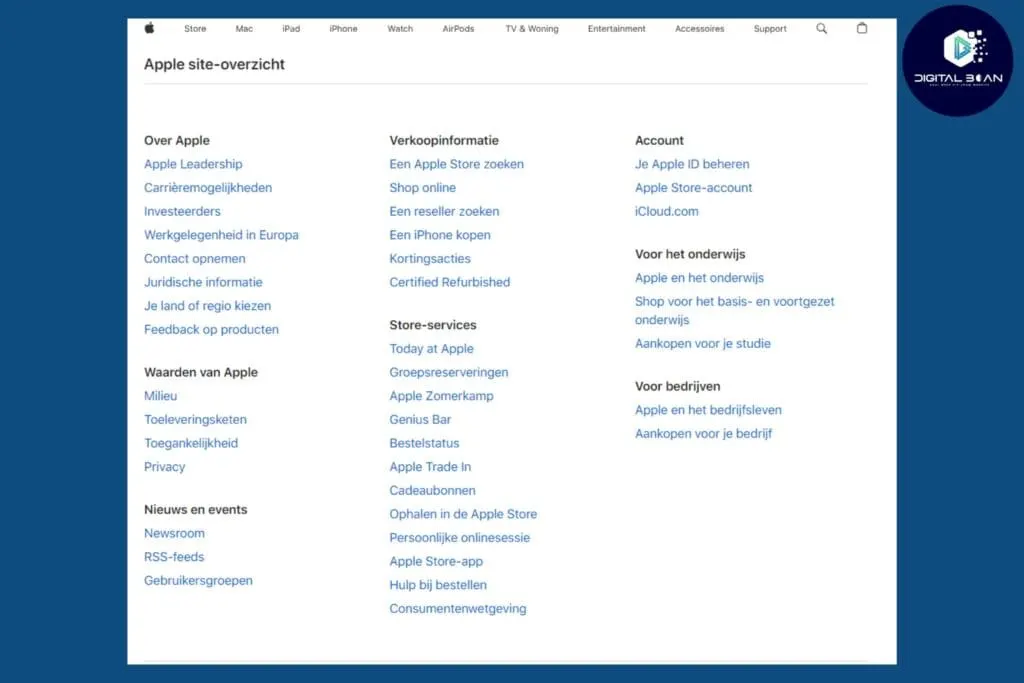
HTML Sitemap
An HTML sitemap is intended for your visitors. It’s a page on your website containing all the important links to other pages. This helps visitors quickly find what they’re looking for.
You use this sitemap if you have an extensive website and want to improve navigation for your visitors. It’s also useful for websites with a lot of content or complex structures.
The HTML sitemap is often placed in your website’s footer, or in the main menu under a heading like “Sitemap” or “Overview”.
XML Sitemap
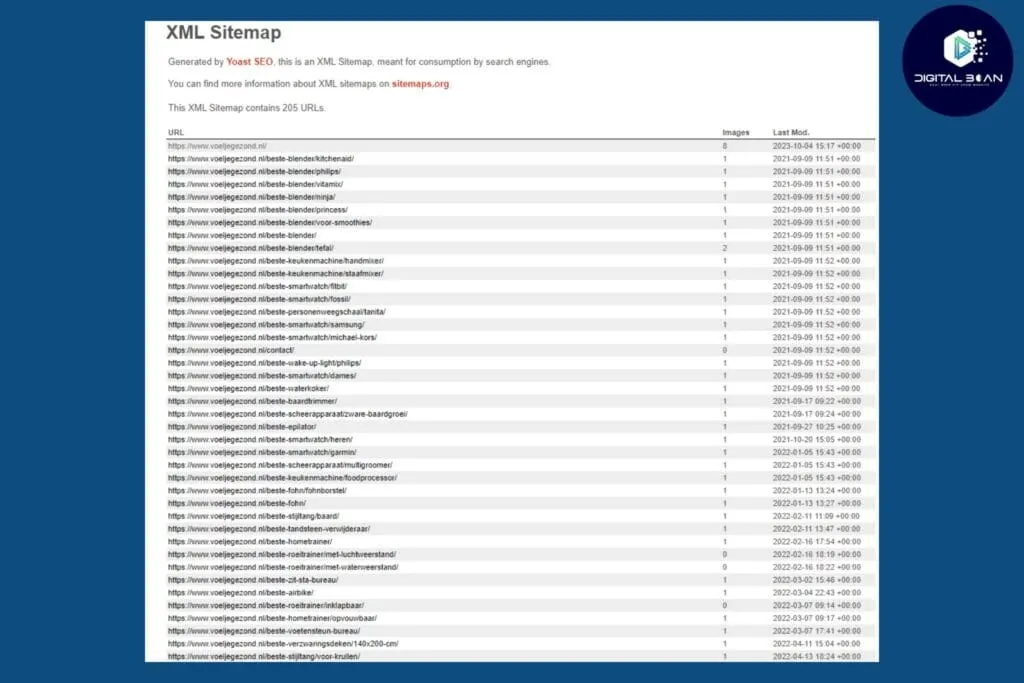
An XML sitemap is specifically for search engines like Google. It contains a list of all your pages, including important information such as when they were last updated. This helps search engines index your site better.
An XML sitemap is ‘mandatory’ if you want to rank well in search engines. Every website should have an XML sitemap to make sure search engines can find and easily index all its pages.
An XML sitemap can usually be found by adding “/sitemap.xml” to the end of your domain name (e.g. www.yoursite.com/sitemap.xml). If you have a WordPress website, a plugin like Yoast SEO can generate an XML sitemap for you automatically.
Video Sitemap
Got a lot of videos on your site? Then a video sitemap is handy. It gives search engines extra information about your video content, such as the duration, category and description of the video.
If videos are an important part of your content, a video sitemap is worth considering too. This helps make your videos more visible in the search results, provided you also use good alt text for the videos and have well-written context around them.
Just like the XML sitemap, a video sitemap can often be found by adding “/video-sitemap.xml” to your domain name. Not every website has this sitemap, and it isn’t a must either, but it can be handy if you put a lot of video content on your website. Tools like the Google Video Sitemap Generator can help you create a video sitemap.
Check out Google’s guidelines on video sitemaps here.
Image Sitemap
If you have a lot of images, an image sitemap is a good choice. This sitemap helps search engines find and index all your images, which can help drive more traffic via Google Images.
If you have a lot of visual content you want to optimise for search engines, this is definitely a nice addition. It’s especially useful for photographers, e-commerce sites with product images, and blogs with lots of images.
Especially with developments like Google Lens, where people are increasingly searching with a camera and based on images, this is a good addition for the future.
An image sitemap can often be found by adding “/image-sitemap.xml” to the domain name. Plugins like Yoast SEO and tools like Screaming Frog can help you create an image sitemap.
Here you’ll find Google’s guidelines for image sitemaps
Mobile Sitemap
A mobile sitemap is specifically for mobile versions of your site. These sites are often more static and fully optimised for mobile users. A mobile sitemap helps search engines better understand and index your site’s mobile content.
Use this if you have a separate mobile site or specific mobile content you want indexed. This is less relevant if you have a responsive website that already adapts automatically to the screen size.
You might still choose a mobile version of your website if you want fast loading times and a different design for mobile users.
Just like all the other sitemaps, a mobile sitemap can often be found by adding “/mobile-sitemap.xml” to your domain name. These are used less often, since most websites are responsive these days.
News Sitemap
For websites that publish news, a news sitemap really matters. It contains information about recent articles and helps search engines pick up your news quickly.
Use this if you regularly publish news articles and want them to appear quickly in Google News. This matters a great deal for news websites and blogs with timely content.
A news sitemap can often be found by adding “/news-sitemap.xml” to your domain name. Google Search Central offers guidelines for creating a news sitemap. Check out the guidelines here.
Geo Sitemap
A geo sitemap is useful for websites with a lot of geographic information. It helps search engines better understand and index location data.
Use this if your site has a lot of location-based content, such as a directory of local businesses, events, or geographic data. This sitemap matters if you operate in multiple countries or use a lot of hreflang tags.
A geo sitemap can often be found by adding “/geo-sitemap.xml” to your domain name. This is a specialist type of sitemap, though, and is used less often.
In short, there are several sitemaps you can use to make your website more visible and accessible. Choose the sitemaps that best fit your website’s content and goals. This improves not just your website’s visibility, but also your visitors’ experience and your SEO performance in search engines.
How Do You Create a Sitemap?
All well and good, but how do you actually create a sitemap like that? We’ve explained it briefly below!
Manual vs. Automatic
Manual: You can create a sitemap yourself by writing a list of all your pages and organising them in a logical order. This can take up a lot of time, though, and is prone to errors. And to be honest, it’s a bit 2005, haha!
Automatic: There are tools and plugins that do this work for you. They scan your website and automatically create a sitemap.
Tools like Yoast SEO or Screaming Frog generate a complete sitemap within minutes. These tools do all the heavy lifting, are less error-prone, and keep your sitemap easily up to date.
Step-by-Step Plan to Generate a Sitemap With Yoast SEO
- Install a Plugin: If you use WordPress, install a plugin like Yoast SEO.
- Activate the Plugin: Follow the steps to activate the plugin.
- Generate the Sitemap: Go to the plugin’s settings and find the option to create a sitemap. In Yoast SEO, you’ll find this under ‘SEO’ > ‘General’ > ‘Features’ > ‘XML sitemaps’.
- Check Your Sitemap: After generating it, you’ll get a link to your sitemap. Check that all your important pages are included.
- Stay Up to Date: Make sure your sitemap gets updated automatically whenever your site changes. This is usually a standard feature in plugins like Yoast SEO.
By following these steps, you’ll quickly have a working sitemap that makes your website easier to find for search engines.
But you’re not quite there yet! This beautiful sitemap still needs to be submitted to Google!
Submitting a Sitemap in Google Search Console
Submitting your sitemap to Google helps the search engine index your website faster and better. This means your pages can be found by users more quickly. Here’s how you submit that sitemap in Google Search Console!
Steps to Follow to Submit Your Sitemap Successfully!
Go to Google Search Console Visit Google Search Console.
Log in Log in with the Google account your website is linked to. If you don’t have an account yet, create one first, obviously.
Select your website Choose the website you want to submit the sitemap for. If your website hasn’t been added yet, click “Add property” and follow the steps to verify your site. Check out our full blog on setting up Google Search Console.
Go to the Sitemaps Section Click on “Sitemaps” in the menu on the left.
Add your sitemap Enter your sitemap’s URL in the “Add a new sitemap” field. This is usually something like “https://www.yourwebsite.com/sitemap.xml.“
Click Submit Click the “Submit” button to submit your sitemap.
By following these simple steps, you make sure Google can crawl and index your website more efficiently. Good luck!
This Blog’s Sitemap! (Summary)
A sitemap is a structured overview of all the pages on your website, designed to help search engines and users navigate and index your site.
A sitemap offers plenty of benefits for your website, including:
- Better Visibility: A sitemap helps search engines find and index all your pages. This means your website gets found faster and better in the search results.
- Technical Benefits: Search engines can crawl your site more efficiently, leading to fewer errors and a better ranking. This makes sure important content doesn’t get overlooked.
- Faster Indexing of New Pages: A sitemap makes sure new and updated pages get picked up faster by search engines, so your content becomes available to your audience sooner.
- Content Prioritisation: A sitemap lets you indicate which pages are more important. This helps search engines find and show your most important content faster.
Not quite figuring it out? Feel free to send us an email. Check here for our contact details.
Looking for help with your SEO, in a transparent and honest way with short lines of communication? Then you’re in the right place!
Book a call here and let’s look together at what we can do for you.