What is a robots.txt file and how do you create one?
 Joram BoonSEO and content specialist
21 August 2024 · updated 27 July 2024
What if there was a simple text file that could dramatically improve your SEO performance?
Often forgotten, but incredibly powerful: the robots.txt file. Many website owners ignore this simple text file, but it can make a world of difference to your SEO performance.
You've got a beautiful e-commerce website full of great products, but search engines don't know which pages are important to crawl. The result? Your website doesn't get the attention it deserves. This is where the robots.txt file comes in.
This simple file tells search engines exactly what to do, so your website gets crawled more efficiently and effectively. That means better indexing and ultimately more traffic to your online store.
Curious about the power of the robots.txt file and how it can take your online store to the top? Keep reading!
What is a robots.txt file?
In short, a robots.txt file contains rules that tell search engine crawlers which URLs they may (or may not) visit.
A robots.txt file is a simple text file that sits in the root directory of your website. By giving specific instructions to search engine bots, or 'robots', you decide which parts of your website these crawlers can and can't access.
A practical example…
Imagine you own a huge library. The robots.txt file acts as a sign at the entrance that tells the librarians which sections they're allowed to search and which are off-limits.
This doesn't just help keep the library (your website) organised, it also makes sure search engines focus on the most valuable and relevant content.

Why a robots.txt file matters.
A robots.txt file plays a key role in managing how search engines crawl your website.
By giving specific instructions, you help search engines like Google work more efficiently. That means they waste less time on unimportant pages and spend more attention on the pages that actually matter.
Benefits of a good robots.txt file:
- Efficiency and speed:
- Search engines don't need to wade through unnecessary pages, which results in faster and more efficient crawls.
- This means your most important content gets indexed faster and more often.
- Server load:
- By excluding certain pages from crawling, you reduce the load on your server. This matters especially for large e-commerce websites with lots of pages.
- Less server load means a faster website for your visitors, which in turn contributes to a better user experience and higher conversion rates.
Application for e-commerce.
For e-commerce websites, it matters a great deal to point search engines to the right places.
A well-set-up robots.txt file helps with this by prioritising important product and category pages and excluding less relevant pages such as the shopping cart and checkout.
Benefits of a robots.txt file for e-commerce…
- Improved indexing:
- Make sure your product pages get found and indexed quickly. This increases the visibility of your products in search results.
- Keep sensitive pages such as your shopping cart and customer accounts out of the search results to protect your customers' privacy and avoid irrelevant pages.
- Better SEO strategy:
- A well-configured robots.txt file supports your SEO strategy by helping search engines understand which pages matter.
- This results in higher rankings for your most important pages, leading to more organic traffic and potentially higher sales figures.
Now that you understand why a robots.txt file matters for the SEO of your online store, it's time to learn how such a file works and how to set one up. Let's dive into the details of how a robots.txt file works and how to configure it for the best results.
How a robots.txt file works
The robots.txt file works as a guide for search engines, telling them which parts of your website they may or may not visit.
Here are the main parts and rules:
- User-agent: This part of the rule specifies which search engine the rule applies to. An asterisk (*) means the rule applies to all search engines.
- Example:
User-agent: *means the rule applies to all search engines.
- Example:
- Disallow: This rule specifies which parts of your website search engines are not allowed to crawl.
- Example:
Disallow: /wp-admin/stops the admin pages of your WordPress site from being crawled.
- Example:
- Allow: This rule is used to make specific pages within a disallowed directory accessible to crawlers after all.
- Example:
Allow: /wp-admin/admin-ajax.phpgrants access to a specific page within the wp-admin directory.
- Example:
- Sitemap: It's also useful to include the location of your sitemap in the robots.txt file, so search engines can find it easily.
- Example:
Sitemap: https://www.yourwebsite.com/sitemap.xml
- Example:
- Wildcards: Wildcards let you set up rules that apply to multiple URLs matching a certain pattern.
- Asterisk (*): Use an asterisk to indicate that the rule applies to multiple URLs.
- Example:
Disallow: /private/*stops all URLs starting with /private/ from being crawled.
- Example:
- Dollar sign ($): Use a dollar sign to indicate that the rule applies to URLs ending in a certain pattern.
- Example:
Disallow: /*.pdf$stops all PDF files on your website from being crawled.
- Example:
- Asterisk (*): Use an asterisk to indicate that the rule applies to multiple URLs.
Now let's look at a concrete example, as shown in the screenshot:
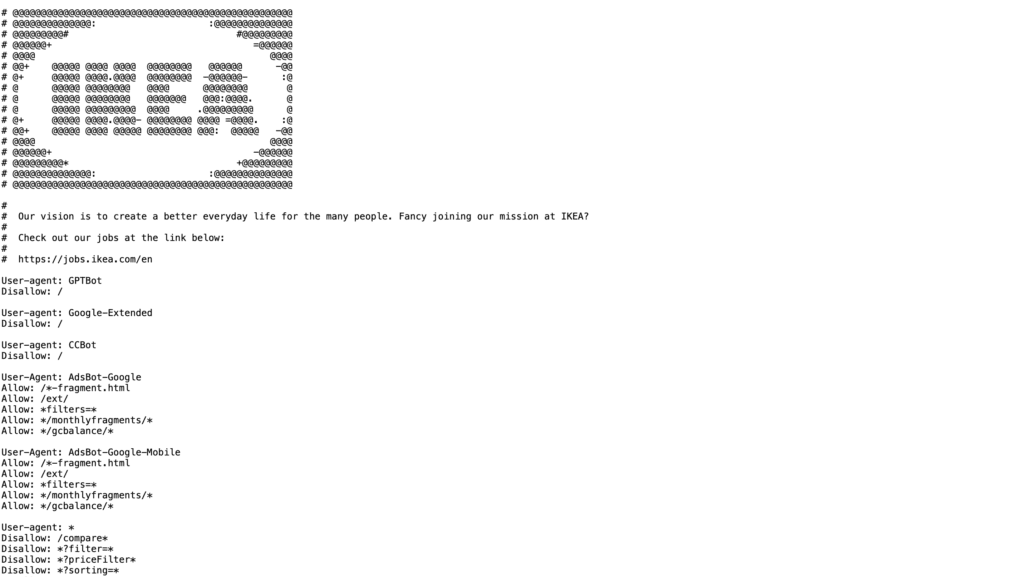
In this example, several rules and user-agents are used to manage search engine access:
- User-agent: GPTBot, Google-Extended, CCBot, AdsBot-Google, AdsBot-Google-Mobile are specifically excluded.
- Allow: Specific paths such as /~fragment.html, /ext/, and /filters= are allowed for certain user-agents.
- Disallow: General exclusions for all search engines are /compare=*, /filter=, /priceFilter=, /sorting=.
This detailed robots.txt file shows how you can give different search engines specific rules and manage certain URL patterns using wildcards.
Now that you know how to set up a robots.txt file and which rules you can use, including wildcards, it's time to learn how to actually create and implement this file.
Let's go through the steps to create a robots.txt file and upload it to your website.
Step-by-step guide to creating a robots.txt file (WordPress)
Creating a robots.txt file in WordPress is easy, especially with the help of the Yoast SEO plugin. Follow these concrete steps to create and optimise your own robots.txt file.
Install and activate the Yoast SEO plugin:
- Go to your WordPress dashboard.
- Navigate to "Plugins" and click "Add New".
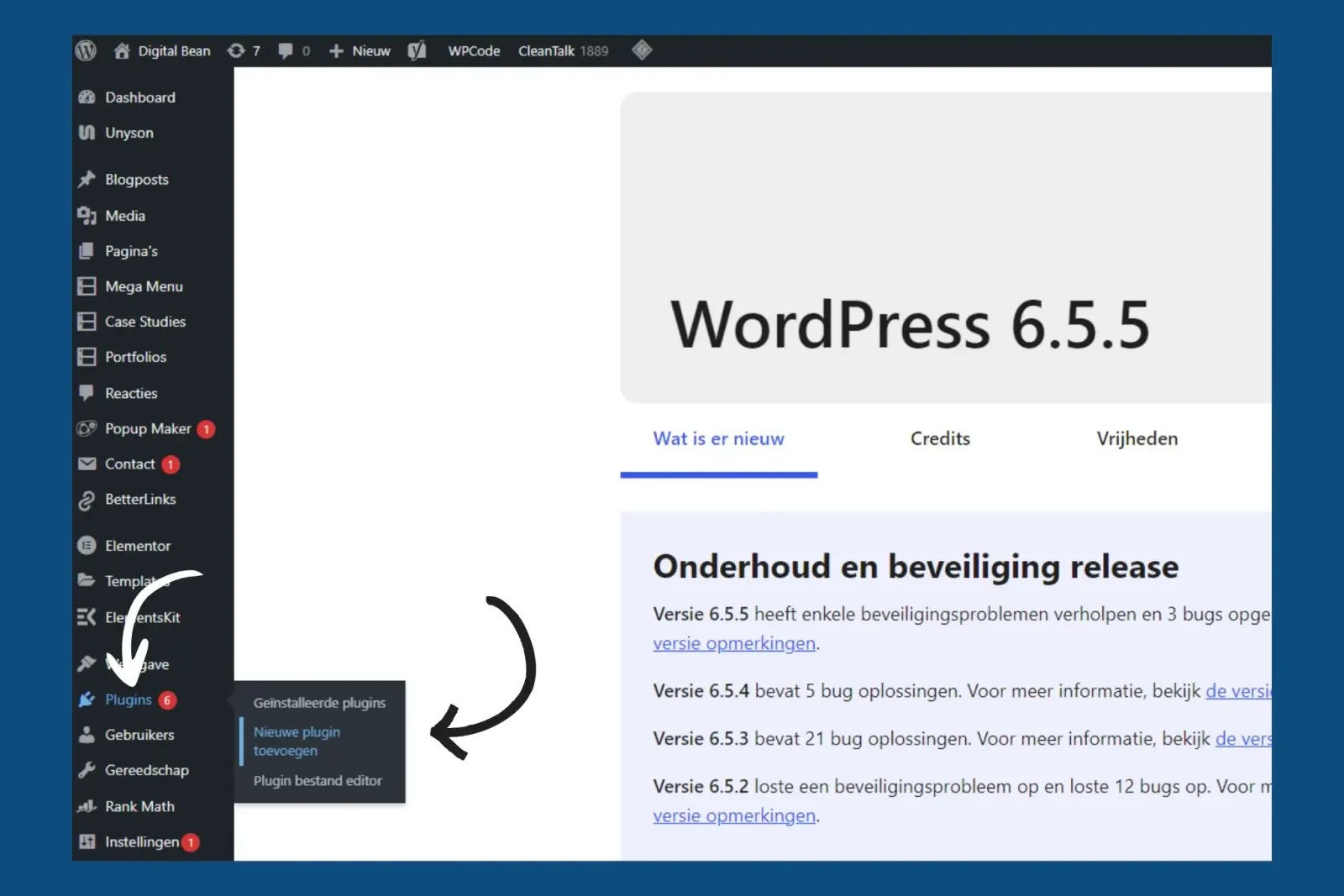
- Search for "Yoast SEO" and click "Install Now".

- Activate the plugin after installation.
Go to the Yoast SEO settings:
- In your WordPress dashboard, go to "Yoast SEO" in the sidebar.
- Click "Tools" under the SEO menu.

Create your robots.txt file:
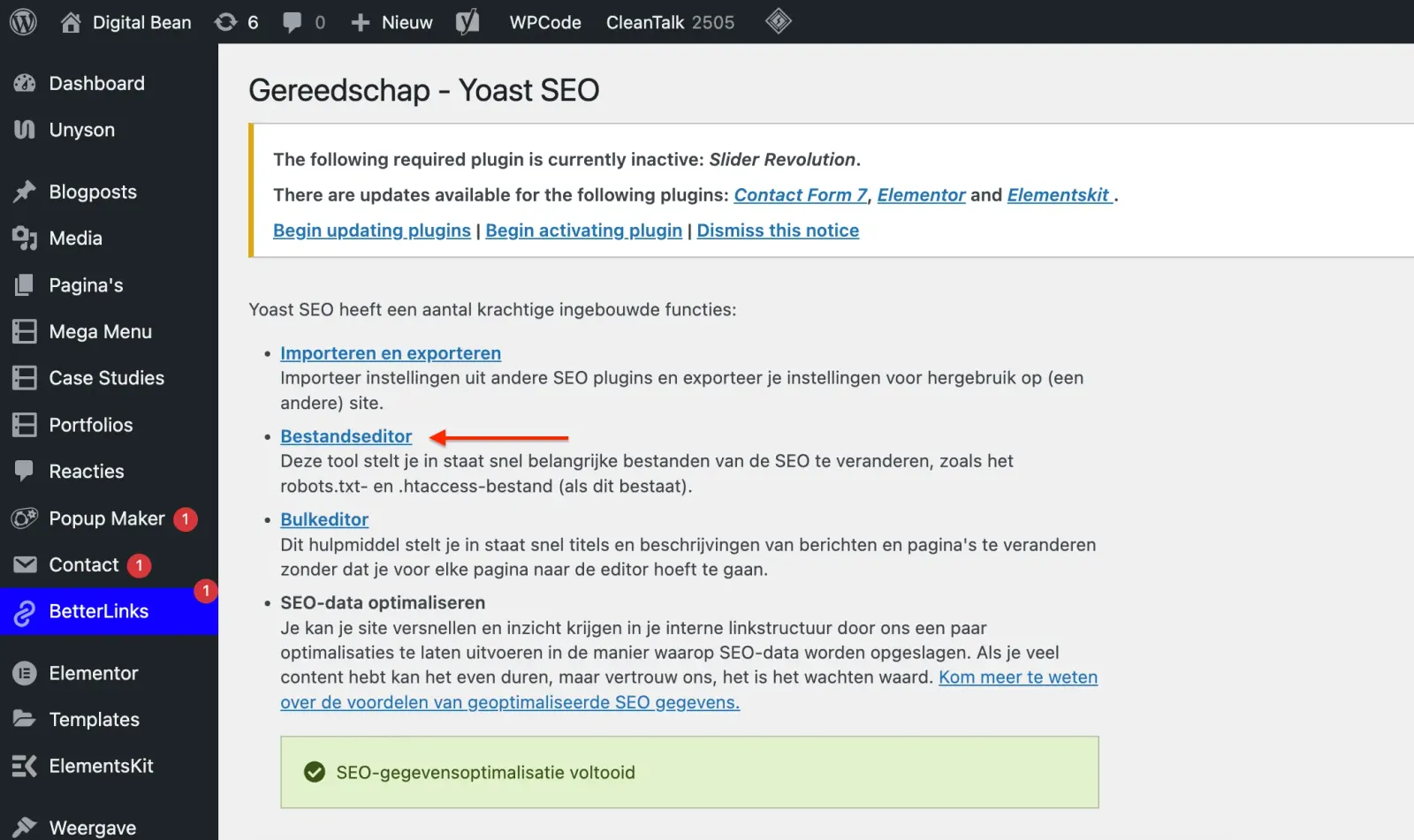
- In the "Tools" menu, click "File editor".
- If a robots.txt file already exists, you can edit it here. If not, click the "Create robots.txt file" button
Add rules to your robots.txt file:
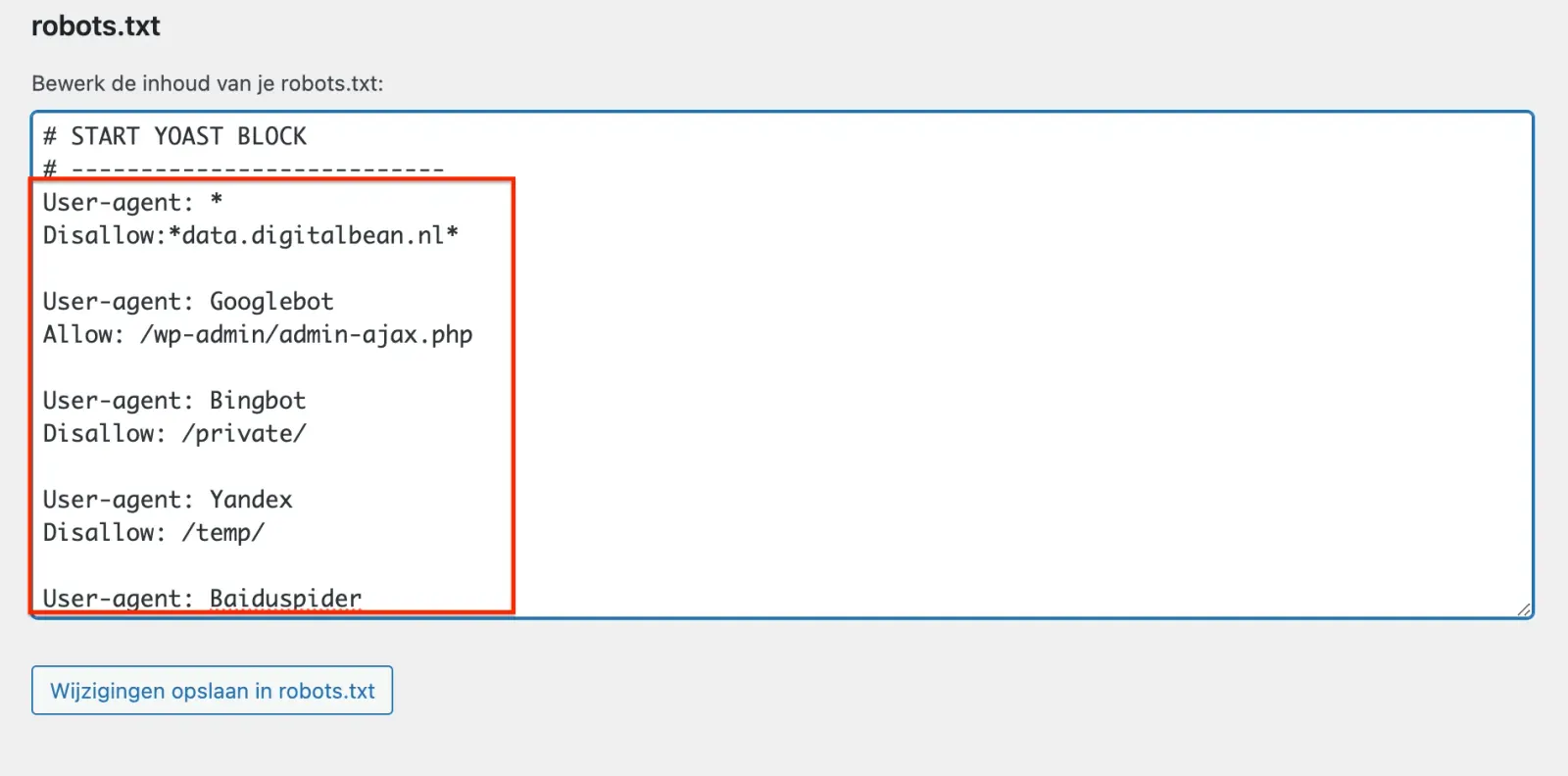
- Start by adding basic rules such as:
User-agent: *
Disallow: /wp-admin/
Disallow: /wp-login.php
These are probably already there when you create the robots.txt file, Yoast SEO usually does this automatically.
- Specific rules for other parts of your website can be added after that. A few examples could be…
User-agent: Googlebot
Allow: /wp-admin/admin-ajax.php
User-agent: Bingbot
Disallow: /private/
User-agent: Yandex
Disallow: /temp/
User-agent: Baiduspider
Disallow: /test/
Save your changes:
- After adding the rules you want, click "Save changes" to save your robots.txt file.
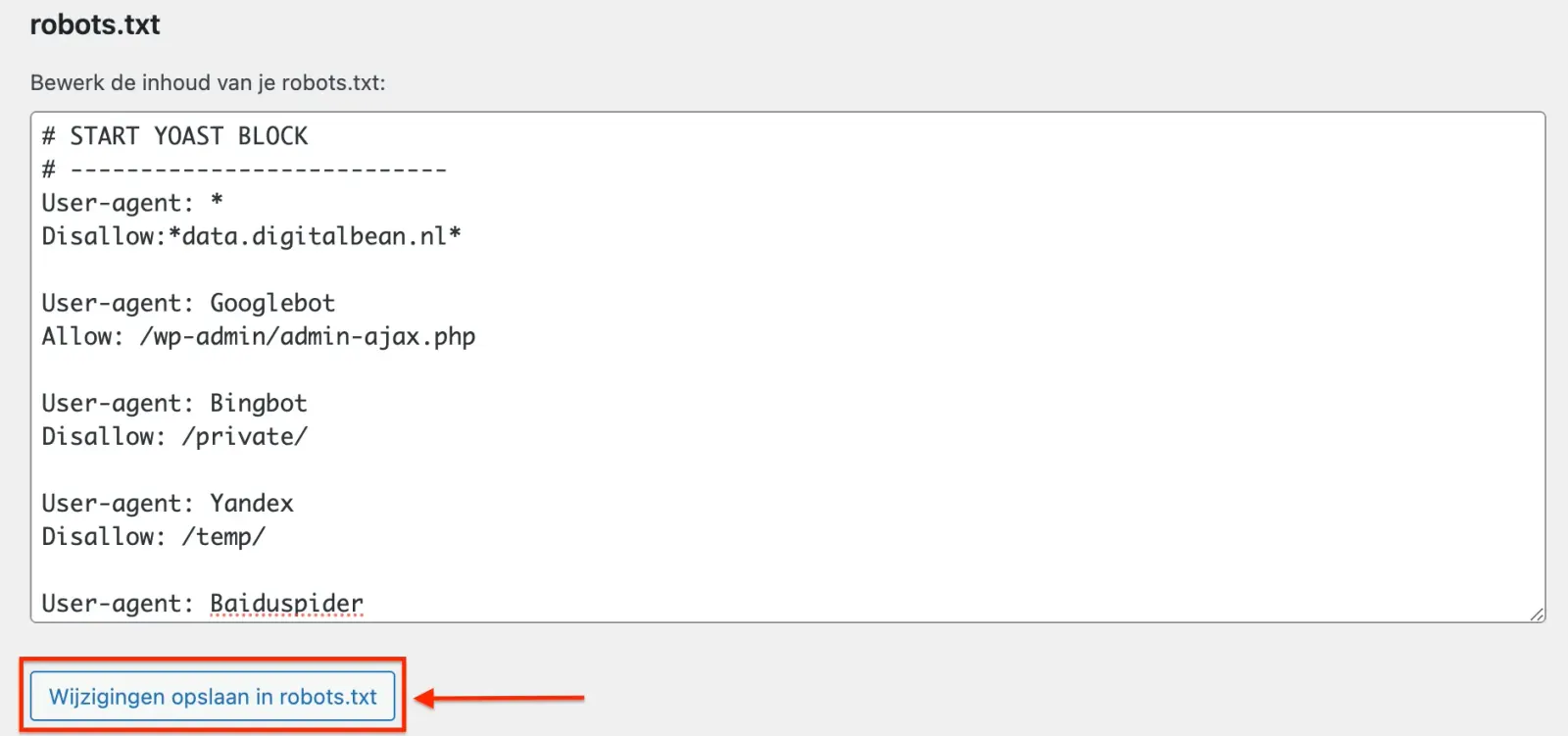
Now that your robots.txt file is created and optimised, you can make sure search engines navigate your e-commerce website efficiently. Pretty simple, right?
If not, we're of course here to help, get in touch here for help creating and implementing your own robots.txt
See Yoast SEO's own explanation of how to create a robots.txt file in their plugin.
Wrapping up…
A well-configured robots.txt file matters a great deal for optimising your e-commerce website for search engines. By telling search engines which pages they can and can't crawl, you make sure your website gets indexed more efficiently.
This doesn't just help improve the visibility of your most important pages, it also stops unimportant or sensitive pages from showing up in the search results.
Key points to remember…
- A robots.txt file helps search engines crawl more efficiently, which improves your website's overall SEO.
- For e-commerce websites, it's critical to keep pages such as the shopping cart, checkout, and account pages out of the search results, while giving your product and category pages extra attention.
- Creating and managing a robots.txt file is easy, even in WordPress, thanks to handy plugins such as Yoast SEO.
Stuck, or got questions about setting up your robots.txt file? No worries! The experts at Digital Bean are ready to help.
Book a FREE consultation here and find out how we can help get your online store to the top of the search results.