10 universal SEO tips that make an impact! Simple but powerful!
 Joram BoonSEO and content specialist
10 April 2024
Tired of your website not getting the attention and traffic it needs?
With these 10 simple SEO tips, you'll optimise your website for Google and attract more relevant traffic to your site.
In this blog article, we reveal the 10 universal best practices for boosting your online visibility and increasing your conversion rate.
Read the top 10 SEO optimisation tips below to start optimising today!
1. SEO content made for users and matched to search intent!
In the fast-changing world of online marketing, there's one saying that keeps coming back, and it's the basis of good SEO: “Content is King“. But what does that actually mean?
When we talk about SEO content, it's not just about placing keywords in strategic spots.
It's about creating valuable content that solves the visitor's problem, or helps them get to a place where their problem gets solved.
Want to write better SEO copy? Here are a few basic points:
- Search intent: What's the intent behind a search from your target audience? Do they want a 'how to' step-by-step plan, data or a few tips? Look at the search results page for your primary keyword to find out. Want to know more about search intent? Click here!
- Understand your audience: Get to know them. What are their needs? What are their questions and pain points? By understanding their perspective, you can create more effective content. This is very similar to search intent.
- Quality over quantity: A well-researched, in-depth article is worth more than several shallow ones. Go the extra mile!
- Natural use of keywords: They're hugely important for SEO, but need to be worked into the text naturally.
- Keeping content current and updated: The online world never stands still. Keep your content current. If a well-ranking article starts slipping, it's time for an update. Adding to or rewriting it once every 6 months is a good rule of thumb!
- Share personal experience (increasingly important): This builds trust and makes your content authentic, setting it apart from other content. On top of that, with the current Google updates, EEAT matters more and more!
- A clear call to action: After sharing valuable information, what's the reader's next step? Make it clear and simple. A confused visitor says 'no'!
With these guidelines, you can create content that's valuable both for search engines and for your visitors.
2. Use a hierarchical site structure with internal links!
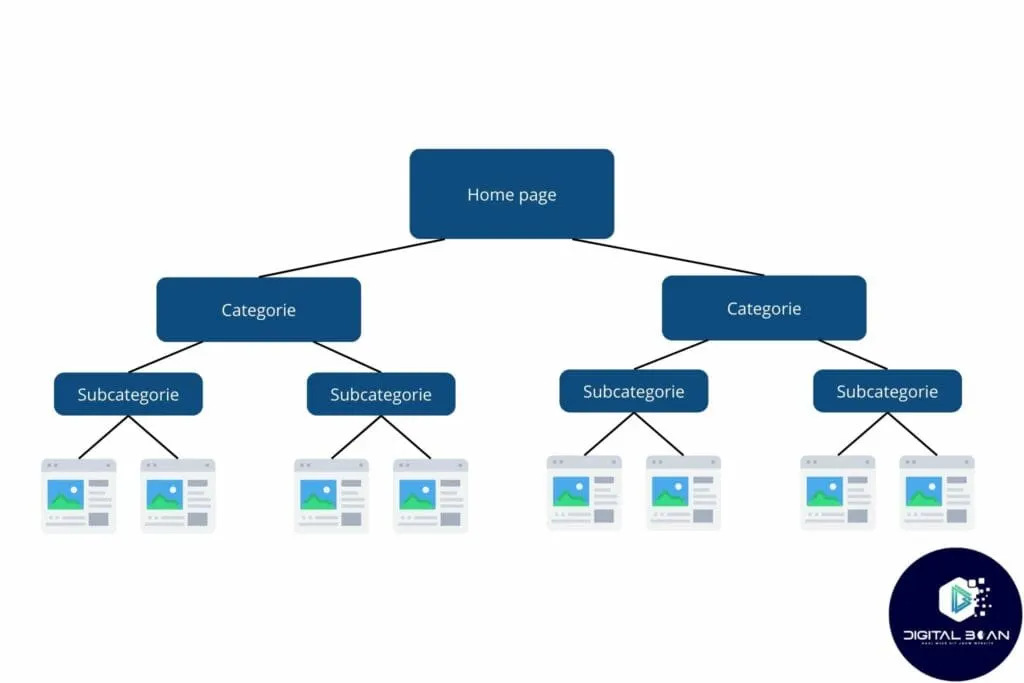
Although it sounds simple, plenty of online stores fall short when it comes to setting up a clear, logical structure. A well-organised site helps users quickly find what they're looking for, and makes it easier for search engines to index and understand your content. Here are some tips for creating a hierarchical structure:
- Start with a main page (homepage) that serves as the starting point of your website.
- Organise your products/content into main categories that make sense for your business and your audience. Preferably named with relevant keywords!
- Create subcategories under the main categories for a more detailed breakdown of your range or information. Think of, instead of 't-shirts', the category 'red t-shirts', where you'd naturally place all the red shirts in your range.
- Keep navigation simple, so every page can be reached within three clicks from the homepage.
Below, we've made an example to help paint the picture!
>>Check out our blog on online store structure here<<
Internal linking for maximum impact!
Once you have a nice site structure, it's time to add internal links! You can think of these as little bridges between your pages, connecting them to each other. This makes it easy for visitors and search engines to navigate your site and find your relevant content or products!
They also distribute link value (link juice) across your website! Link value is the amount of authority search engines attribute to a website or web page. Simply put, it makes a huge difference to how well your online store ranks!
Here's how to build a good internal link structure:
- Link to relevant content: Link to pages that logically connect with the topic of the current page, to highlight the depth of your content and keep users engaged further.
- Use descriptive anchor text: Choose anchor text that clearly describes the content of the destination page, which helps both the user experience and search engine optimisation.
- Build a link hierarchy: Make sure important pages receive more internal links than less crucial ones, highlighting their importance and visibility to search engines.
- Improve navigation: Use internal links to create an intuitive navigation structure, so users can move through your site easily.
- Avoid broken links: Regularly checking for and fixing broken internal links improves site health and the user experience.
- Make use of footers and sidebars: Place useful links in footers and sidebars for better accessibility, but avoid excessive or irrelevant links.
3. Keyword in your H1, H2, and in the first/last 100 words!
If you want people to find your website, you need to make it clear to Google what your pages are about. You do that by using keywords smartly. Put your most important keyword in your main title (H1), in one of your subheadings (H2), and at the start and end of your text. This helps Google better understand what your content is about.
To sum it all up:
- Title (H1): Put your most important keyword here. This is often the first thing people and Google see.
- Subheadings (H2): Use your keyword here too, or other similar words. This makes your text clear and easy to follow.
- Start of your text: Work your keyword into the first 100 words. This lets search engines know straight away what your page is about.
- End of your text: Repeat your keyword in the last 100 words. This confirms the topic of your text for search engines, but also for visitors.
Things to watch out for, and more you can do:
- Natural use: Make sure using your keyword feels natural. Overusing it, or 'keyword stuffing', can have a hugely negative effect on SEO and readability. Repeating your primary keyword around 10 times is often already enough!
- Relevant secondary keywords: Choose keywords that closely match the topic of your content and are relevant to your audience.
- Use synonyms: Use synonyms and related terms in your H2s and text to create rich, but relevant, content. This plays into how search engines use semantic indexing.
4. First impressions count, optimise your meta title and description!
Did you know that the title and description you see in Google (also known as meta tags) are the first things people see on the search page?
So it's essentially your shop window on the Google search page!
A catchy title and (meta) description are a 'must' if you want to score clicks!
You need to convince searchers to come to your website through this title and description.
How do you do that? You might be wondering. So here's a quick summary…

Optimising your meta title
- Length: Keep it between 50-60 characters.
- Include your most important keyword early in the title.
- Every page should have a unique title.
Be clear and precise! Your title should tell people what your page is about at a glance!
Make it exciting! You want people to click, right? Use power words, numbers (like "12 tips…") or ask a question to spark curiosity and interest.
Optimising your meta description
- Length: Between 150-160 characters.
- Use your most important keyword once in the meta description!
- Give a concise summary of the page. Show visitors what they can expect by clicking through to your page. What will they learn? What problem do you solve? Make sure the benefits are clear.
- A clear call-to-action (CTA) is a must, and give a reason for the CTA. Use words like 'Discover', 'Learn more', or 'Start today' to motivate the reader to click through.
- Every description should be unique for every page. Do NOT keep copying the same one! This stops you from being flagged as duplicate content in search engines, and helps you highlight what makes each of your pages special.
- Make it appealing! You want people to click on your link. So use active language and make a clear offer, or ask a question that prompts action.
5. Optimise your images!
Images play a hugely important role on websites these days.
They bring stories to life, illustrate complex concepts and grab visitors' attention.
But their power goes further than just imagery; images are also an important tool for search engine optimisation!
Search engines look beyond just text.
Images have the power to rank in the search results, and on the 'Images' search page.
And what does that mean? More visibility. More traffic.
Here's how to optimise images for SEO!
- Choose the right file format: JPEG for photos (compression), PNG for transparency (logos/icons), and WebP for excellent compression without loss of quality.
- File name: A file name like "IMG1234.jpg" tells Google nothing. Google wants to know what's actually in the image. "man-on-bike.jpg"? That's a different story.
- Alt text: Again, describe what information is in the image, in the same way as the file name. It's short, it's descriptive, and it's essential.
- Add keywords where you can in the file name and alt text, but not too often! Otherwise you run into 'keyword stuffing' problems again. For online stores, image SEO is becoming more important due to developments such as Google Lens
- Lazy loading: Implement 'lazy loading' for images, so they only load when they're needed. This can significantly improve page load time.
- Responsive for mobile: Many visitors arrive via mobile. Make sure your images adapt. Good for users, good for SEO and good for conversion!
- Compression = speed, and search engines care enormously about speed! Use a FREE tool such as Smush to easily compress your images without too much loss of quality.
NOTE! Sometimes Smush can compress too much, resulting in poor quality. Checking every now and then that your images are still good quality is a smart move!
6. Make your loading speed lightning fast!
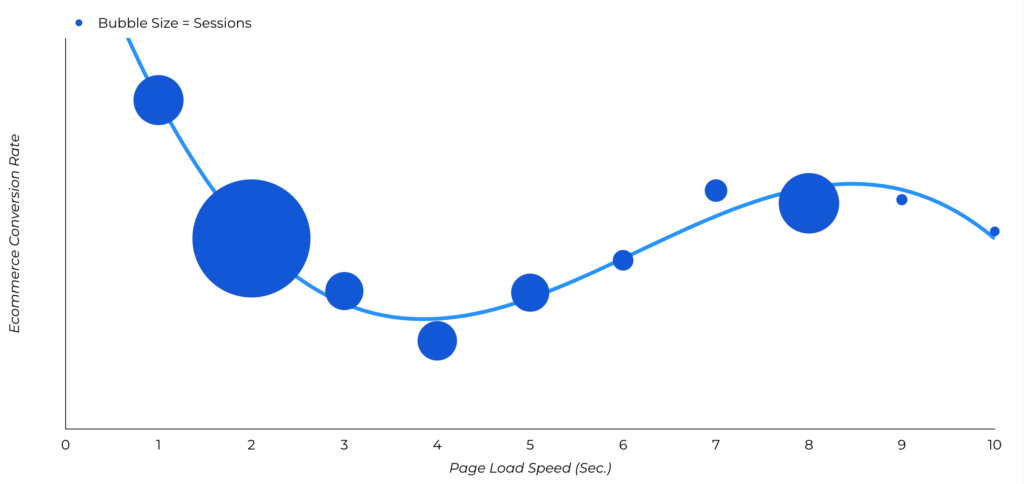
Website conversion rates drop by an average of 4.42% for every extra second of load time (between 0-5 seconds). According to this article.
So a faster website doesn't just mean a better user experience, it can also significantly increase your conversion rate.
So, by optimising your website for speed, you not only improve the user experience, you also boost your chances of higher conversions.
Improving load times, here's where to start!
Use tools such as Google PageSpeed Insights to determine your starting speed. Once you've established a baseline, you can get started on the following:
- Optimise images: Compress images and choose the right format (JPEG, PNG, WebP) to shorten load time without sacrificing quality.
- Minify CSS, JavaScript, and HTML: Remove unnecessary spaces, comments and code to reduce file size and improve loading speed.
- Make use of browser caching: Set browsers to store static resources (such as stylesheets, images, and JavaScript files), so returning visitors load pages faster.
- Use a Content Delivery Network (CDN): A CDN stores copies of your site in various locations worldwide, so content loads faster for users regardless of their geographic location. Use services such as Cloudflare!
- Avoid redirects: Every extra redirect increases a page's load time. Try to minimise them or eliminate them entirely.
- Turn on lazy loading: This means images and videos only load once they come into the user's view, reducing the page's initial load time. This is often switched on automatically!
7. Use an SEO-friendly URL
SEO-friendly URLs are URLs that are optimised for search engines. They're short, clear and contain relevant keywords. This helps search engines better understand what the page is about, which can improve the page's visibility.
Tips for creating SEO-friendly URLs:
- Use relevant keywords: Choose the most important keyword relevant to the page's content and work it into the URL.
- Keep the URL short and punchy: Avoid long, unnecessary text in the URL. Keep it concise and to the point!
- Use the right separators: Separate words in the URL with hyphens (-) rather than underscores (_).
- Avoid capital letters and special characters: Only use lowercase letters and avoid special characters such as &%$#@!, etc.
- Make the URL static: Dynamic URLs with parameters are less SEO-friendly. Use static URLs wherever possible.
- Add the focus keyword: Include the page's focus keyword in the URL.
- Make the URL readable: The URL should be readable not just for search engines, but for people too.
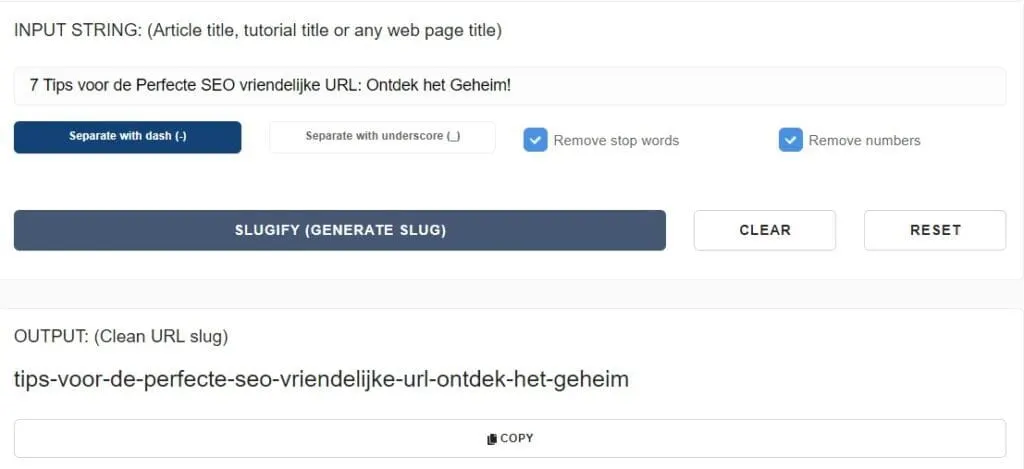
To easily shorten your URL, you can use tools such as Slugify! But as you'll see below, you'll still need to trim a fair bit yourself. Though it does already strip out special characters and numbers!
8. Make mobile-friendliness a priority!
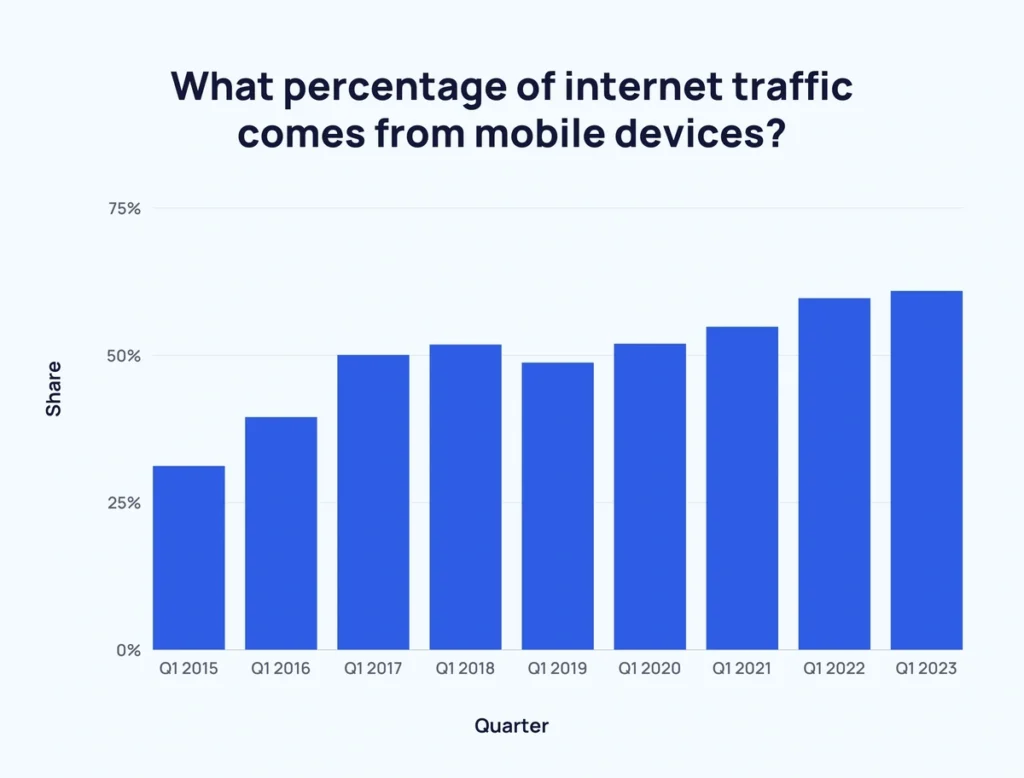
More and more people use their smartphone or tablet to shop online. As of February 2024, more than 60% of all online orders have been placed via a mobile device. A mobile-friendly online store is therefore essential!
On top of that, Google also uses 'mobile-first indexing' to index websites. This means the mobile version of a website is prioritised over the desktop version. This means Google uses the mobile version of your website to determine how your website ranks in the search results.
Tips to make your online store mobile-friendly!
- Use a responsive design. This means the website automatically adapts to the screen size of the device being used.
- Make the text readable. Avoid small fonts and long blocks of text.
- Use clear, large buttons. Make sure buttons are easy to find and use.
- Optimise images. Make sure images aren't too large and load quickly.
- Keep the checkout process simple. Avoid too many steps and complicated forms.
By making your website mobile-friendly, you give your customers an optimal user experience and get ready for the future of e-commerce.
9. Long-tail keywords for a few quick wins!
Long-tail keywords are longer and more specific than short, general search terms. They usually consist of 3 or more words and are used by people who already have a good idea of what they're looking for, often with a higher purchase intent!
Benefits of long-tail keywords!
- Less competition: There's less competition for long-tail keywords than for short, general search terms. This means it's easier for your online store to reach the first page of Google.
- More targeted traffic: People searching for long-tail keywords are already further along in their buying process. So they're more likely to buy something from your online store.
- Higher conversion rate: The conversion rate (the percentage of visitors who make a purchase) is higher for long-tail keywords than for short, general search terms.
Finding long-tail keywords!
1. Google Keyword Planner:
- The Google Keyword Planner is a free tool you can use to find long-tail keywords.
- Enter a relevant keyword and the tool gives you suggestions for long-tail keywords along with their search volume and competition level.
- Note: Keyword Planner is designed for advertisers, so it's important to filter by "search volume" and focus on keywords with a low competition level.
2. Using Google autocomplete:
- Use Google Search's autosuggest feature to find long-tail keywords.
- Type in a relevant keyword and look at the suggestions Google gives.
- Click on a suggestion to find more related keywords.
Want a more detailed explanation of the power of long-tail keywords? >> Check out our blog on long-tail keywords here! <<

3. Related searches:
- At the bottom of Google's search results page, you'll find the "Related searches" section.
- This section contains long-tail keywords relevant to your search.
4. Google's 'People also ask' section
- Just like related searches, there's also a 'people also ask' section in Google search!
- It often appears somewhere in the middle of the search results!
- Here, you can find questions people have around this topic, and respond to them.

5. Quora and Reddit:
- Search relevant forums and websites such as Quora and Reddit for questions people ask about your niche.
- These questions sometimes contain long-tail keywords you can use.
10. Work on your EEAT!
EEAT stands for Experience, Expertise, Authoritativeness and Trustworthiness. It's a concept Google uses to assess the quality of websites. Websites with a high EEAT score are rewarded by Google with higher positions in the search results.

Improving your EEAT!
Experience:
- Show your experience: Demonstrate that you or your team have been active in the field for a good while. This can be through years of experience, previous projects, or case studies.
- Highlight relevant experience: Focus on experience that's directly relevant to the topics you cover.
- Use testimonials and customer reviews: Let satisfied customers talk about their positive experiences with you or your business.
Expertise:
- Make sure your content is expert-level: Ensure the content on your website is written by experts with in-depth knowledge of the topic.
- Show your expertise: Demonstrate your knowledge through awards, publications in recognised sources, or other proof of expertise.
- Use citations and source references: Reference reliable sources to back up your claims and support your expertise.
Authoritativeness:
- Build authority: Gather links from other high-authority websites. This can be done by writing guest blogs, giving interviews, or getting mentioned in relevant publications.
- Share your knowledge: Share your expertise on social media, online forums, and other platforms. But don't spam, share when asked!
- Become recognised as an authority: Aim to be recognised as an authority in your field. This can happen through attending conferences, winning awards, or being cited by other experts.
Trustworthiness:
- Trustworthiness above all: Make sure your website is reliable and that the information you offer is accurate, up to date and based on facts.
- Clear contact details: Make your contact details clearly visible on your website.
- Security: Use an SSL certificate (an 'https' before your URL) to secure your website and protect your visitors' privacy.
- Earn trust: Create a privacy policy and cookie statement, and stick to them. Be transparent about your revenue models and any advertising.
Improving your EEAT score is a long-term strategy. It can take a while before you see the results. But once you're established as an authority, it's more than worth it!
SEO tips summarised!
With these 10 powerful SEO tips, you're ready to get your website scoring! They might not be the newest or sexiest search engine optimisations out there, but they're definitely the most effective!
Unfortunately, we still see it all the time online: the basic SEO fundamentals simply not being done… Such a shame!
Let's recap everything:
- User-focused content: Create valuable content that's relevant to your audience and answers their questions.
- Hierarchical structure: Ensure a logical structure with internal links to encourage navigation.
- Keyword optimisation: Use the right keywords in your H1, H2, titles, meta descriptions, and content.
- First impressions: Optimise your meta title and description for a better click-through rate.
- Optimise your images with alt tags and file names.
- Speed up your loading time for a better user experience.
- SEO-friendly URLs: Use short, descriptive URLs that are relevant to the content.
- Mobile-friendliness: Make sure your website is mobile-friendly to meet Google's guidelines.
- Long-tail keywords: Target long-tail keywords for more targeted traffic.
- EEAT: Strengthen your Experience, Expertise, Authoritativeness, and Trustworthiness to boost your reputation.
Don't let your website go unnoticed any longer! Take action today and start optimising!
No time or inclination for this yourself? Let Digital Bean help! Our team of experts is ready to optimise your online marketing strategy and grow your visibility.
We work with honesty, transparency and short lines of communication, so you're always up to date on what we're doing and can ask your questions directly.
Get in touch today, no strings attached, for a call, talk soon!